Stamp Community Family of Web Sites
Thousands of stamps, consistently graded, competitively priced and hundreds of in-depth blog posts to read


Stamp Community Forum
 
Username:
Password:
Save Password
Forgot your Password?

This page may contain links that result in small commissions to keep this free site up and running.

Welcome Guest! Registering and/or logging in will remove the anchor (bottom) ads. It's Free!

PMGS Stampfix

Previous Page | Next Page    
 
To participate in the forum you must log in or register.
Author Previous TopicReplies: 205 / Views: 22,115Next Topic
Page: of 14
Bedrock Of The Community
Australia
38679 Posts
Posted 12/04/2022   9:22 pm  Show Profile Bookmark this reply Add rod222 to your friends list  Get a Link to this Reply
Stamper JD,
here is my method, when it works for you.

Epson Scanner V370 photo (Cost $20 used)
Seiko software in built

I place stamps on the platen ( takes 1 through to 40 normal stamps)
Click "preview" and scan platen
I place a carousel, around each stamp, say 40 stamps

Select 600dpi, hit "scan"
The scanner automatically scans all 40 stamps at 600dpi
Drops them in "my stamps" folder

I click on Stampfix
I reduce it to left hand side about quarter screen, open "my stamps" in ACDsee (half screen) select all 40 stamps, drag and drop

Stampfix works its magic
I open "My stamps" with Picasa 3
sort by "name"
do any fiddly adjustments (Mint stamp will be perfect)
stamps with "pulled perfs" and any dust specks on the platen
will need adjusting a few degrees

Sounds involved, but I did 300 El Salvador Postage dues / officials etc yesterday took about 15 minutes,
Most time is taken by pacing stamps on the platen, then
removing them (pointy tongs work fabulously there)

Good Luck
Send note to Staff  Go to Top of Page
Edited by rod222 - 12/04/2022 9:25 pm
Bedrock Of The Community
Australia
38679 Posts
Posted 12/04/2022   9:51 pm  Show Profile Bookmark this reply Add rod222 to your friends list  Get a Link to this Reply
I mean, how nice is this ?


Send note to Staff  Go to Top of Page
Pillar Of The Community
United States
2941 Posts
Posted 12/04/2022   10:12 pm  Show Profile Bookmark this reply Add PostmasterGS to your friends list  Get a Link to this Reply
Rod,

Quote:
I place a carousel, around each stamp, say 40 stamps

Have you tried drawing a single carousel around the entire group? Should work just as easy in StampFix, and would save you some effort.
Send note to Staff  Go to Top of Page
Presenting the GermanStamps.net Collection - Germany, Colonies, & Occupied Territories, 1872-1945
Bedrock Of The Community
Australia
38679 Posts
Posted 12/04/2022   11:08 pm  Show Profile Bookmark this reply Add rod222 to your friends list  Get a Link to this Reply
Hi Postmaster,

Quote:
Have you tried drawing a single carousel around the entire group? Should work just as easy in StampFix, and would save you some effort.


True, but I like my stamp images "in your face" ie good for study, and fly specking.

If I desired what you suggest, I would have to scan the platen at 600dpi
I don't think my well loved Windows 7 could handle the size.

I do that for my Steiner Page (scan at 200dpi) and the images are too poor
for study.

Do I have that right?
--------------

At 600 dpi, I can identify easily "varieties"
Place 2 stamps side by side and "Toggle"

Scanning changed my entire enjoyment in stamp collecting
seeing Stamps "In your face" brought a new wonderment to collecting.

Eg: The stamps of El Salvador, Bi-colour, using 1 plate.

I can see where the Printers are creating mistakes, by covering some parts of the design with Chalk to prevent printing.
(Obliterating some parts of the Intaglio)


Send note to Staff  Go to Top of Page
Edited by rod222 - 12/04/2022 11:17 pm
Valued Member
United States
41 Posts
Posted 12/05/2022   8:22 pm  Show Profile Bookmark this reply Add stamperJD to your friends list  Get a Link to this Reply
What is meant by drawing a carousel? Even google was of no help, it just showed the carousels kids ride on, I'm not familiar with the usage of the word in this context.
Send note to Staff  Go to Top of Page
Bedrock Of The Community
Australia
38679 Posts
Posted 12/05/2022   9:29 pm  Show Profile Bookmark this reply Add rod222 to your friends list  Get a Link to this Reply
Here I have thrown a few Turkiye on the platen,
scanned a "preview"
Then drew carousels around the items I wish to scan (dotted lines)

When I hit "scan" the Epson automatically scans all in sequence at 600dpi
and drops them into "My stamps"

I then drop them into "stampfix" and I have 5, beautifully cropped, and deskewed stamp images.


I think I must have picked up the verbiage "carousel" from Epson
Send note to Staff  Go to Top of Page
Edited by rod222 - 12/05/2022 9:34 pm
Pillar Of The Community
United States
2941 Posts
Posted 12/05/2022   9:37 pm  Show Profile Bookmark this reply Add PostmasterGS to your friends list  Get a Link to this Reply
StamperJD,

Did you get my return e-mail? Just checking because my e-mails tend to get spam filtered by a lot of email services.
Send note to Staff  Go to Top of Page
Presenting the GermanStamps.net Collection - Germany, Colonies, & Occupied Territories, 1872-1945
Valued Member
United States
41 Posts
Posted 12/05/2022   10:36 pm  Show Profile Bookmark this reply Add stamperJD to your friends list  Get a Link to this Reply
Ah I see what you mean now Rod, the illustration was very helpful, thank you.

Postmaster GS your email was in my spam folder for some reason, I pulled it out and I'll reply back after I try what you suggested.
Send note to Staff  Go to Top of Page
Valued Member
United States
41 Posts
Posted 12/05/2022   11:44 pm  Show Profile Bookmark this reply Add stamperJD to your friends list  Get a Link to this Reply
PostmasterGS was able to help me out, the support and response times provided was far better than that of many applications I pay for. Thank you Rod222 and PostmasterGS for all your efforts which resulted in a successful resolution.
Send note to Staff  Go to Top of Page
Pillar Of The Community
United States
2941 Posts
Posted 12/05/2022   11:51 pm  Show Profile Bookmark this reply Add PostmasterGS to your friends list  Get a Link to this Reply
SCF needs a bug emoji. TO THE CODE!!!
Send note to Staff  Go to Top of Page
Presenting the GermanStamps.net Collection - Germany, Colonies, & Occupied Territories, 1872-1945
Pillar Of The Community
United States
2941 Posts
Posted 06/10/2023   7:04 pm  Show Profile Bookmark this reply Add PostmasterGS to your friends list  Get a Link to this Reply
New version uploaded - v1.64. This is a bug fix version.

Back in v1.54, I fixed the order in which single stamps extracted from a multi-stamp image were named, so that they were now numbered from top to bottom, left to right. In doing so, I introduced a bug that was causing the last image to be skipped in certain circumstances, depending in large part on how many stamps were in the last row of the image. This caused a mismatch in the image count, resulting in the error message that says the app was unable to process all the images, and resulting in an inability to complete the extraction process.

This release hopefully fixes that bug.
Send note to Staff  Go to Top of Page
Presenting the GermanStamps.net Collection - Germany, Colonies, & Occupied Territories, 1872-1945
Edited by PostmasterGS - 06/10/2023 7:04 pm
Pillar Of The Community
United States
2941 Posts
Posted 02/19/2024   4:38 pm  Show Profile Bookmark this reply Add PostmasterGS to your friends list  Get a Link to this Reply
Ladies and Gents, I give you.... PMGS StampFix version 2.

First, a little about the "Why?".

Since I created PMGS StampFix v1.0 back in 2016, I've changed computers, and I was never able to get my new computer setup properly to work on the app. The versions of all the various software bits-and-pieces that I needed were no longer available for download. This meant that I had to keep an old computer around just for working on the app, and that eventually, to get it working on the new computer, I was going to have to update it the newer versions of Java and the various add-ins, since those were the ones that were now available for download.

So, that time has come. I also took this opportunity to re-write about 95% of the code, hopefully making it more efficient, and to add some new features that should help get stamps from scans that were otherwise un-processable.

Before we get to what's new, a little about what's changed from v1.64.

1. New OS Support

There is now a single version for Mac, a single version for Windows, and a version for Ubuntu-based Linux. No more light and full packages, and no more 32-bit Windows support. The files are bigger with the new Java bundled, but that ensures it will work consistently across installations. Also, for any Linux users, other versions might be possible, I just don't have the ability to test them because I only have an Ubuntu machine. If you use a different version of Linux and want to give it a try, e-mail me and I'll see what I can do to build an installation package for your specific OS version.

2. The Appearance.

As is always the case when new features are added, some reorganization is required for space reasons. Here's the new StampFix window.
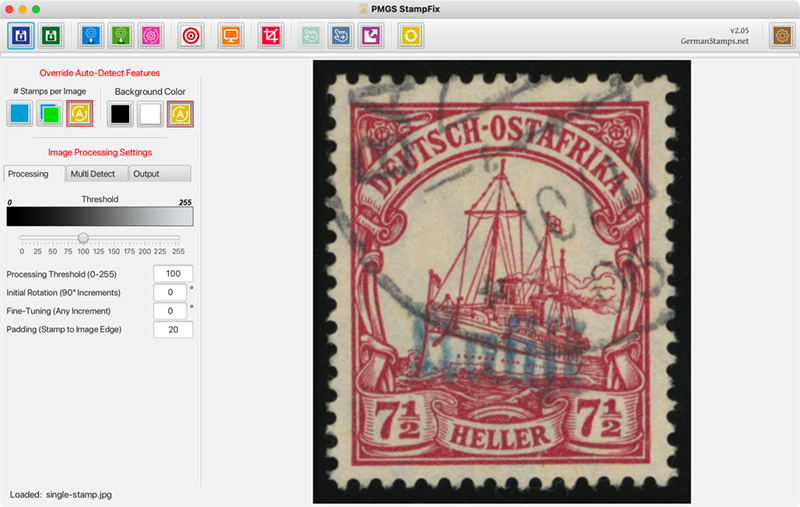
All of the old features are still there, just in new places.

There used to be separate load buttons for processing a single stamp from a single file, processing multiple stamps from a single file, processing multiple files, and processing folders. There is now 1 load button that handles all files. Folders can't be handled be the file chooser, but those can still be dragged and dropped.

The former contents of the sidebars (left sidebar had processing and output settings, right sidebar had settings for extracting multiple stamps from a single image) are now in tabs in the left sidebar.

3. A few Quality-of-Life Improvements

You can now double-click in the image window to open the File Chooser.

Dragging and dropping a folder will now output with the same folder structure as the input folder.

4. Accuracy Improvements

The background color detection is much better, and there's now a toggle that allows you to force a black or white background color.

And now the big news - what's new!

1. Cropping

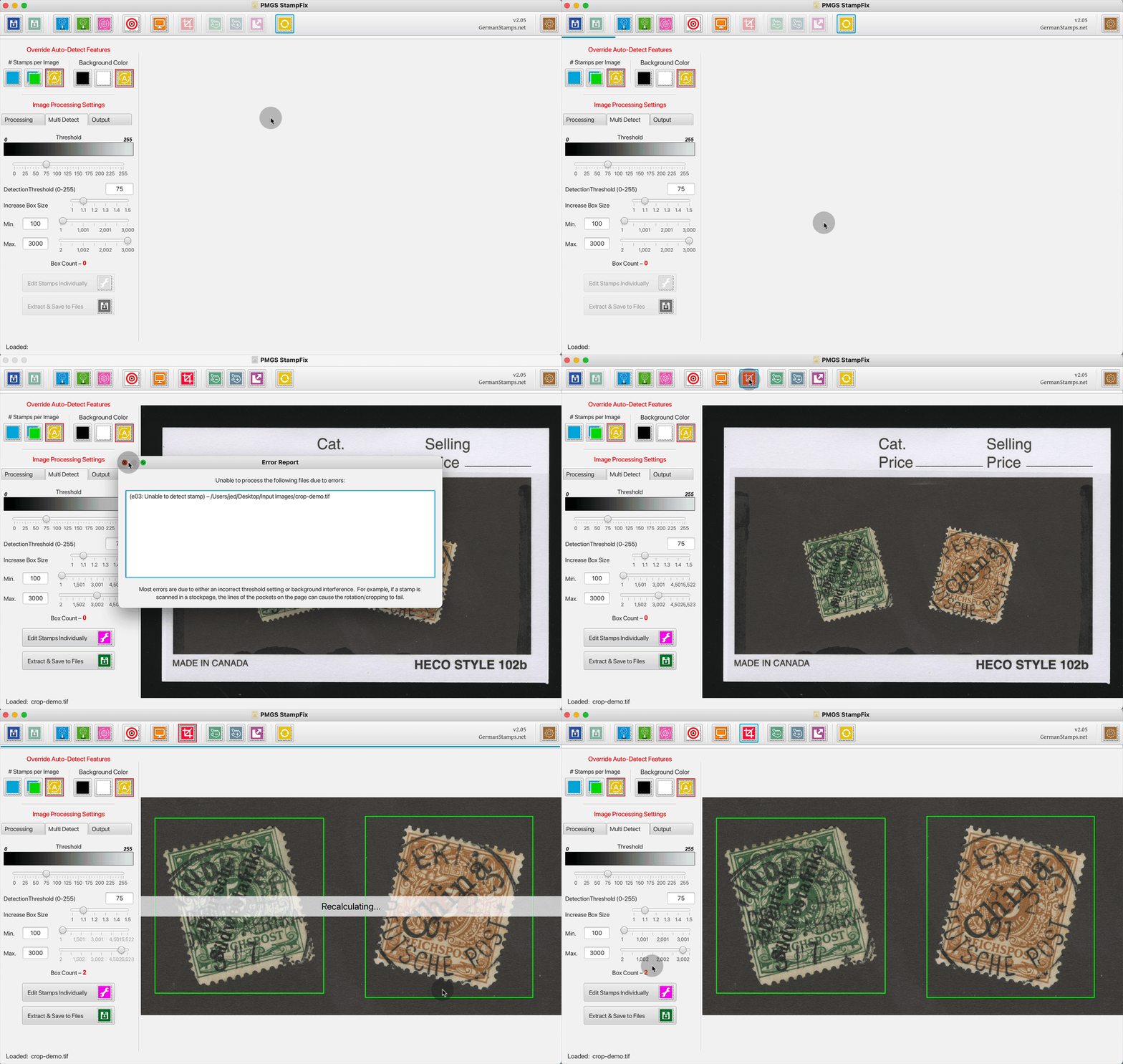
In the past, this image would have been un-processable.
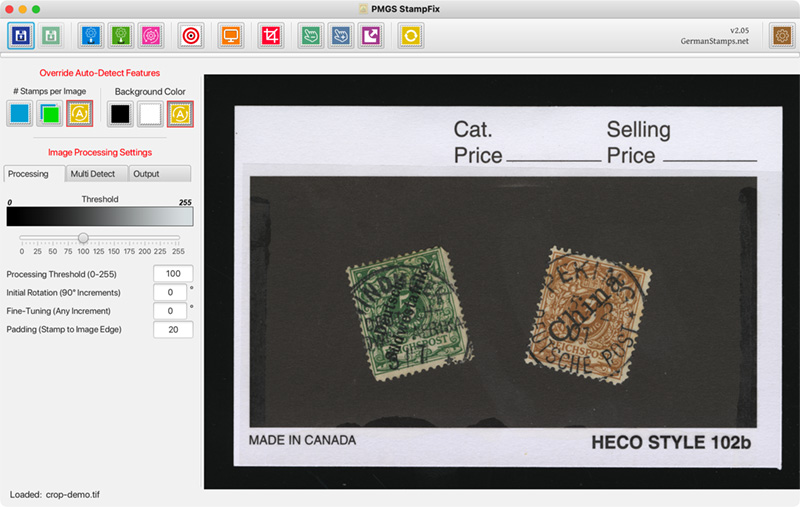
Scanning these stamps in the card caused too much clutter in the background, and the app couldn't find the stamps.

Now, when you load this image, it still generates an initial error saying that it can't find the stamps, but then you have a couple new options that can get you to where you want to go. The first is the Crop.

You can click the crop button and draw a new rectangle that, when you release the mouse button, extracts that portion and re-processes it as if it's a new image. This helps to find those stamps that were otherwise lost in the background clutter.
2. Manually Drawing Bounding Boxes

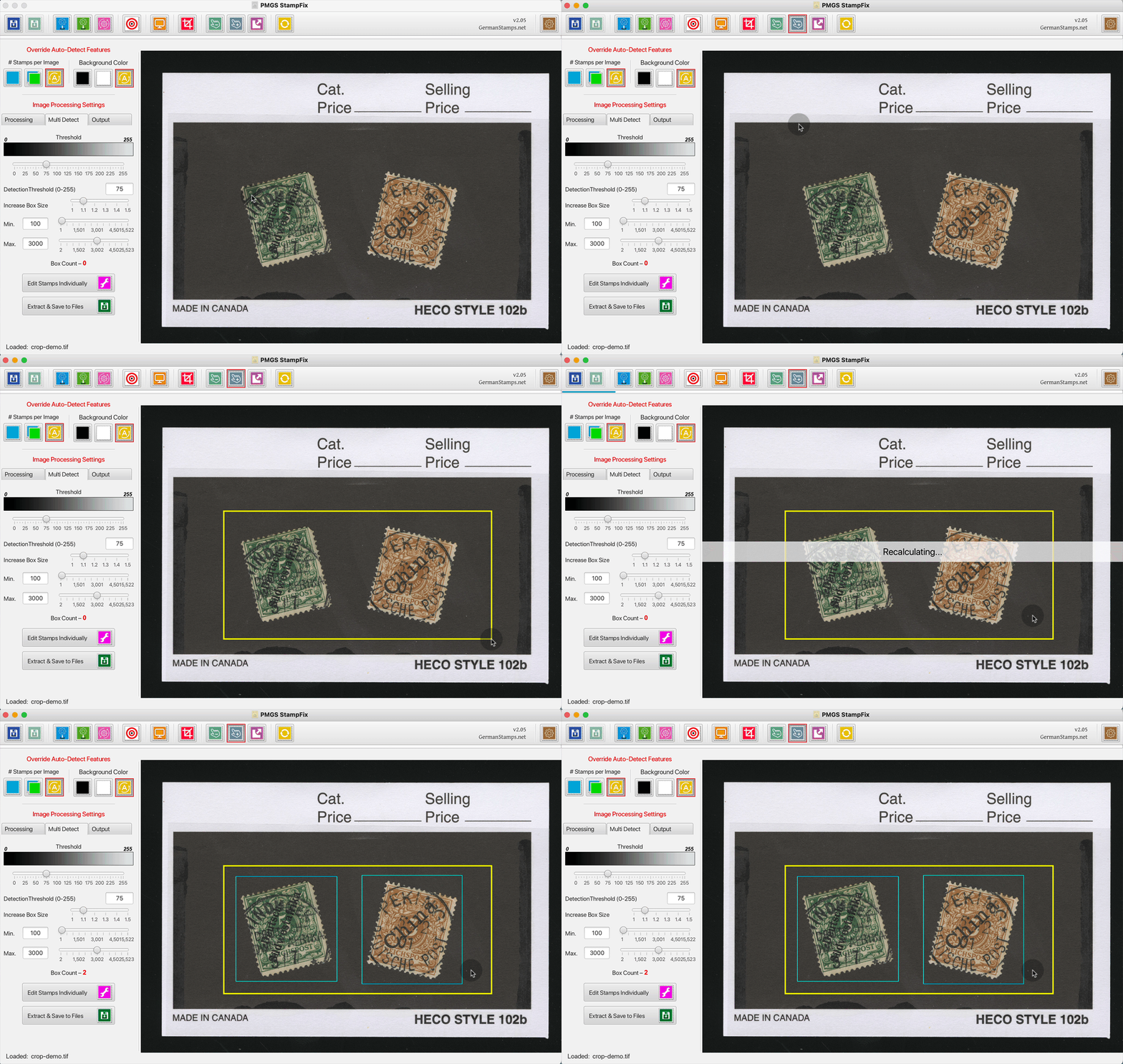
With the image shown above, you have another option, which is to manually draw a bounding box. Once you finish drawing the new bounding box, the app searches within that box for stamps, and if it finds any, draws a new blue box around them. As with the cropping function, this allows you to find otherwise undetectable stamps by "removing" the background clutter. This function differs from the crop function in that it doesn't dispose of the remainder of the image, so if you need to draw multiple manual bounding boxes you can.
3. Extracting without Rotating/Cropping

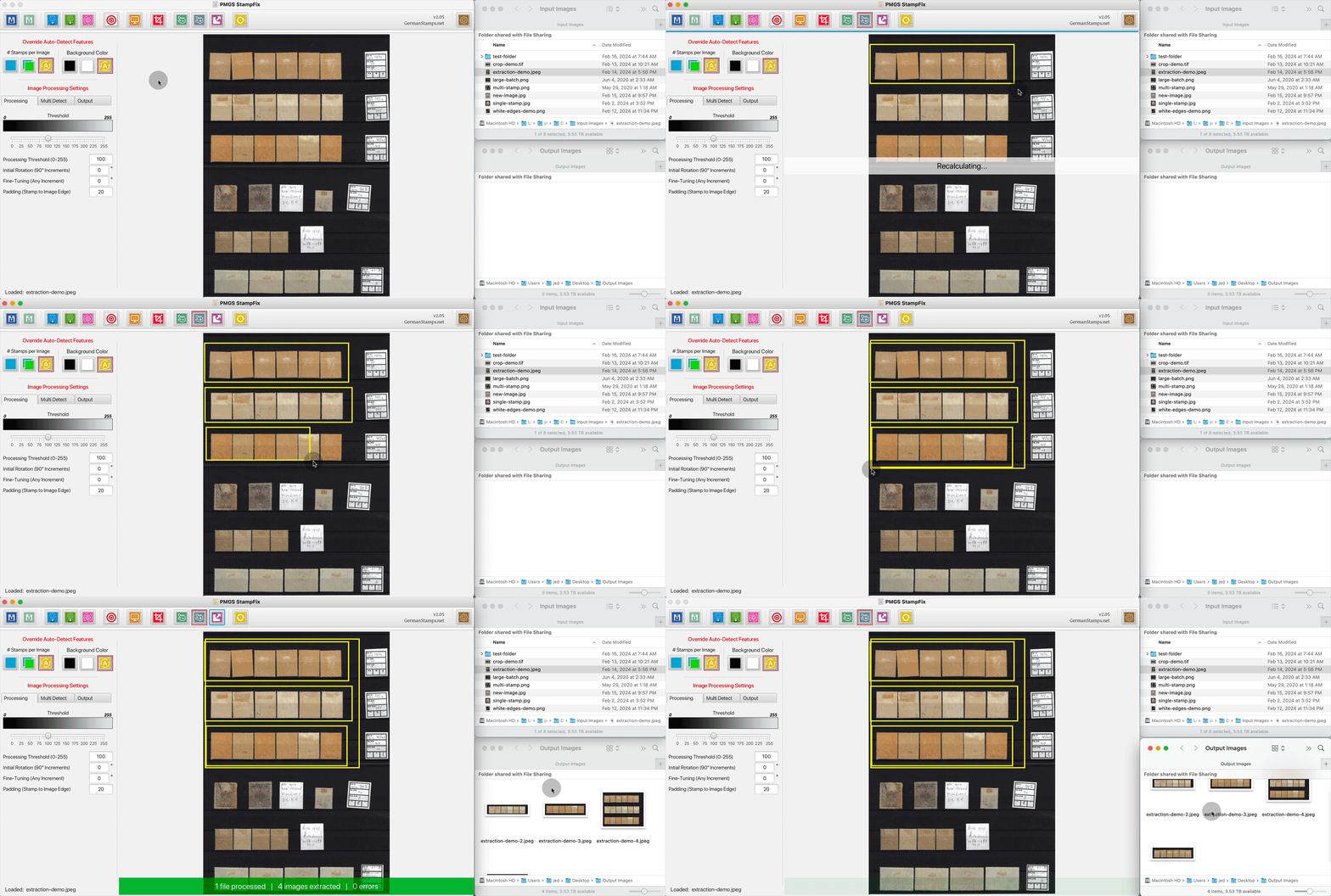
You can also use the manually drawn bounding boxes and autodetected bounding boxes to extract stamps or entire regions of the image without processing them at all. No rotation, no cropping, just extraction.
4. Removing bounding boxes

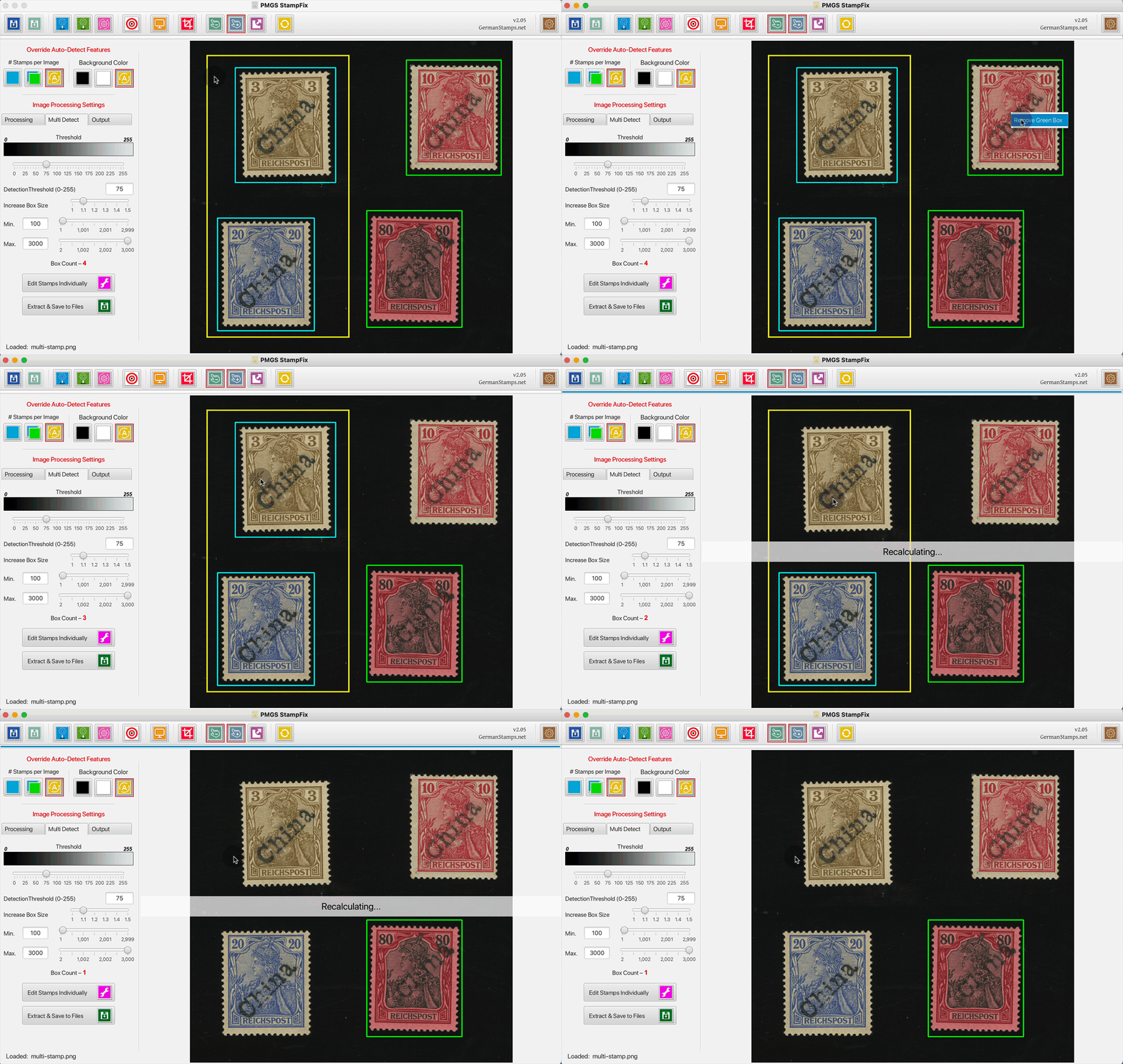
Finally, you now have the ability to manually remove bounding boxes as well.
My hope will all these changes is that folks who weren't able to have success with the app in the past because of their workflow (scanning stamps in stockbooks, dealer cards, etc.) will now have more success with it.

I have no doubt that, because of the volume of the changes and the complexity of the new features, there will be bugs. If you spot any bugs, see any behavior that isn't as you would expect, or just have any questions, please let me know. Additionally, if you have an image you're unable to process, please send it to me. If I can't get you settings to make it work, I can at least use it to guide future fixes and features.

Download is here, as are a Youtube video, a written guide, and animated .gif demos.
Send note to Staff  Go to Top of Page
Presenting the GermanStamps.net Collection - Germany, Colonies, & Occupied Territories, 1872-1945
Valued Member
Netherlands
78 Posts
Posted 02/20/2024   03:47 am  Show Profile Bookmark this reply Add hansthedutchman to your friends list  Get a Link to this Reply
postmasterGS,

The link you have provided in this thread does not work for me. I end up in a loop going back to the downloadbutton each time.

I also would like to give you a big thank you for making this software available. It has saved me a lot of time. I'm also looking forward to the new features as the look very promising

Hans
Send note to Staff  Go to Top of Page
Pillar Of The Community
United States
2941 Posts
Posted 02/20/2024   08:07 am  Show Profile Bookmark this reply Add PostmasterGS to your friends list  Get a Link to this Reply
I guess it would help if I actually made the page visible to non-admins... I think I'm brain-fried at this point. Should work now.
Send note to Staff  Go to Top of Page
Presenting the GermanStamps.net Collection - Germany, Colonies, & Occupied Territories, 1872-1945
Valued Member
United States
82 Posts
Posted 02/20/2024   09:12 am  Show Profile Bookmark this reply Add Conker to your friends list  Get a Link to this Reply
Don't know if there are any other linux users in the community but as a Kubuntu user I cannot try out Postmaster's StampFix.
I recently tried to use Wine which is an application to run many windows programs in linux.
I have successfully installed wine but only partial success with installing StampFix. The main window loads but only icons are present, no descriptive text and no text in pull-down windows.
I am willing to act as a test bed and try any suggestions.
Send note to Staff  Go to Top of Page
Page: of 14 Previous TopicReplies: 205 / Views: 22,115Next Topic  
Previous Page | Next Page
 
To participate in the forum you must log in or register.

Go to Top of Page

Disclaimer: While a tremendous amount of effort goes into ensuring the accuracy of the information contained in this site, Stamp Community assumes no liability for errors. Copyright 2005 - 2026 Stamp Community Family - All rights reserved worldwide. Use of any images or content on this website without prior written permission of Stamp Community or the original lender is strictly prohibited.
Privacy Policy / Terms of Use    Advertise Here
Stamp Community Forum © 2007 - 2026 Stamp Community Forums
It took 0.28 seconds to lick this stamp. Powered By: Snitz Forums 2000 Version 3.4.05