Stamp Community Family of Web Sites
Thousands of stamps, consistently graded, competitively priced and hundreds of in-depth blog posts to read


Stamp Community Forum
 
Username:
Password:
Save Password
Forgot your Password?

This page may contain links that result in small commissions to keep this free site up and running.

Welcome Guest! Registering and/or logging in will remove the anchor (bottom) ads. It's Free!

Inventory Software

 
To participate in the forum you must log in or register.
Author Previous TopicReplies: 5 / Views: 1,815Next Topic  
Pillar Of The Community
Learn More...
United States
4426 Posts
Posted 03/02/2016   07:21 am  Show Profile Bookmark this topic Add angore to your friends list Get a Link to this Message
Whew...

After a extended time away from organizing my collecting, I am nearly finished inventorying everything. I had been accumulating but not inventorying. I had been using StampCAT Plus (had everything through 2005 or so) but abandoned this for excel because it was just quicker to type everything (whether I had it or not) into excel. I also got to learn a few new things about excel.

The main disadvantage is that it cannot sort scott numbers so I just mainly use filters to see different views based upon fields I have set up. I am also going to create subheading so it is not just rows and rows. I have all major and most minor issues entries for US to date in with denom, description, first day info, some variety info, etc. in this file. The file has almost 8000 entries.

I used several sources (Scott specialized, Durland, PNC3 reference info, several dealer price sheets) to get information. The PNC3 checklists in excel have been invaluable for summary and conciseness.

This process alone has encouraged me to collect some specialized items (like Great Americans). I started checking what was in my albums to see whether I had the major or minor varieties on some of the definitive issues. This all started again during one of the snow events and stuck in the house and started playing with the spreadsheet.

Al
Send note to Staff

Pillar Of The Community
United States
2941 Posts
Posted 03/02/2016   11:17 am  Show Profile Bookmark this reply Add PostmasterGS to your friends list  Get a Link to this Reply
angore,

It's pretty easy to setup a custom sort in Excel that would allow you to sort by Scott (or any other custom list). I can walk you through it if you can tell me what operating system and version of Excel you're using.
Send note to Staff  Go to Top of Page
Presenting the GermanStamps.net Collection - Germany, Colonies, & Occupied Territories, 1872-1945
Pillar Of The Community
Learn More...
United States
4426 Posts
Posted 03/06/2016   08:03 am  Show Profile Bookmark this reply Add angore to your friends list  Get a Link to this Reply
I would appreciate help.

For example, this is how excel sorts this list....I know you would need leading zeros

1
2
100a
10a
10B
2a
400Bc
Send note to Staff  Go to Top of Page
Moderator
Learn More...
United States
12330 Posts
Posted 03/06/2016   08:22 am  Show Profile Bookmark this reply Add 51studebaker to your friends list  Get a Link to this Reply
Al,
Excel treats cells with numbers and letters differently than those with pure numbers. They have a workaround outlined here
https://support.microsoft.com/en-us/kb/214282

Here is the issue and how I handle it....
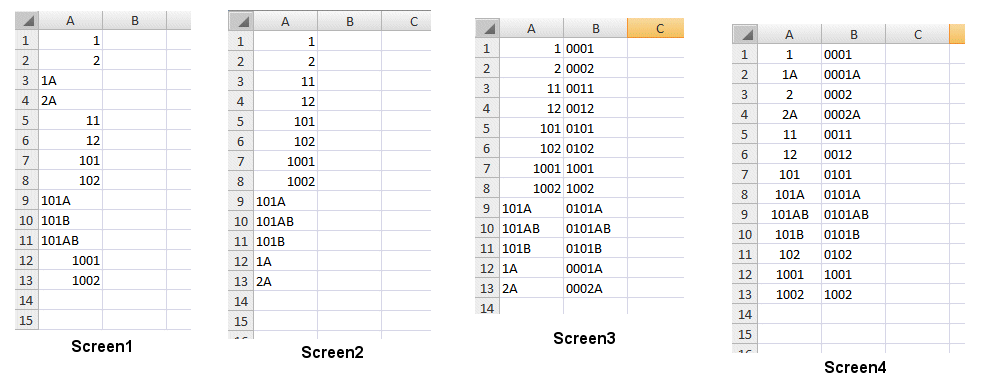

Screen1 shows random Scott numbers in column A. Note that the numeric cells are shown as right justified and alphanumeric as left justified.

Screen2 shows how Excel sorts them, not what we want.

Screen3 show the addition of a new column named 'Sort'. In cell B1 type =REPT("0",4-LEN(-LOOKUP(1,-LEFT(A1,ROW($1:$10)))))&A1 and then copy this down into other cells in column B.

Screen4 shows after I have sorted on Column B, Scott number in column A are now how we want them.


Don

Send note to Staff  Go to Top of Page
Edited by 51studebaker - 03/06/2016 09:40 am
Pillar Of The Community
United States
2941 Posts
Posted 03/06/2016   09:39 am  Show Profile Bookmark this reply Add PostmasterGS to your friends list  Get a Link to this Reply
Al,

Would you be willing to send me a copy of your spreadsheet, or at least a clean spreadsheet with just the catalog column?

There's a way to do what you want to do, but it may be easier for me to provide you a working sample rather than trying to explain it. It involves splitting your existing catalog numbers into separate components (prefix, number, suffix), then sorting those components using multiple custom sorting lists, then recombining them into a final catalog number. It's not difficult, just difficult to explain.
Send note to Staff  Go to Top of Page
Presenting the GermanStamps.net Collection - Germany, Colonies, & Occupied Territories, 1872-1945
Pillar Of The Community
Learn More...
United States
4426 Posts
Posted 03/06/2016   4:38 pm  Show Profile Bookmark this reply Add angore to your friends list  Get a Link to this Reply
Thanks.

I will give it a try. I actually store the catalog number in 3 cells (prefix, base, suffix) and then use the concatenate function to combine in one cell to print as one number.


Al
Send note to Staff  Go to Top of Page
  Previous TopicReplies: 5 / Views: 1,815Next Topic  
 
To participate in the forum you must log in or register.

Go to Top of Page

Disclaimer: While a tremendous amount of effort goes into ensuring the accuracy of the information contained in this site, Stamp Community assumes no liability for errors. Copyright 2005 - 2026 Stamp Community Family - All rights reserved worldwide. Use of any images or content on this website without prior written permission of Stamp Community or the original lender is strictly prohibited.
Privacy Policy / Terms of Use    Advertise Here
Stamp Community Forum © 2007 - 2026 Stamp Community Forums
It took 0.16 seconds to lick this stamp. Powered By: Snitz Forums 2000 Version 3.4.05
