Quote: One last point, we often mix up the terms ppi and dpi, which are designations for different uses. When we scan an image into a digital format, scanners normally use ppi (pixels per sq in). Technically, dpi (dots per sq in) is primarily for the resolution of the printout of the image. You could scan an image in at 1200 ppi, but if your printer only prints out a 300dpi photo, you will only get 300dpi. I know some scanners use dpi for scanning, however the designation is because it is normally a scanner/printer, which were primarily designed for scanning an image for printing.
Respectfully disagree, virtually every scanner specification, and marketing materials, I have ever seen uses dpi. Ditto for printer specs. Pixels per inch (PPI) is a measurement of the pixel density of display devices.
Quote: What software is used for digital albums? I have about 15K scans of my Israel collection, and I am looking for a way to present them. I was hoping to make an online catalog, where I show not only the stamps, but the FDC's, and other related material for each issue. If there is some tool already available for this, it could save me a lot of effort.
Depends on who you want to reach and what kind of web hosting you have. Reaching people on mobile devices, and setting yourself up for many years of future use, will drive you in a different direction.
If you want to buy some deeply discounted Flash generated software that requires 'no coding' and makes image albums, there is plenty being offered right now. This is because Flash technology is end of life and will not be supported by a lot of browsers starting in a few months.
Quote: What software is used for digital albums? I have about 15K scans of my Israel collection, and I am looking for a way to present them. I was hoping to make an online catalog, where I show not only the stamps, but the FDC's, and other related material for each issue. If there is some tool already available for this, it could save me a lot of effort.
In my experience, for your own personal digital album, The best by far in the world, is ACDSee 3.1 It will log in excess of 1,000,000 images, and display them in "Windows Explorer" format, with folders and files........superb.
Downside. This software is no longer available, I would happily pay for it, but it is near on impossible to source.
ACDsee ability to publish online albums is a bit kludgey. (I've used it since early versions but stopped buying it on version 12 and it is on version 19 now.) Its album output is straight html, it uses a couple of 'wizard' steps that require users to add 'headers and footer files if they want to customize the output much. If you don't want to do anything custom (page colors, titles, etc.), it might work for you. I would recommend staying away from using it to build any image database because the database format is proprietary. But as a personal, local image viewer I agree with Rod, it is a fine app. Don
I scan my stamps on my Epson scanner at 1200 dpi... (2400 dpi if I plan to print an 8x10 in. photo.) I then manage the image with Paintshop Pro...way cheaper than Photoshop and does the job nicely. To straighten images I just use the "perspective correction" option of the program...works fine..lastly I'll sharpen the image...then save.
JKjblue and ArtfulHinger...thanks for your comments on my scans....the only downside is at times the scans show the faults in certain stamps..i.e...foxing and toning etc....things that aren't noticed without magnification.
I think some of this is theoretical versus practical.
I use Lightroom since I use it to manage my photo images. I shoot and correct in RAW and can straighten and many other complex image modifications without any perceptible degradation in quality. JPG format is not perfect but you can make tweaks and save again. I would just suggest keeping a master image and make all changes from that so it is a 1st generation change. It is not like re-saving it again destroys the image and no one will know.
There is more than one software method to straighten a stamp.
I agree about this being about perspective; saving images is no different than saving stamps. Some folks assemble collections with stamps that are affordable, centering and condition is not as important for them. Others do the opposite and collect the best centering and condition they can find.
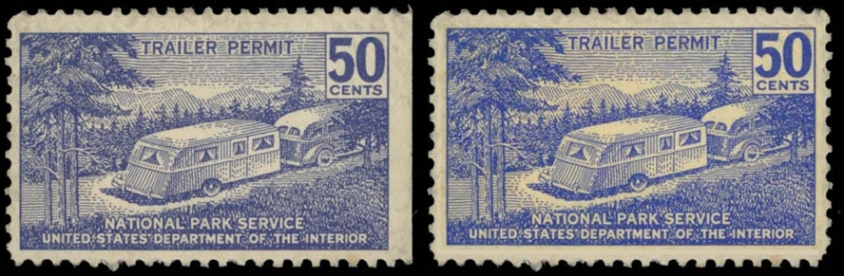
Perhaps some of this is also about the intended use of the image. I am one of these people who can perform a quality 'PhotoChop' of any image quickly. So I can 'improve' a stamps centering in an instant, add perforations to a straight edge or damaged stamp, improve the colors in a faded stamp. It only takes a second to lift one stamp design and place it on completely new perforations.
But when I do this I am undermining any value for the image to be re-used as an accurate stamp image in the future. Manipulated images are basically worthless for any educational or future study purposes.
Is it acceptable to publish a manipulated image without being designated as being manipulated? The above shows two images of the same stamp. The stamp on left has no manipulation, same image on right after 45 seconds of image manipulation. I post the image on the right in this forum or on a website without any indication that the image was manipulated. Sometime in the future, someone decides to do a census for this issue and counts this image as a well-centered stamp and believes it has no straight edge. Ut oh.
Another unfortunate part of image manipulation is that there are some people who do not realize that their software is doing 'auto-correction' or other 'improvements' to their scanned images. This gets particularly tricky when using images for online listings. A simple manipulation of the saturation can greatly deceased any toning that a stamp image may show. If I do this intentionally for a listing image I am committing fraud; is it less fraudulent if I am unaware and just think 'oh gee that scan looks good'?
So where is the line concerning image manipulation? A 'little' is ok? It is ok only if the image is marked as being manipulated? Are we looking at an accurate representation of a stamp or are we looking at someone's manipulation skills and software capabilities? Don
If the retouched image is used by an album publisher, it may mislead a collector to believe there exists this stamp in both four-way perf and straight-edge. Remember, some booklet stamps have at least one straight edge. The collector could waste time trying to find a four-way perf and when they learn of the retouch, they stop buying albums from that publisher. Now I have also read offers for quick-sort accessories, which you lay on a table and it shows the different stamp images of one denomination and their respective Scott numbers, and you sort your off-paper mixture faster. This is where it hit me that the way to sort off-paper stamps is by country, then by denomination, then by variety. Changing the centering does not really add much value to an album or quick sort accessory.
Understood, but doesn't publishing images extend beyond catalog makers?
We have all kinds of newer hobbyists in this forum. I intentionally used a 'straight edge only' stamp to make this point; a newer collector might then assume for years that this stamp came in this format (it didn't). Image manipulation without notification results in losing educational value at best and can certainly mislead people at worse no matter what the media and/or the intent.
There may be some 'line' that can be drawn as to which image manipulations are 'acceptable' but I have yet to understand what they are.
Some folks may have the experience to know that any image is not to be trusted at all. Others may think that 'seeing is believing'. Don
On ebay, I see lots of over saturated colors and over sharpening. If one has a digital collection, I guess they can try to show they had perfection. However, some images are dull to poor scanning or using a camera phone.
One point is that a jpg image is actually a manipulated image. It was not what the sensor saw but the creating of the software converting it into a jpg, Raw format images are closer to what the sensor saw and the software can correct flaws in the sensor such as video noise and sharpening.
Disclaimer: While a tremendous amount of effort goes into ensuring the accuracy of the information contained in this site, Stamp Community assumes no liability for errors. Copyright 2005 - 2026 Stamp Community Family - All rights reserved worldwide. Use of any images or content on this website without prior written permission of Stamp Community or the original lender is strictly prohibited. Privacy Policy / Terms of UseAdvertise Here





 Posted 08/25/2016 4:39 pm