Stamp Community Family of Web Sites
Thousands of stamps, consistently graded, competitively priced and hundreds of in-depth blog posts to read


Stamp Community Forum
 
Username:
Password:
Save Password
Forgot your Password?

This page may contain links that result in small commissions to keep this free site up and running.

Welcome Guest! Registering and/or logging in will remove the anchor (bottom) ads. It's Free!

How Do The Professionals Scan Stamps?

Previous Page
 
To participate in the forum you must log in or register.
Author Previous TopicReplies: 42 / Views: 11,611Next Topic
Page: of 3
Valued Member
81 Posts
Posted 08/30/2016   08:43 am  Show Profile Bookmark this reply Add SomebodySmart to your friends list  Get a Link to this Reply
Actually, almost any manipulation causes loss of detail, however rotating 90, 180 or 270 does not necessarily lose detail, since it is a rectangular array anyway and remains rectangular with the same dimensions.
Send note to Staff  Go to Top of Page
Pillar Of The Community
1448 Posts
Posted 08/30/2016   11:10 am  Show Profile Bookmark this reply Add Jkjblue to your friends list  Get a Link to this Reply

Newfoundland 1932 Scott 210 24c light blue
"Loading Iron Ore at Bell island"


Scanned @ 1200, saved in jpeg, and "straightened".

Again, I would like to reemphasize that the above approach, in my opinion, is more than acceptable in 99% of ordinary situations.

Flyspecking.. Check.
Pleasing detail..Check
Aesthetics...Check.

If one is after the other 1%, well, go for it.


Send note to Staff  Go to Top of Page
Classical era collecting with the Blues
http://bigblue1840-1940.blogspot.com/
Edited by Jkjblue - 08/30/2016 12:09 pm
Moderator
Learn More...
United States
12330 Posts
Posted 08/30/2016   12:17 pm  Show Profile Bookmark this reply Add 51studebaker to your friends list  Get a Link to this Reply
JkBlue,
Agreed that if a user does exactly as you describe, with a non-compressed format, then the loss of detail is minimal.

Disagree if the user is working with a typical saved image. Once an image has been saved in a compressed format like JPEG*, virtually ANY rotation will cause a substantial and notable lose of quality. This is because of the way most files are compressed (and decompressed to do the rotation) during the process. Some 90/180 degree JPEG rotations can be done with loss of data/pixels IF the image dimensions are a multiple of the file's block size. This is typically 8x8 or 16x16 pixels for JPEGs.

And of course users must have an application that is capable enough to rotate an image without data loss. There was a lively discussion among imaging experts a few years back on whether or not Photoshop was capable or not of doing rotating images without loss; if I recall correctly the consensus ended up being that it could not.

So I think we can summarize with;
- Quality loss will occur if you are working with a previously saved image in many of the typical formats like JPEG.
- Quality loss may not occur if you are working a freshly scanned, higher DPI image, have an application that is capable enough, and know how to do it.
Don

*You are apparently saving in an uncompressed JPEG format. Some apps are able to do this, in others this is available as an option when saving, in others it is not clear what they do. But do not assume that uncompressed JPEG format is typical for most imaging apps; the 'value' of the JPEG format is thought to be that the compression decreases the image size. (Faster downloading times and less disk space.)

Edit:
There is actually a term for the type of JPEG quality data loss over multiple processes; it is called 'generation loss'. Rotating a JPEG once might not show much as JKBlue has shown above, but here is what happens with rotational generation loss (image rotated 200 and 500 times).
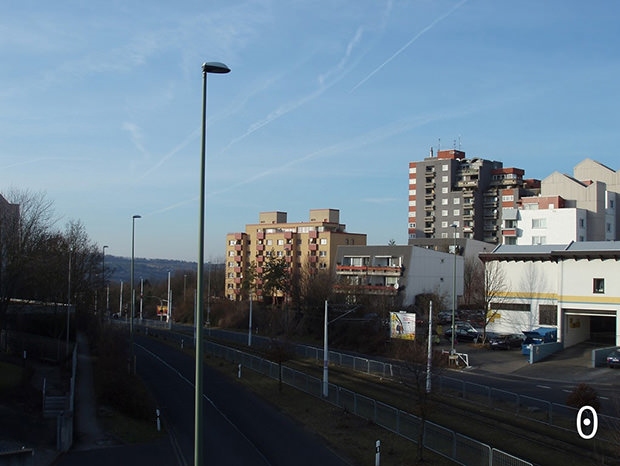
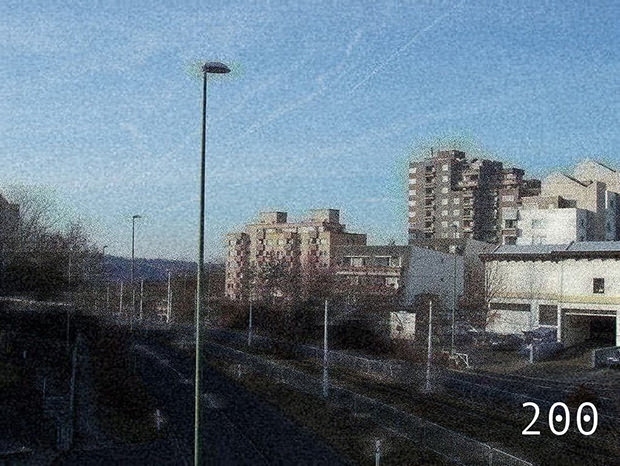
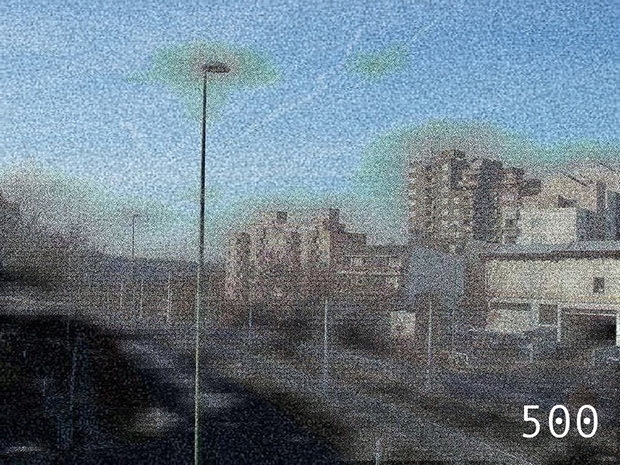


Edit; Jk, Here is your original image, copied form your site, rotated 75 times in Photoshop, and saved only once as JPEG without any compression. This is what just the rotation process can do in terms of pixel loss. Of course no one would ever do this, it is only for demo purposes.
Send note to Staff  Go to Top of Page
Pillar Of The Community
1448 Posts
Posted 08/30/2016   1:44 pm  Show Profile Bookmark this reply Add Jkjblue to your friends list  Get a Link to this Reply

Quote:
Jk, Here is your original image, copied form your site, rotated 75 times in Photoshop,


Yikes, I only do it once.

Your point is taken, appreciate the demonstration and detailed explanation.

I don't think we are really disagreeing.
Send note to Staff  Go to Top of Page
Classical era collecting with the Blues
http://bigblue1840-1940.blogspot.com/
Valued Member
81 Posts
Posted 08/31/2016   1:01 pm  Show Profile Bookmark this reply Add SomebodySmart to your friends list  Get a Link to this Reply
Actually, I figured it out. I scan at 2540 dpi because the Epson creeps don't want users to enjoy the benefits of the metric system, and my work-around is to use what works out to 100 dots per millimeter.

I save as bitmap. Then I open that with PaintShop Pro. The rotate option is available when using the crop tool. You select STRAIGHTEN and draw a straight line, which I draw along the perforations. The loss of detail is loss of high-magnification detail. Then I reduce to 200 dots per centimeter (The resize function defaults to dpi but allows selection of centimeters, but the poor user has to select it every time. Just a nasty way Corel picks on people who want to enjoy the benefits of the metric system.) Then I save as .JPG

http://stamps.directory/images/used...n1000005.bmp

http://stamps.directory/images/used/r1000005.jpg

reduced image:

Send note to Staff  Go to Top of Page
Edited by SomebodySmart - 08/31/2016 1:03 pm
Moderator
Learn More...
United States
12330 Posts
Posted 08/31/2016   1:15 pm  Show Profile Bookmark this reply Add 51studebaker to your friends list  Get a Link to this Reply
You probably don't need to draw a straight line. In PaintShopPro you can configure and use the 'grid' feature to make sure an image is straight; the visible grid is easy to turn and off.
Don
Send note to Staff  Go to Top of Page
Pillar Of The Community
United States
1624 Posts
Posted 08/31/2016   4:25 pm  Show Profile Bookmark this reply Add sdtom to your friends list  Get a Link to this Reply
I use photoshop to rework my images. My printer has a scanner at 300dpi which seems to be sufficient.
Send note to Staff  Go to Top of Page
Pillar Of The Community
United States
1414 Posts
Posted 09/02/2016   01:00 am  Show Profile Bookmark this reply Add cfrphoto to your friends list  Get a Link to this Reply
A 600 DPI scan is needed to make an image of a definitive stamp large enough to meet the minimum 500 pixel requirement on ebay.
Send note to Staff  Go to Top of Page
Pillar Of The Community
Learn More...
United States
856 Posts
Posted 09/02/2016   08:19 am  Show Profile Bookmark this reply Add rustyc to your friends list  Get a Link to this Reply

Quote:
...to meet the minimum 500 pixel requirement on ebay.


Pardon me for veering slightly off topic, but I've never sold on ebay and am astonished to hear that there are imaging requirements. I say this considering the countless blurred photographs and images that are 90% background, with a tiny stamp at the center. Now back to the regularly scheduled thread.
Send note to Staff  Go to Top of Page
Valued Member
81 Posts
Posted 09/06/2016   2:26 pm  Show Profile Bookmark this reply Add SomebodySmart to your friends list  Get a Link to this Reply
Many years ago I read about the invention of that product that is placed on the card backing the stamps in packets, so that the stamps stay in place in the window, without being damaged. I am looking for the black card product, not to make packets but to hold stamps in place so I can scan numerous stamps all at once. The trick is to place them on fairly straight, using a T-square, then turn this face-down onto the scanner bed.

Send note to Staff  Go to Top of Page
Moderator
Learn More...
United States
12330 Posts
Posted 09/06/2016   2:44 pm  Show Profile Bookmark this reply Add 51studebaker to your friends list  Get a Link to this Reply
I remember those black cards, they had an adhesive that held the stamps; haven't seen those in a while and recall some that had damaged some stamps.

I would imagine that the adhesive they use on the current 3M 'Stick-It' Notes would hold used stamps without damage.
Don
Send note to Staff  Go to Top of Page
Valued Member
United States
114 Posts
Posted 09/06/2016   11:14 pm  Show Profile Bookmark this reply Add flyinlo to your friends list  Get a Link to this Reply
I am far from an expert at scanning stamps or scanning in general. But I like to think I'm an expert at saving time whenever I can.

I use a Epson V600 scanner to scan a selection of stamps at one time at 300 dpi, then I load them into the EzImage program which allows me to separate them with two or three clicks then crop and rotate them with one click ultimately saving them to the correct location to be used in the EzStamp inventory program. I can scan and prepare whatever stamps I can scan in one pass in just a few minutes.

I use bitmaps instead of jpegs as that seems to be the preferred file format with the programs I use. They can be converted to jpeg at any time. Of course I can go back to scan any item that I may need at a higher dpi at any time. You never know I may want to print a poster size stamp one day, then I'll need a very high dpi file.

I'm not saying I am getting the ultimate scan for my stamps but I am able to inventory my collection using a scan that is clear and ready to work with in other programs and ready to possibly list for sale on any of the auction sites. A scan at 300dpi does not use up outrageous space on my computer either.

It is so much easier then spending time getting each stamp placed just so on the scanner to get it straight. At this point I'm working on my Great Britain collection, so far I have scanned 465 specimens not pictured in the EzStamp program, due to the fact they are gutter pairs, booklet covers or something other than a lone stamp. I have about two weeks of time that I can spare getting this far. I believe I may have 3 or 4 hundred to go.

After all I am not collecting scans I'm documenting a collection that others whom come after me will understand...I hope!

I hope I have not strayed too far off the trail with this post.
Send note to Staff  Go to Top of Page
Page: of 3 Previous TopicReplies: 42 / Views: 11,611Next Topic  
Previous Page
 
To participate in the forum you must log in or register.

Go to Top of Page

Disclaimer: While a tremendous amount of effort goes into ensuring the accuracy of the information contained in this site, Stamp Community assumes no liability for errors. Copyright 2005 - 2026 Stamp Community Family - All rights reserved worldwide. Use of any images or content on this website without prior written permission of Stamp Community or the original lender is strictly prohibited.
Privacy Policy / Terms of Use    Advertise Here
Stamp Community Forum © 2007 - 2026 Stamp Community Forums
It took 0.21 seconds to lick this stamp. Powered By: Snitz Forums 2000 Version 3.4.05
