|
This page may contain links that result in small commissions to keep this free site up and running.

Welcome Guest! Registering and/or logging in will remove the anchor (bottom) ads. It's Free!
To participate in the forum you must log in or register.
| Author |
 Replies: 16 / Views: 6,148 Replies: 16 / Views: 6,148 |
|
Pillar Of The Community
United States
772 Posts |
|
|
Hi all, Looking to learn from those with some experience with this... One of the complaints you sometimes here regarding Steiner pages (or other homemade pages for that matter) is that some people just don't like the look of their stamps on an 8-1/2 x 11" page in a cheap 3-ring binder. I must admit that I am one of those people (you might have guessed, or else why would I be writing this post?). Now, unlike just a few years ago, it seems like wide-format inkjet printers are becoming more widely available and prices are coming down. For example, according to a quick internet search, the top rated Brother MFC-J6935DW printer (can print 11x17 inch pages) can be had for $335 on Amazon. This is now falling within the realm of the possible. But, what are the added cost/effort of finding the right paper, ink, and binders, etc. for these larger pages? Anyone out there doing this for either their Steiner pages or homemade pages? Would it be practical, for example, to print onto blank Scott Specialty pages (blank with the border) or some other album system's pages so that you can use the matching binders? Looking to hear from those who have gone down this route. Thanks! |
|
Send note to Staff
|
|
|
|
|
Pillar Of The Community
721 Posts |
|
|
Hi Chris. I am using an HP wide format 11x17 or an Epson 17x 22, and Steiner and have printed many thousands of pages. Very little in the way of problems. I do however have to print in an 8 1/2 X 11 format even though using custom cut size, 65 or 70 lb paper. HP does not allow user customized page settings. This has not been a problem for me. I get my paper from a print shop and they cut it to exactly whatever size I give them. I just recently purchased 2000 sheets in two different sizes and the cost was appx $95. Previous to that I was using staples but they repeatedly had poor cuts with paper slivers hanging on from the cuts and variations in sizes as much as 1/64th inch. Very sloppy looking.You will use an extreme amount of ink. I feel the printers are as low as they are because they make the profit on the ink.
Hope that helps. Paul |
Send note to Staff 
|
|
|
Pillar Of The Community
United States
3224 Posts |
|
|
A print shop should also be able to punch (they say "drill") holes to your specification, though maybe not the rectangular style for Scott Specialty albums. If using a commercially-made stamp album, it would be a good idea to give the printer a sample page to use as a guide.
Ink should be archival quality (most are today, check Brother's specs) and permanent (many are today, you don't want to have a spill making ink run, though a flood will get your stamps, too. Again, check ink specs). As for cartridge cost, most can be refilled more cheaply at home or by a drugstore chain that cannot be named here. Check the ink refill sites to see if your cartridge can be refilled and check out their ink specs at the same time. |
|
Send note to Staff
|
|
|
Pillar Of The Community
1366 Posts |
|
|
I'm one of those people who has posted a few times about my not liking the small 8.5 x 11" page size that Steiner pages usually get printed on. I realize that most of us are on a budget, our stamps are not our top priority compared to the mortgage and so forth, so printing on a standard printer on standard sized paper is a big money saver for many collectors. Nothing wrong with that. But to me, the smaller pages just look bad. It's too much like a school notebook for my taste. And the resulting page is just far too cramped to have any elegance to it. Traditional stamp albums, at least the ones at the higher end of the spectrum, use larger pages to give the stamp layout some "breathing room". It's the difference between framing a picture with or without a mat around it. Everyone's entitled to their own taste, and this is mine. I want my album pages to look open and appealing. So I've been intrigued for a number of years by collectors who print pages, either by Steiner or their own self-designed pages, on larger paper. That requires a wide-bed or large format printer, as you say. I have never actually done this -- which is kind of important to note -- but I've been following those who do, so I know a few things about it. For one thing, if you print Steiner's page layouts on larger paper, you will still end up with the actual layout being the same size. The borders don't magically get spread out more just because you are printing on larger paper. I'm not sure this is a big problem, but I'd certainly prefer it if I could spread the borders out a little. I've seen posted (here, I think) instructions for saving Steiner's pages into PowerPoint format which then allows changes to be made to them. I assume this way you could spread out the border, and perhaps using that format you could do it just once for all the pages in your PowerPoint file which would then make the same change on each page? I've worked with PowerPoint many times, but I can't recall offhand how to do that -- if you can do that. But I think you can. Then you either save the pages back into their original format or just print from PowerPoint. Again, I've never done this, but others say it works. Then there's the idea of substituting a different border to Steiner's page layouts, perhaps something a bit fancier for larger pages (like Scott's Specialty series page borders). That can be done, but I sure don't have the expertise to do this. It would be helpful if someone would explain how to do this -- step by step. And again, I'd hope that using a format like Power Point you wouldn't have to change each page's border one by one which could get laborious, but would only have to do it once for an entire file of pages. Not sure about that. As for ink usage, I can't really see why you'd use more ink on larger pages than you would on smaller pages -- especially if the layouts were the same. Ink isn't cheap, but for my regular-sized HP printer I've found some very good non-HP ink cartridges on Amazon which have worked extremely well at about 1/3 the price of the HP ink. Look for high ratings. I've had good luck with the OSIR brand of ink cartridges. I wouldn't hesitate to use this ink to print album pages. Paper for larger sized pages can be purchased online from Amos Advantage or Subway Stamp Shop if you want to use Scott album sized blank paper. Or you could use blank paper sized for Lighthouse or Schaubek or other albums which they may also sell -- but keep in mind that these hole punches may not fit your binders. The 3-ring binders Scott now sells might be the best option. That way you could use pages punched with the standard three holes. And, as mentioned here, print shops will be more than happy to cut paper to your exact specs. Bring in a sample page, if you can, but it's not required. They can easily do a three hole punch, but I think they'll have trouble trying to duplicate the Scott two post (rectangular hole) punch. For that, they will charge you for making up the hole punch itself -- if they can even do it that way. It may be expensive, hence the suggestion to stick to standard round hole punches. The European 22-ring hole punch is also an option since there are many album binders set up this way (common in Britain, and the German album maker Schaubek uses a 22-ring punch on its pages). A print shop might be able to do this -- not sure -- but there are occasionally 22-hole hand punches available if you search long enough on ebay. I found one. But they're certainly nowhere near as easy to find as regular 3-ring hole punches. One other consideration: When you buy "blank" paper from a stamp company, it comes with a border already printed on it. This is not going to work as when you print your Steiner page layout, you'll end up with two borders on the page. What you need, then, is "all blank" pages. Some dealers do sell such pages, but a print shop again might be your best and least expensive option. I'd figure how many pages I needed to have them cut for me, then double it. It's not nearly as expensive to buy blank album pages this way as it is to buy printed album pages. It would be helpful, also, to hear the pros and cons of different brands (and maybe models) of wide bed printers. The printer itself does matter. For one thing, you're going to probably want a printer that sends the paper straight through the printer, rather than curving it around. Why? Well, typical album page paper is much heavier weight than normal printer paper. Many printers are going to have some difficulty curving the heavier paper reliably, and they may end up with paper jams. A "straight through" printing system with the paper tray located on one side and the output tray on the other will work more reliably. I'll be interested to hear more about this -- and I might even get up the nerve to do some printing (on larger sized paper, of course) myself one of these day. |
|
Send note to Staff
|
| Edited by DrewM - 08/07/2017 01:19 am |
|
|
Moderator

United States
12330 Posts |
|
|
For me the value of printing my own pages would be to create custom, high quality albums. The final product would be much more costly than simply using commercial pages offered in both terms of cost and time.
But some folks choose to print their own pages as a cost savings approach by using work-arounds like Power Point, using less expensive 'acid free' paper, and printing on low cost ink jet printers. Personally if I am going to do something then I look to do it in a way where I can maximize the time and money I invest in it long term.
For example, Power Point. I can make Power Point sing, so if this was just to make a few quick pages than this might be a solution. But I would never consider pouring a few hundred man hours into developing a large amount of pages in this kind of application work-around. I would use an application that is designed for desktop publishing and can work with PDF files natively (i.e. Adobe Live Cycle Designer). If I am going to be printing just a few pages, then an ink jet printer might do. But if I am going to be printing a hundreds and hundreds of wide format pages, I would only consider a laser printer. And if I am going to the time and trouble of printing my own pages, then I am not going to be buying cheap 'acid free' paper, I am going to spring for true archival paper which is 2 or 3 times the cost of typical 'acid free' paper.
My approach would not result in an inexpensive final product. So I guess each of us has to decide up front if we are printing our own pages to save money or if we are looking to produce a quality heirloom.
Don |
|
Send note to Staff
|
|
|
Pillar Of The Community
United States
772 Posts |
|
|
Quote:
It would be helpful if someone would explain how to do this -- step by step. Stay tuned! I'm working on writing up a post for Jim's BigBlue blog on exactly that. I will give step-by-step instructions on how I edit Steiner pages with PowerPoint, including how I have "hacked" a way to add different borders, including Scott International and Scott Specialty borders. I think it will come out at the end of September. As for ink usage, not sure that the issue is that you would be using any more ink on a page, but just that the ink cartilages for the wide format printer might be more expensive, just as custom larger paper is more expensive than 8.5 x 11 inch paper. -Chris |
|
Send note to Staff
|
|
|
Valued Member
United States
101 Posts |
|
|
Quote:
"I have never actually done this -- which is kind of important to note -- but I've been following those who do, so I know a few things about it. For one thing, if you print Steiner's page layouts on larger paper, you will still end up with the actual layout being the same size. The borders don't magically get spread out more just because you are printing on larger paper. I'm not sure this is a big problem, but I'd certainly prefer it if I could spread the borders out a little."
Many copiers have the ability to enlarge the original, thus spreading out the page. This also enlarges the spaces for the stamps which is not a problem as long as only a 3 - 5% enlargement is used. I find that sometimes the spaces for the souvenir sheets on Steiner pages are too small so I will do this for those pages, but it would not present a problem to do it regularly to increase the page size. This usually requires two steps: printing on regular sized paper, then copying and enlarging on the larger paper. |
|
Send note to Staff
|
| Edited by billresh - 08/08/2017 6:27 pm |
|
|
Pillar Of The Community
1366 Posts |
|
|
You're saying that if you print pages from the Steiner website or CD onto ordinary computer paper as your "originals," you can then run these originals through a photocopier ("Xerox' machine), using the enlargement setting to slightly enlarge what you print on the album pages by a few percent. I hadn't thought about that, but yes you can.
This requires two steps: (1) Printing all the pages you need on printer paper first. (2) Then you load the "xerox" machine with whatever larger album paper you want the final product print on, and "xerox" the originals onto that larger paper. It's a two-step process. And you'll need both a computer printer and a photocopier.
My thoughts:
1. Two steps is more complicated than one. It would be even better to enlarge the Steiner page borders to print your album pages using your computer printer -- no photocopier needed. You will need a wide-bed printer to handle the larger-sized album pages you're using.
2. Many people aren't going to have access to a photocopier at home that can handle work this efficiently. If you're making up an album of hundreds of pages, that's going to be pretty laborious. So it means heading off to the local office service store to use their photocopiers. If you need to make repeated trips, that gets tiresome.
3. Is the ink used in photocopiers just as safe as the ink used in computer printers? I suppose they're pretty much the same. It has to be stable and safe.
4. If enlarging the page also enlarges the stamp boxes are the boxes going to become too large?. What if I want the page borders enlarged more than 2-3%?
Even though this is a two-step process, it is very workable and would save the cost of buying a wide-bed printer. Thanks for the tip.
But I'd prefer to enlarge just the border of the page and leave the stamp boxes as they are. As I mentioned earlier, there's supposedly a method using PowerPoint which allows you to save Steiner pages as a PPT where you can enlarge the border on all pages at the same time. Then either save them back as a PDF and print them out -- or print them out from PPT. I'm not quite sure how this works. I've played around with it, but haven't been successful.
If it did work, you could print onto larger pages an enlarged border with the stamp boxes remaining the same size. As long as the border isn't made a great deal larger, the proportions are likely to still look good. In fact, because (in my opinion) Steiner's pages are much too cramped for 8.5 x 11" pages, enlarging the border may make them look even better by loosening them up a little. Most higher quality albums allow stamps more breathing room.
I would prefer -- if I had my 'druthers -- to do what Don (51Studebaker) describes. I'm sure those pages would be much better looking than anything done otherwise. But, I would need step-by-step guidance, omitting all the usual assumptions people who are extremely comfortable with computers have about terminology, written in regular English, and so on. A guide to making your own album pages "for the rest of us" is very much needed. Heck, if it were a well written book (or booklet), I'd even pay for it. |
|
Send note to Staff
|
| Edited by DrewM - 08/27/2017 11:29 pm |
|
|
Valued Member
Canada
440 Posts |
|
|
The Steiner pages are a wonderful resource that have made self printed albums an affordable reality for thousands of collectors.
However for that small group of people who do not want a cookie cutter approach, rather than try to hack the Steiner pages, they may find it easier to simply create custom pages that exactly match their needs in the first place.
There are a number of general purpose drawing or word processing programs that could be used for that purpose, as well as dedicated programs developed specifically for stamp album page layout. In the latter group I am going to humbly suggest giving my free application AlbumEasy a try (I can't post links here but Googling AlbumEasy should take you straight to the web site). I even include a sample page that closely mimics the Steiner style for anyone who wants to supplement their Steiner pages.
Using AlbumEasy, one line of text controls the page size for the whole album, and can be set to any size your printer is capable of. So for example to print on Scott 10" X 11.5" pages one would simply set the page size in mm as follows:
ALBUM_PAGES_SIZE (254.0 292.1)
Similarly, one line of text enables/disables or styles borders for the complete album:
ALBUM_PAGES_BORDER3
Some people find the text based page description used by AlbumEasy intimidating at first, but most have found that after persevering for and hour or two that it is actually a very productive way of creating album pages. I am always happy to offer support either via an online forum such as this or via the contact page on my web site.
Clive
|
|
Send note to Staff
|
AlbumEasy - Free software for creating custom stamp album pages ChromaMate - Compare, match, analyse, free colour matching software ImageSleuth - Images, hidden inside images, revealed. A retroReveal alternative PSGSA - The Philatelic Society for Greater Southern Africa |
|
|
Pillar Of The Community
United States
4513 Posts |
|
|
The challenge is if you are doing a lot of countries, it can take a lot of time. For a lot of pages, I would go the route of converting Steiner to power point then transfer them to a larger page size. You can just group them then copy so just 1 action. 8.5x11 Steiner Brunei page 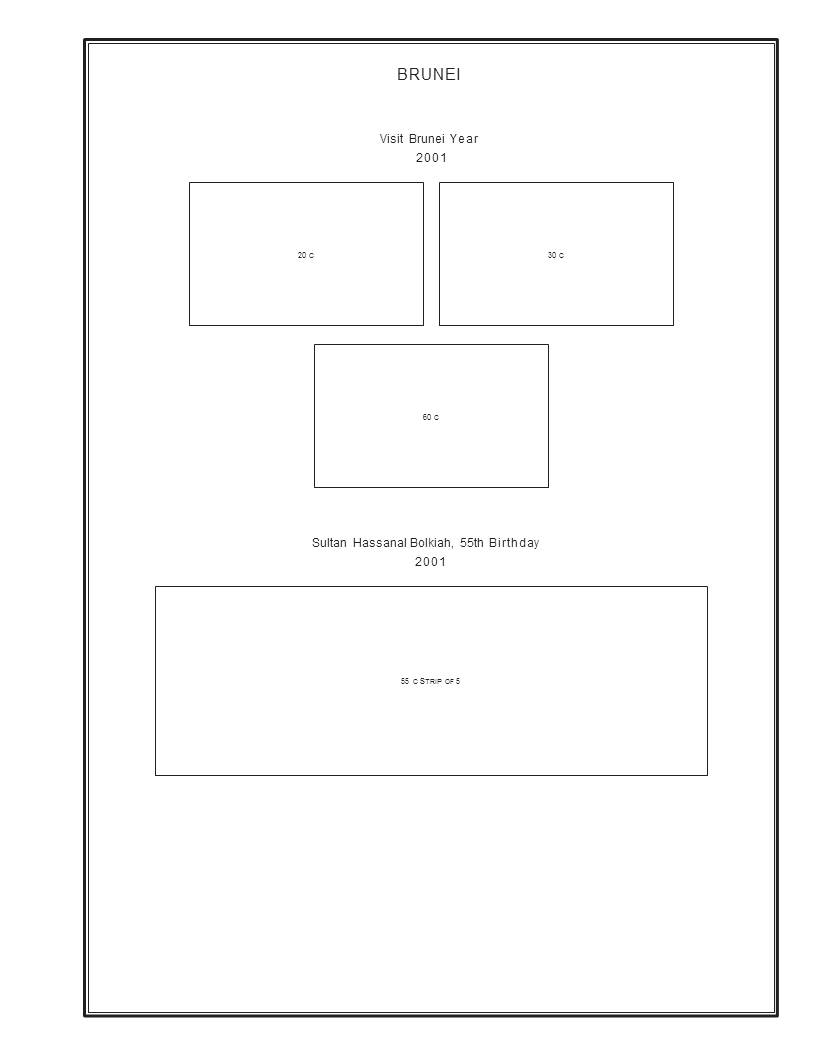 10x11.5 Steiner Brunei page after changing page properties to 10x11.5 (without copying elements. The should be a way to change page properties without affecting content. 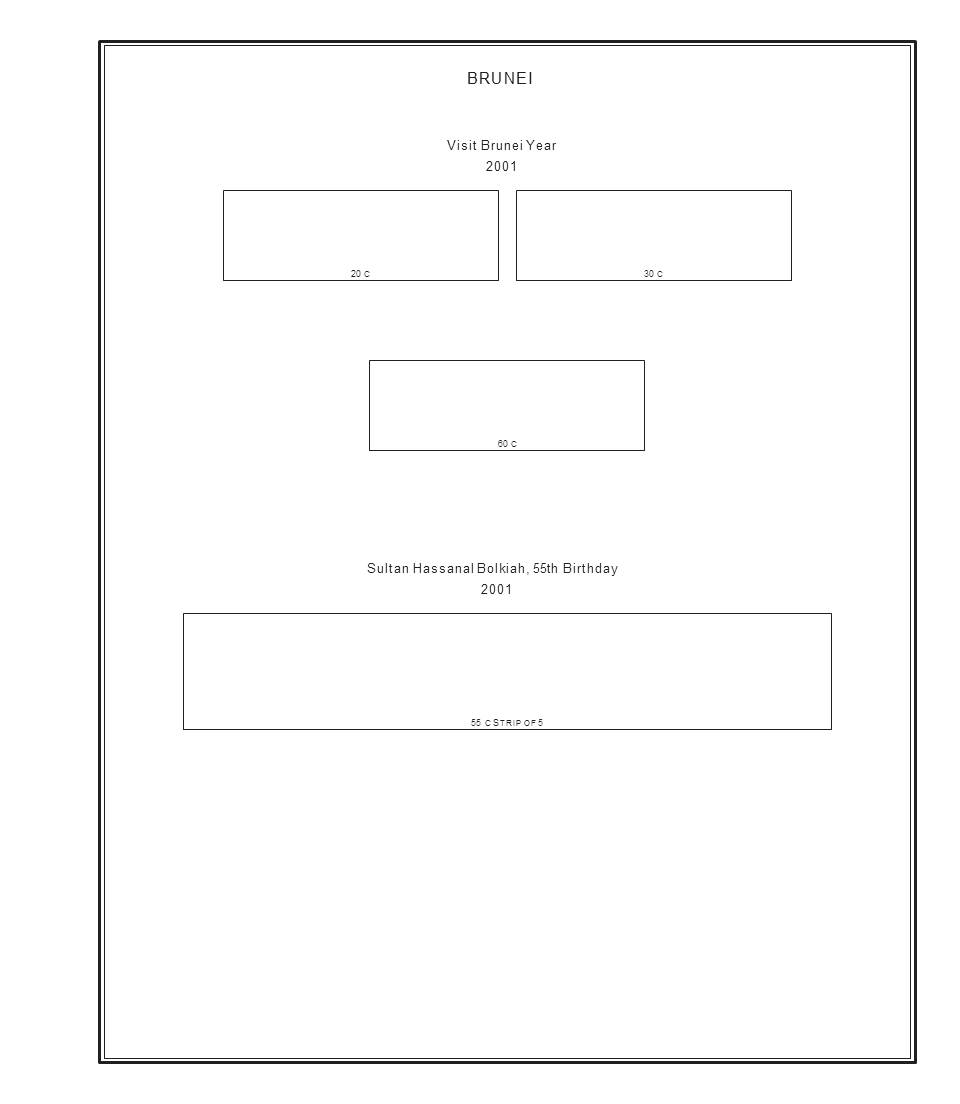 Elements copied to larger template - lots of extra space.... 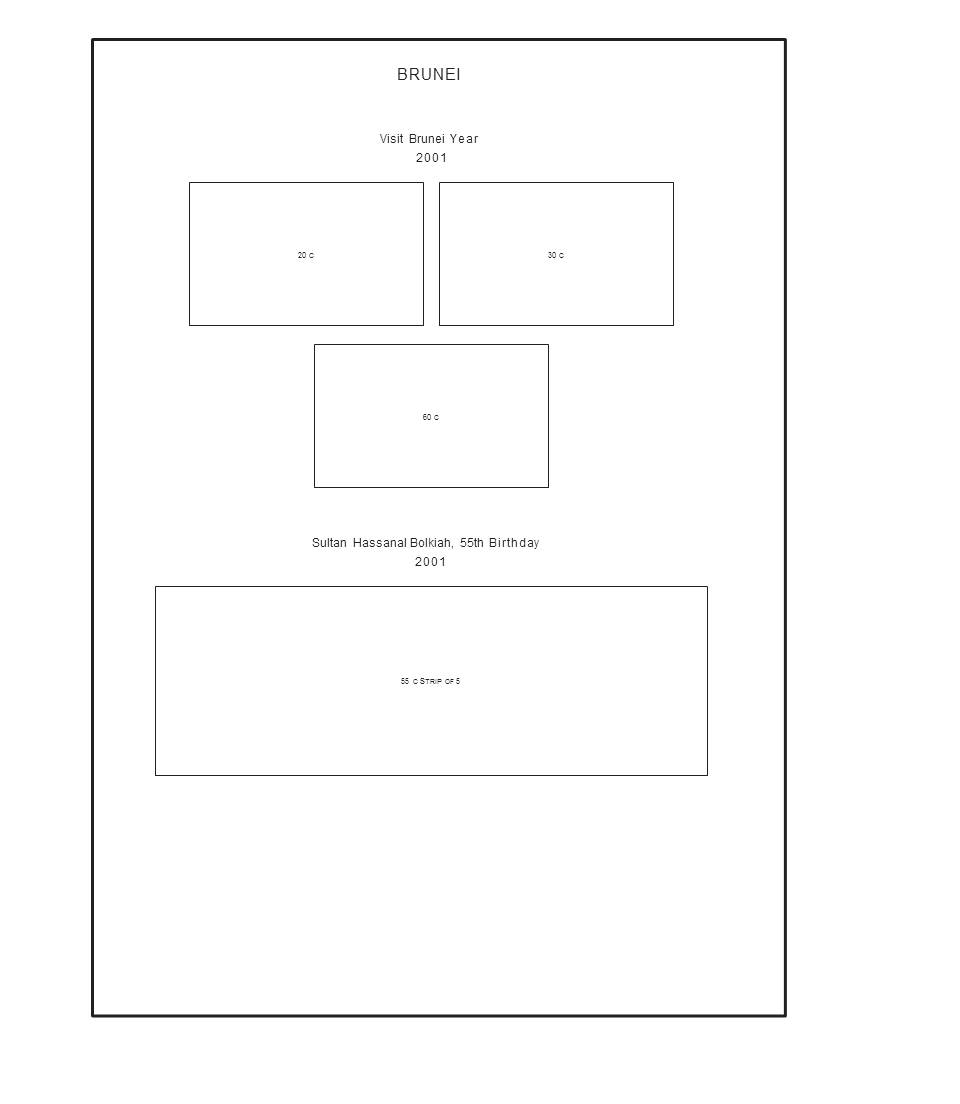 |
|
Send note to Staff
|
Al |
| Edited by angore - 08/28/2017 4:40 pm |
|
|
Pillar Of The Community
1366 Posts |
|
|
"Elements copied to larger template - lots of extra space..." Yes, very nice looking indeed.
That looks like a Scott National / Specialty album size page. Note that if you print on blank page, normal blank pages from Scott already have a border. You'll need "completely blank" pages which have no border at alll. Does Scott / Amos Advantage sell completely blank Scott pages? I think Subway Stamp Shop might sell their own version, maybe less expensively.
Scott blank pages cost around 50 cents a page. One way to cut expenses would be to have a print shop cut similar weight paper in the appropriate color to the size of Scott pages. If you plan to use Scott 2-post binders, a concern would be whether they can punch the rectangular holes Scott uses. If you're use the 3-ring binders, that's a lot easier to do.
For more upscale neighborhoods, Lighthouse and KA-BE pages (and perhaps Schaubek and maybe Davo) sell completely blank pages, also. They're pretty expensive. And you'll also need their binders which tend to be pretty expensive, too. I just priced the first two of these brands and it's about $1.00 per blank page. Compare that to Scott's "around" 50 cents per page -- compared to card stock paper in the standard 8.5 x 11" size the Steiner pages are usually printed on from an office supply store which costs less than 10 cents a page. That's from less than 10 cents to $1.00 per page. You pays your money and you makes your choice. . . .
A basic 3-ring binder using 100 pages of 8.5 x 11 office-supply paper might cost you no more than $20-30 per volume. At the more elegant end (Lighthouse, etc.), it's going to cost up to $200 a volume. LH and KA-BE binders cost about $100. Add about $100 for the pages. Quite a difference, especially is you need multiple volumes. An album for an entire country might need five or more volumes. That's maybe $150 for the small basic album most collectors print themselves vs. $1000+ for Lighthouse, etc. And these are do-it-yourself pages, not the printed pages these publishers normally sell. It might be better to stay away from the high-rent neighborhoods and use a local printer to cut your pages to whatever size your binder requires.
Using Scott blank pages in a Scott 3-ring binder puts you somewhere in the middle of this range, $50 for 100 blank Scott pages plus $40 for a Scott 3-ring binder (plus more for a slipcase). So for Scott it's about $100 a volume. Still, printing onto larger-sized paper might cost 2-3 times more than the 8.5 x 11 pages most collectors use. Worth thinking about.
And you will need to have access to a wide-bed printer, too. Add a few hundred dollars for that, as well.
Assuming none of this deters you, the remaining issue is "how to" do it. Is there any chance of getting a step-by-step set of instructions about how to use PowerPoint to enlarge Steiner pages? Things most people are going to want to know:
- How do you save Steiner files into PowerPoint?
- How do you enlarge the borders on all the pages? Can you do that to all pages in the file at the same time or should you do it page by page?
- How do you copy and paste the stamp boxes onto your pages with enlarged borders? If you first enlarge the borders, the stamp boxes are going to enlarge also. I assume you first need to 'copy' (or maybe it's better to "cut?) each page layout before you enlarge the border -- which you probably must therefore do one page at a time. Then "paste" the stamp layout back onto that same page . . . ? Or am I missing something?
- If you do have to enlarge each border one page at a time, how do you insure that all the borders are the same size?
- Do you print the altered pages from Powerpoint? Or do you need to save them back into their original format or another format?
I've used PowerPoint for years, but I don't understand how you do all this in that format. Any help would be very much appreciated -- the more literal the better. |
|
Send note to Staff
|
| Edited by DrewM - 08/28/2017 9:13 pm |
|
|
Pillar Of The Community
United States
4513 Posts |
|
|
Some quick answers.
1. I used an free web tool to convert the PDF to PPT. It used two...One did a great job, one did not. If you google, PDF to PPT it is one of the top ones that pop up.
2. If you just take the ppt and change page properties you will get the stretch version. I checked and there is no way to change page properties without affecting elements per MS.
3. If you create a blank with the desired size and then copy, the border does not automatically copy over it was a two step copy. The borders are in the Master Page (smart converter program) so you have to go to Master Page view to copy those over.
My intent of this has been to tinker with some pages. After doing a bunch of album pages for my Mystic album, it takes a lot time. I said "if I would do it" but I would never actually do many this way. I just do not want to lay them out in some simple array (endless rows not grouped). |
|
Send note to Staff
|
Al |
|
|
Pillar Of The Community
United Kingdom
8633 Posts |
|
|
I'm immune to the charms of Mr Steiner, but, if you're going down the luxury route, worth looking in the "accessories" section of auctions, where expensive items depreciate rapidly. As an example, a current list I'm looking at has lots of five and four "new condition" Lighthouse binders with estimates of £40 and £35 respectively. In fact, I had to stop myself from bidding for something that "might come in useful"! Similarly, I've often bought packs of Lighthouse, Schaubek etc leaves from the same sources at a fraction of retail price. |
|
Send note to Staff
|
|
|
Pillar Of The Community
United States
772 Posts |
|
|
Pillar Of The Community
1366 Posts |
|
|
The appeal of the Steiner pages is pretty obvious -- low cost, generally good layouts, all countries are provided for (not just the most popular), and it's easy and simple to make up your own albums.
Higher end European albums from Lighthouse, Davo, Schaubek, and so on, sell for $100 or more per volume for the binder and pages. Most countries require 3-6 different volumes for full coverage. So per country, these albums run from $500 to well over $1K just for one country. If you're on a budget, how many of these could you afford? For most collectors, the answer is "none".
Scott albums are less expensive. Scott binders cost $40 or so (plus slipcase). A typical album for a major country requires 2-4 Scott binders. I have a Russia collection in Scott albums that's up to 3 full volumes now, and I really do need a fourth one. Germany requires at least three volumes, Japan two to three volumes. And so on. The cost of Scott pages for one country is going to be $100-200, maybe more. This is less expensive than the fancy European albums. But using Scott albums, you're still going to spend at least $200 per country and $300 wouldn't be unusual for some of them.
And to keep them up to date, you have to keep buying the supplements which can be particularly expensive.
Enter the Steiner pages! You can buy the entire set of pages for your own use for maybe $30 (not sure). And they're yours for life. All you need is paper and a computer printer. You can print all the pages for one country for only the cost of ink and paper. An entire Russia, Germany, or Japan album will cost you less than $50 for pages. You must provide binders, but cheap office-supply binders will keep your costs down to less than $10 each. That's easily less than $100 for an album for an entire country. If you spring for nicer binders (Lighthouse Vario, for example) you'll spend maybe $30 per binder. But that's still less than $200 for an entire country's album. And you can print your own supplements when you need them.
It's no wonder that lots of people now use Steiner's pages. But there are some drawbacks.
My big complaint about the Steiner pages is that they are easy to print only on small 8.5 x 11" computer paper. To me, that makes the pages much too small to look good. They're too cramped for my taste. To print on larger paper, you'll need to buy a wide-bed printer for a few hundred bucks. But you'll still be printing the same size page on the larger paper. The pages don't magically spread themselves out. Still, that can look much better than on the smaller sized paper.
I also don't always like Steiner's page layouts which often seem too crowded, perhaps to save pages. Between the sometimes over-crowded layouts and the small, cramped pages they're designed to be printed on, the result can be less than appealing. I'd call Steiner albums "thrifty" looking. Nothing wrong with that, but it won't appeal to people who want their lifetime collections to look more elegant than that.
There is a service which will print Steiner's page layouts on larger album pages. For 25-30 cents a printed page, this loosens up the cramped page problem somewhat and makes for a better looking product. In my estimation, anyway. Look for "Stamp Albums Web".
Then there's the Steiner border which is simply lines, a little like the Scott National page border. I prefer something a little fancier like the Scott Specialty border. There are no border options built into Steiner's page files, nor is there s a "border enlarging" tool, either. There should be both.
For my own collections, I generally use Scott albums (the International, some Scott Specialty albums plus a lifetime Scott National album) along with a few Davo albums and some blank-page albums. For countries which Scott does not publish pages for, I'm happy I can use Steiner pages. Remember, he offers pages for every single stamp issuing country -- which is much more than you can say for any other album publisher. That includes Uruguay, Tunisia, Egypt, Mongolia, and others for which there are no major brand albums available. Unless you want to use blank pages to make your own layouts -- a bit more laborious -- if you collect these countries, your album has to use Steiner pages in one size or another. |
|
Send note to Staff
|
| Edited by DrewM - 08/30/2017 4:34 pm |
|
|
Pillar Of The Community
721 Posts |
|
|
One more comment on printer capabilities. A few weeks ago I decided to print out Bureau Precancel pages using the free pages from PSS. As there was going to be a lot of page turning I wanted to try 8 1/2 X 11, 70 lb card stock. Much to my surprise the HP 7612 that I referenced in my earlier post above handled the heavy stock with out any failures or jams. My only issue with the HP is repeatedly having to reload the software at what appears to be every time Windows has an upgrade. I sincerely hope this does not start a OS software comment war. Just voicing suspicion. |
|
Send note to Staff
|
|
|
Replies: 16 / Views: 6,148 |
|
|
To participate in the forum you must log in or register. | |
 Weird Covers, 1885,1886, And 1982 For Users Of Two-Post Blue International Albums What Is Your Experience With Binders. New Member Posting Image Of Avatar, Front And Back Of U2 Cut Square, Market Value Or References? Working On An Offline Collection George Washington 3 Cent 1861 With Print On The Back Hello From The Netherlands - New Member Then And Now, From Old Postcards New Member Wanting To Add An Avatar Sparks Auction Fees? 163 VF Nyfm Vertically Ribbed 163 XF Quartered Cork, Labeled Jumbo 136 VF Quadruple Split H Grill Nashville Philatelic Society-Your Invitation To Our Auction Night Meeting Monday, October 26, 2026 Nashville Philatelic Society-Your Invitation To Our Meeting Monday, October 19, 2026 Christmas Around The World 2026 C.e. In The Large Queen Cancel A More Condensed Album Page Experiment. US Scott #3 Postmarked Or Fake? Linn's Is Back - The Newspaper Is Back In Print Lots Of 1867 Grills On Sale Ajman Michel 1292A (1294A?) International Postage Stamp Album, Junior Edition By Scott C. 1928 Need Help Finding Original Source Of This Patriotic "paste-On" Cutout It's Now Cheaper To Use Fedex Ground Than USPS Ground For Some Zip Codes Share Your New South Wales Two Pence Emu Centennial Stamp Varieties Weird Covers, 1885,1886, And 1982 For Users Of Two-Post Blue International Albums What Is Your Experience With Binders. New Member Posting Image Of Avatar, Front And Back Of U2 Cut Square, Market Value Or References? Working On An Offline Collection George Washington 3 Cent 1861 With Print On The Back Hello From The Netherlands - New Member Then And Now, From Old Postcards New Member Wanting To Add An Avatar Sparks Auction Fees? 163 VF Nyfm Vertically Ribbed 163 XF Quartered Cork, Labeled Jumbo 136 VF Quadruple Split H Grill Nashville Philatelic Society-Your Invitation To Our Auction Night Meeting Monday, October 26, 2026 Nashville Philatelic Society-Your Invitation To Our Meeting Monday, October 19, 2026 Christmas Around The World 2026 C.e. In The Large Queen Cancel A More Condensed Album Page Experiment. US Scott #3 Postmarked Or Fake? Linn's Is Back - The Newspaper Is Back In Print Lots Of 1867 Grills On Sale Ajman Michel 1292A (1294A?) International Postage Stamp Album, Junior Edition By Scott C. 1928 Need Help Finding Original Source Of This Patriotic "paste-On" Cutout It's Now Cheaper To Use Fedex Ground Than USPS Ground For Some Zip Codes Share Your New South Wales Two Pence Emu Centennial Stamp Varieties
International Postage Stamp Album, Junior Edition By Scott C. 1928 Weird Covers, 1885,1886, And 1982 For Users Of Two-Post Blue International Albums What Is Your Experience With Binders. New Member Posting Image Of Avatar, Front And Back Of U2 Cut Square, Market Value Or References? Hello From The Netherlands - New Member Odd Shapes On Stamps (Including Hexagons) Pushing 330,000 All Different Worldwide Stamps In One Collection . Working On An Offline Collection Venues For Art And Culture: Museums, Theatres, Galleries, Concert Halls, Etc. US Slogan Cancels Christmas Around The World 2026 Science-Fiction/Fantasy Stamps George Washington 3 Cent 1861 With Print On The Back Old Picture Postcard Mining Scenes Then And Now, From Old Postcards What Did You Do Philatelically: Today Or Recently? Going Ape Amusement Parks & Bath Houses Alaska Postcard Collectors: I've Started A New Group Just For You. 1904 St. Louis Worlds Fair Postcards 163 VF Nyfm Vertically Ribbed 1851-57 12c Washington 163 XF Quartered Cork, Labeled Jumbo Musicians And Composers On Stamps Show Us Geology On Stamps. Geologic Formations, Etc
Disclaimer: While a tremendous amount of effort goes into ensuring the accuracy of the information contained in this site, Stamp Community assumes no liability for errors. Copyright 2005 - 2026 Stamp Community Family - All rights reserved worldwide. Use of any images or content on this website without prior written permission of Stamp Community or the original lender is strictly prohibited.
Privacy Policy / Terms of Use Advertise Here |
| Stamp Community Forum |
© 2007 - 2026 Stamp Community Forums |
| It took 0.28 seconds to lick this stamp. |
 |
|
|
|


 Posted 07/19/2017 10:04 am


