| Author |
 Replies: 101 / Views: 41,909 Replies: 101 / Views: 41,909 |
|
|
|
Valued Member
Netherlands
230 Posts |
|
|
Quote:
Hello Ricky check out this thread, Iit uses a spread sheet for the data but you need to know stamp sizes ext.
new learning curve, I haven't used it so cant really help, might help you. My biggest problem with doing my own album pages is the stamp sizes for the places im interested in, plus for topic albums I think it would be a nightmare if you don't own the stamp. Uhm, which topic do you mean, Perfin_RK? I cannot find a url in your post. And I am thinking of getting those price cards (  ) And putting those cards at every stamp I have in my UK collection, instead of making all those album pages...... Because making the pages is a ton of work..... |
Send note to Staff 
|
|
|
Valued Member
South Africa
229 Posts |
|
|
Valued Member
South Africa
229 Posts |
|
|
Maybe do the tags, but once you have it laid out the way you want start with the album, sure its going to take a long time but then the pressure is off and do it when you have time. What I do I get the stamps put them in a stock book measure them research get as much info as I can then do an album page for the set or definitive series. But that's fine for a small amount of stamps.
This is what I would do to tackle the album pages. Start with the first area you want to make the pages for
See what size is the average stamp, or the size of majority of stamps, see how many stamps in a series or year
The make up a template page to the average, then copy and paste that for the number of pages you need,
Then go back and edit the sizes descriptions etc.
|
|
Send note to Staff
|
|
|
Valued Member
Canada
19 Posts |
|
|
Hi Ricky, I like your "price cards" or tags. Did you make them yourself? Can you provide an editable template in Microsoft Word or Excel?
Thanks,
erthur
|
|
Send note to Staff
|
|
|
Valued Member
Netherlands
230 Posts |
|
|
Valued Member
Canada
440 Posts |
|
|
Quote:
Hi Peter,
I've just send an email to Clivel.
Thanks for the hint.
~Ricky Hi Ricky, I haven't received the email, but it seems as if there is a problem with personal emails on this site. I have sent a few to other members which have not been received. If you could give an example of what you are trying to search and replace, I can try and offer a solution. Perfin_RK's Notepad++ snippets do look useful, unfortunately I haven't been able to use them as I don't have Notepad++. Regards, Clive |
|
Send note to Staff
|
|
|
Valued Member
Netherlands
230 Posts |
|
|
Valued Member
Canada
440 Posts |
|
|
Ricky,
your UK album looks great, unfortunately it is time consuming, especially having to manually rewrite the stamp colours and denominations from the catalogue, no matter what method you use there is no getting around that.
One suggestion to speed things up could be to only include the catalogue number, as once a stamp is in place the colour and denomination are not really necessary. Personally I prefer to place under the stamp only information that is not apparent when the stamp is present such as the catalogue number, perf variations, and maybe an error e.g "crown extra jewel".
I also find the CTL-D key very useful, on Notepad++ and some other editors it duplicates the line under the cursor. So for example if I wish to place a set of 8 stamps, I will insert the first STAMP_ADD command for the set, then press CTL-D seven times to create the set of 8 stamps in seconds. Unfortunately one still has to enter the text though.
Hopefully this helps,
Regards,
Clive
|
|
Send note to Staff
|
| Edited by clivel - 08/16/2018 1:38 pm |
|
|
Valued Member
South Africa
229 Posts |
|
|
Nice Start Ricky, looks great. it does get quicker with practice.
Hey Clive looking forward to your next release of Albumeasy. |
|
Send note to Staff
|
|
|
Valued Member
Canada
440 Posts |
|
|
Perfin_RK,
I will have version 3.8 out in the next few days. The new items are fully functional, it is just the documentation that I need to get updated. When it comes to documentation I am the world's worst procrastinator.
Clive |
|
Send note to Staff
|
|
|
Valued Member
South Africa
229 Posts |
|
|
I have started to ready my word document for albumeasy user manual for 3.8 so when you release it it shouldn't take me too long to update it with the recent changes. I've added a section for hints and tips, I've added the tip you gave me for adding pictures to each side of the page title. don't want to hijack this thread, will email you. |
|
Send note to Staff
|
|
|
Valued Member
South Africa
229 Posts |
|
|
looking at your tags gave me an idea to spruce up my tags that I use 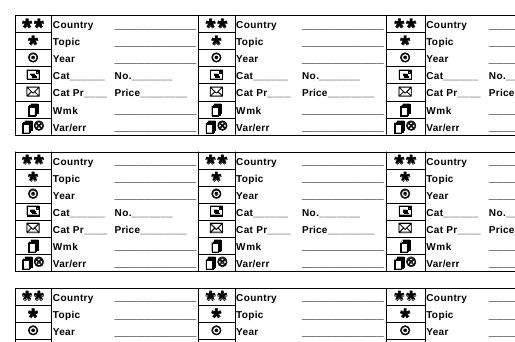 there are 28 tags to an A4 page with a legend at the bottom if anyone is interested here is the link to a zip file with an excel sheet and a libreoffice sheet for the tags, as well as my original tag file. feel free to use and share them. https://drive.google.com/open?id=17...BjZLR-TEcHqT |
|
Send note to Staff
|
|
|
Pillar Of The Community
United States
4531 Posts |
|
|
I downloaded it. I noticed the tags do not include the symbols (stars, cover icon, etc). |
|
Send note to Staff
|
Al |
|
|
Valued Member
South Africa
229 Posts |
|
|
on the PDF it should I used wingdings and wingdings2 for the icons they normally come with windows, will see if I can imbed them into the files |
|
Send note to Staff
|
|
|
Valued Member
South Africa
229 Posts |
|
|
Did a bit of research, cant embed fonts in excel you have to embed the excel worksheet into a word document and embed them there. might be easier to edit on your machine, I haven't got office on my home PC only libreoffice I will update the ODS file in the zip shortly but will have to try the office docs on Monday at work. |
|
Send note to Staff
|
|
|
Replies: 101 / Views: 41,909 |
|




 Posted 08/16/2018 08:47 am


