| Author |
 Replies: 21 / Views: 3,892 Replies: 21 / Views: 3,892 |
|
New Member
United Kingdom
1 Posts |
|
|
I've been working on this since my dad left me a large collection. My problem number one was how to catalog? Tried lots of software. Tried various formats in spreadsheets. It's now been three years time to get some professional advice. Here's a screenshot of my UK collection.  I have listed over 630,000 stamps and related issues from around the world. 10,000 plus for the US. I have not added images for all of these as I only collect pre 2000 UK. I have a simple website *** Edited by Staff - Please Review the rules that you agreed to when you registered. *** if you would like to see better examples. You can comment there if you wish. Perhaps you might like to collaborate and improve the sheet for the country you iike. Look forward to your replies... |
|
Send note to Staff
|
|
|
|
|
New Member
4 Posts |
|
|
It looks like you have done an amazing job! I too have tried lots of software, but didn't like any of them. I use Numbers on my iMac & iPhone to keep track of what I have. I haven't bother with illustrations though. I just keep my listings simple. This is a snapshot of the layout I use for Luxembourg. For most of the worldly issues I have, it is quite basic. 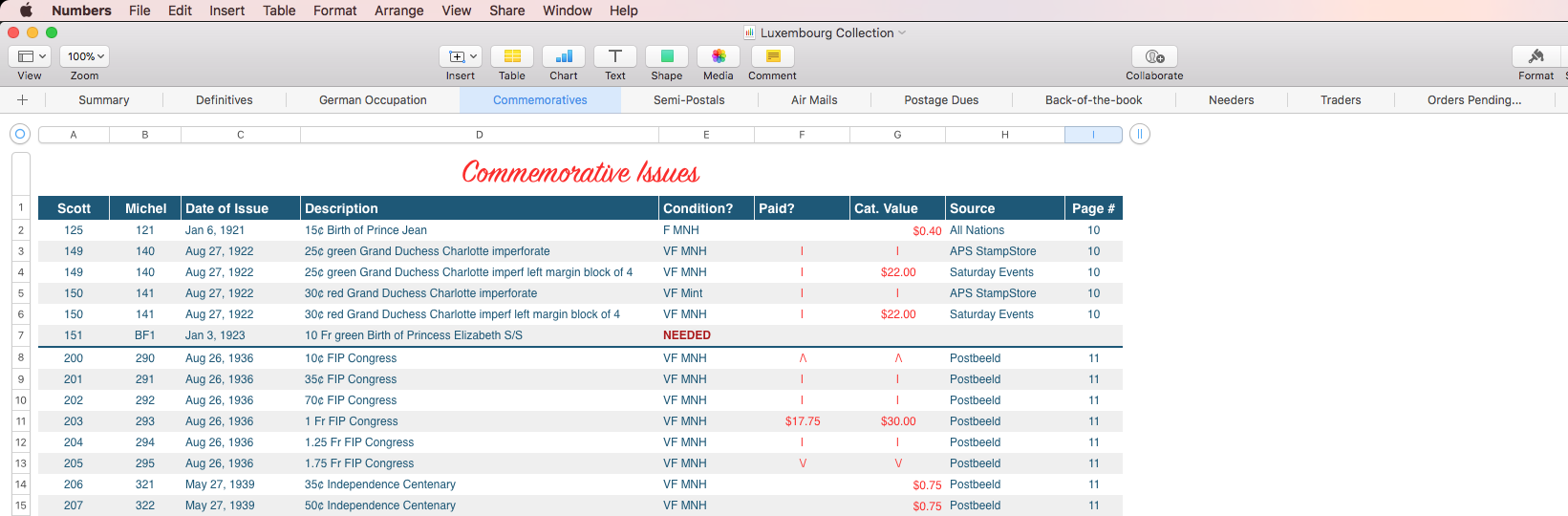 |
Send note to Staff 
|
|
|
New Member
United Kingdom
1 Posts |
|
|
I too prefer the Imac and Numbers. Much better for handling grapics. Adding graphics to my UK collection added around 70mb to the file. Please have a look at my site *** Edited by Staff - Please Review the rules that you agreed to when you registered. ***. Will send you a link to my North America sheet if it could help.
*** Edited by Staff - Please Review the rules that you agreed to when you registered. *** |
|
Send note to Staff
|
|
|
Moderator

United States
4788 Posts |
|
|
Welcome StampDex. We're glad you're here, but keep your links to yourself.
KirkS
SCF Moderator |
|
Send note to Staff
|
|
|
Pillar Of The Community
United States
7072 Posts |
|
|
That's an amazing amount of effort.
As you probably know, the catalogue producers claim copyright in their numbering systems, so unless you've received permission from them, it probably means you are limited to making personal use of them.
Once you go public with their numbers in a cross-reference, they seem to get jumpy. (Unless they've collectively changed their stance in the past year or two and I missed it.) |
|
Send note to Staff
|
|
|
New Member
United Kingdom
1 Posts |
|
|
Sorry to have breached the rules, I like many don't read all the small print. Regards the catalog numbers, again I didn't realise the numbers would be copyright. After all it would encourage people to use their catalogs I feel. Thank you for the comments  |
|
Send note to Staff
|
|
|
Pillar Of The Community

United States
4415 Posts |
|
|
Just creating a sharable file for country listings (even catalog numbers) is still something people can reuse. |
|
Send note to Staff
|
Al |
|
|
New Member
United Kingdom
1 Posts |
|
|
Thank you Angore.
That is my sole intention.
I havve thousands of stamps I am not interested in. Rather than donate them to a dealers poor fund, I would like to swap or trade for ones I do need. UK & Ireland (Republic). I have tried well known auction sites and find them a pain. (something for nothin!!!)
As for the sheets, you can try one for yourself. Only the UK has images. |
|
Send note to Staff
|
|
|
Pillar Of The Community
United States
4415 Posts |
|
|
I have created my own extensive US file but do not include images in excel. I try to keep my file mostly as a table would be in a database.
The best collaborative approach is a CMS wiki with data stored in a database. This gives everyone the most flexibility with data if you provide an API. |
|
Send note to Staff
|
Al |
|
|
New Member
United Kingdom
1 Posts |
|
|
Far to techie for me!!! I can cope with the limitations in Excel (graphics) Numbers and convert to PDF but thats it. I use a app called Send Anywhere if you would like me to use your email address? 10,139 items. 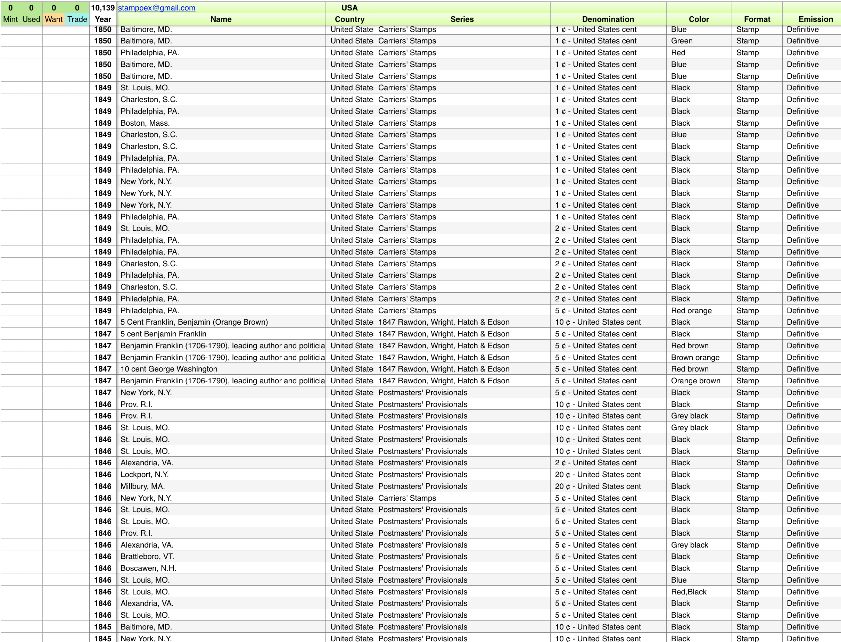 |
|
Send note to Staff
|
|
|
Valued Member
United States
233 Posts |
|
|
Hi Stampdex, that is a huge amount of work!!!! I hope you don't have a day job. I'm a bit loath to add all the additional information to my Excel collection listing except Cat. number and current CV price. This way my legacy will have printed out Excel sheets by country and Cat. and value. Makes it easy to reference the stamp as each stamp has a page number and album identification associated with it. If a new catalog is gotten, the new CV can be written in and re-tabulated in Excel. This to me is a great deal of work as it requires catalog number ID of each stamp and also the ID of empty spaces. I lightly pencil in the catalog number below each stamp or space. Cheers! Wolf-==- |
|
Send note to Staff
|
|
|
New Member
United Kingdom
1 Posts |
|
|
Hi Stampwolf. First point is CV is arguable. I've tried to sell lots on auction sites and don't get, or pay anywhere near Cat Value. Your legacy is only worth what the dealer is willing to pay your heirs, and they have no soul only profit. Second point is keep it simple. Adding images and non identifying data is bloat. I have added a screenshot that shows how my sheets are organised. Workbook = Continent Sheet tab = Country The sheet is sorted by Year Set Face Value  I added images to my Uk collection for ease of identification only. Queen Victoria has over 140 stamps in 60 years. It's hard to tell just by face value and color. |
|
Send note to Staff
|
|
|
Moderator
United States
12330 Posts |
|
|
Quote:
...Adding images and non identifying data is bloat... Done correctly, adding images does not add bloat to a spreadsheet. Instead of embedding an image and making your spreadsheet extreme large and painfully slow to open, instead simply add a link to an image in the same directory. By linking one external image file to each row in a spreadsheet, you then can simply click on the link and the image will open. You can also link to file in other directories but I recommend against this. This is because it is inevitable that the path will change over time (i.e. new computer, changes to where you keep your files, user names, etc.). **************************************** Spreadsheets are ok for personal use but trying to 'share' them is a nightmare; sprinkling many separate spreadsheets around is hardly efficient or effective. Say 15 people get you to send them your current spreadsheet but by this time next year you have improved your version with new countries or other updates. But wait, so have the 15 other people; there are now 16 different versions floating around. How do you merge these together? Yuck. If anyone is going to invest a large amount of time into this kind of project it would be best to use a SQL database. This preserves your work for decades to come, allows you to maintain one version which can be shared with everyone, and removes the nasty dependency upon specific applications and operating systems. SQL databases are freely available (open source) to anyone and any existing spreadsheet can easily be imported into a database (so you do not lose any existing work you have done). Don |
|
Send note to Staff
|
|
|
New Member
United Kingdom
1 Posts |
|
|
Thanks for all the advice Don.
I do understand your comments and I agree with your analysis.
The sheets I've done are for my own use, I don't want to collaborate like a office team or salesforce. I could pay for a online CRM to share my work but how do I justify the cost!
If anyone thinks they can use these sheets for their own use as a template then I'm happy to provide a copy data included. If someone wants modify or update the US sheet for example and let's see what they have done and I like it I will bin mine.
I have the latest Imac 27" with the full memory upgrade so I can easily scroll down the page looking at images to compare with the stamp in front of me.
For example I have 40 Queen Victoria Penny Reds 1854-1864, the color varies from brown, red, deep red, pale red, pale pink (not really pink). Over the 160 years some are faded or stained or heavily cancelled it's a minefield. Value ranges from $0.10 to $100+ depending on condition, color, plate number and what someone will pay.
This why I want to keep it simple.
|
|
Send note to Staff
|
|
|
Moderator
United States
12330 Posts |
|
|
As an example of a SQL country stamp database that is shared publicly, here is one I have under development for Stamps of France http://www.stampsmarter.com/feature...nceHome.htmlThese are the 'public' pages. I also have a secure Add/Edit page which populates the SQL database so spreadsheet application is not needed to make changes, you can use any browser. I also have these for US, Canada, and Australia. The US databases also include a related table which holds over 58,000 plate numbers. This is another powerful aspect of a SQL database, you can form relationships between tables. This allows you to 'connect' different tables to each other and present brand new views of the combined data. So if I have a US stamp table and another tbales which holds plate numbers, I can combine them into a single view. Don |
|
Send note to Staff
|
|
|
|
Valued Member
United States
233 Posts |
|
|
I guess each of us has their own way to do this (or not do this). Adding images of my stamps regardless of how they are linked, or not linked, is way to time consuming. Stampdex is correct in that CV does change over time but the catalog numbers do not change that much. Nor does the location where a stamp is mounted in my albums. So by me just having the minimal information listed, that being catalog number, location and page number gives my "legacy" a simple way to identify and locate each stamp. I leave it up to them to figure out it's value. I'm also hoping Excel will be around for a while. Even if it has evolved into generation X, you should be able to transfer the data over. The only reason I put the current CV in you sheets is because I want to know the total for my collection with absolutely no concern of it's retail value. Cheers! Wolf-==- |
|
Send note to Staff
|
|
|
Replies: 21 / Views: 3,892 |
|




 Posted 02/19/2018 10:41 am


