| Author |
 Replies: 27 / Views: 3,469 Replies: 27 / Views: 3,469 |
|
Valued Member
Canada
440 Posts |
|
|
AlbumEasy V3.8 - The free stamp album page generator One of the highlights of this release is the ability to add decorative borders to the album page. Decorative page borders can be defined by the user, however I have also included seven sample borders. These samples may be viewed by loading the DecorativeBorders.txt example album file. Regrettably my limited artistic ability means that the seven samples are likely more useful as templates for the user to define their own rather than page ready final artwork. 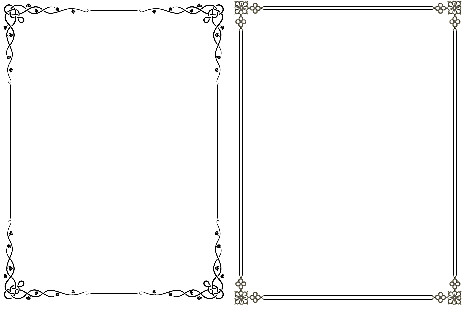 New Commands: New Commands:- ALBUM_PAGES_DECORATIVE_BORDER command for adding predefined or custom decorative borders around the page.
- TEXT_CHAR_SPACING command to adjust the inter-character spacing of text - useful for example to match the spaced text used in the Steiner albums.
- STAMP_BORDER_STYLE command to set dotted or dashed borders for stamp boxes.
Enhancements:- The STAMP_ADD command syntax has been simplified and now supports multiple lines of text below as well as inside the stamp box. As a result the STAMP_ADDX and STAMP_ADDX_IMG commands are no longer required. These commands however, as well as the old STAMP_ADD syntax have been retained for backwards compatibility. It is recommended that for new albums the new STAMP_ADD syntax is used instead.
For an example of how to use the new features please refer to the NewExamples.txt and DecorativeBorders.txt albums which can be found in the examples directory . Please don't hesitate to contact me if you have any questions or come across any bugs. As always AlbumEasy is completely free. I provide versions for Windows and Linux as well as the source code. Clive
|
|
Send note to Staff
|
AlbumEasy - Free software for creating custom stamp album pages ChromaMate - Compare, match, analyse, free colour matching software ImageSleuth - Images, hidden inside images, revealed. A retroReveal alternative PSGSA - The Philatelic Society for Greater Southern Africa |
|
|
|
|
Pillar Of The Community
United States
746 Posts |
|
|
Thanks, Clive. AE is really a great do-it-yourself-your own way piece of software. Besides, FREE is always a good price. |
Send note to Staff 
|
|
|
Valued Member
United States
136 Posts |
|
|
Okay, since I asked this in the other thread, and not to derail it, I ask it here. I want to have a page where on the left side is a vertical strip (say of 4 stamps). On the right side I want the 4 individual stamps stacked vertically. I'm at a loss as to how to do this, or if its even possible.
Second question: I've made a page that effectively has 4 rows of stamps. The spacing between each row seems to be even; though that might be by luck, and it might be part of my problem. I wanted to clone that page but remove the last row. I did this but I got exactly what I said; the fourth row missing, when I wanted the remaining three rows to automatically space themselves so that the page looks evenly spread out.
Is there a way to automatically do this, or do I have specify row separations every time?
Thanks. |
|
Send note to Staff
|
|
|
Valued Member
South Africa
229 Posts |
|
|
Hi clive, just downloaded it, will give it a try this evening, made a start on my reference today
mighr take me a couple of days to sort it out. Its looking great what I have read.
Ray |
|
Send note to Staff
|
|
|
Valued Member
South Africa
229 Posts |
|
|
Got the first draft of a AlbumEasy 3.8 Reference done will tidy it up tomorrow, if anyone has any tips and tricks on using AlbumEasy please send them to me so I can add them to my reference PDF and then will post the link to the PDF file here.
Ill start to update my latest album files with the new features soon, Thanks Clive
Ray
|
|
Send note to Staff
|
|
|
Valued Member
Canada
440 Posts |
|
|
Quote:
Okay, since I asked this in the other thread, and not to derail it, I ask it here. I want to have a page where on the left side is a vertical strip (say of 4 stamps). On the right side I want the 4 individual stamps stacked vertically. I'm at a loss as to how to do this, or if its even possible. Hi BwanaBob, This is not really supported by the current version of AlbumEasy, it is however something I had considered but hadn't come up with a simple solution. After reading your post this morning I was thinking about it on my commute to work when I realised that it wouldn't be too difficult to implement so definitely something I will add to the next version of AlbumEasy. That is of course of no help to you now. There is however a workaround although it is not particularly elegant and a bit tricky to get the exact spacing correct. It relies on the PAGE_TEXT_VSPACE command which allows one to set the space after a line of text, even a blank line of text. PAGE_TEXT_VSPACE (HN 1 "" 10.0) will insert a vertical gap of 1 0mm. It can also take a negative value in which case the next item will be printed before the line of text PAGE_TEXT_VSPACE (HN 1 "" -198) will output the next item 198 mm before the line of text. To produce this page: 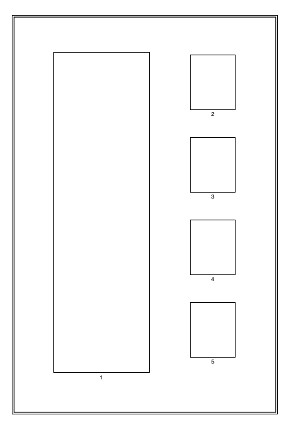 Cut and paste the following into a new album text file: ALBUM_PAGES_SIZE (215.9 279.4)
ALBUM_PAGES_MARGINS (25.0 25.0 15.0 15.0)
ALBUM_PAGES_BORDER3 (0.1 0.5 0.0 0.8)
ALBUM_PAGES_SPACING (1.0 3.0)
PAGE_START
PAGE_TEXT_VSPACE (HN 10 "" 20.0)
ROW_ALIGN_MIDDLE
# Right column top stamp
ROW_START_ES (HN 10 0.1)
STAMP_ADD_BLANK (60 34)
STAMP_ADD (28 34 "" "" "" "" "2" "")
PAGE_TEXT_VSPACE (HN 1 "" 10.0)
# Right column second stamp
ROW_START_ES (HN 10 0.1)
STAMP_ADD_BLANK (60 34)
STAMP_ADD (28 34 "" "" "" "" "3" "")
PAGE_TEXT_VSPACE (HN 1 "" 10.0)
# Right column third stamp
ROW_START_ES (HN 10 0.1)
STAMP_ADD_BLANK (60 34)
STAMP_ADD (28 34 "" "" "" "" "4" "")
PAGE_TEXT_VSPACE (HN 1 "" 10.0)
# Right column fourth stamp
ROW_START_ES (HN 10 0.1)
STAMP_ADD_BLANK (60 34)
STAMP_ADD (28 34 "" "" "" "" "5" "")
# Move next item up 198
PAGE_TEXT_VSPACE (HN 1 "" -198)
# Left column stamp
ROW_START_ES (HN 10 0.1)
STAMP_ADD (60 200 " " " " "1" " ")
STAMP_ADD_BLANK (30 200)
How it works is that the stamps in the right column are placed first. Each in it's own row padded to the right with a blank stamp using STAMP_ADD_BLANK (60 34). The rows of stamps are padded vertically with: PAGE_TEXT_VSPACE (HN 1 "" 10.0) The four stamps in the right hand column are followed by a PAGE_TEXT_VSPACE (HN 1 "" -198) which positions 198 mm up for the tall vertical strip. Hopefully that helps, if it is not clear let me know and I will try and explain again. Clive |
|
Send note to Staff
|
AlbumEasy - Free software for creating custom stamp album pages ChromaMate - Compare, match, analyse, free colour matching software ImageSleuth - Images, hidden inside images, revealed. A retroReveal alternative PSGSA - The Philatelic Society for Greater Southern Africa |
|
|
Valued Member
South Africa
229 Posts |
|
|
I have uploaded my AlbumEasy 3.8 Reference PDF ebook and can be downloaded from this link https://drive.google.com/open?id=1y...1F6WVb9C-NSrPlease any errors let me know and any suggestions and additions would be most welcome. hope it can be of use to someone. As I am learning it help me a lot, I'm a bit old school rather read off paper than the screen. Ray |
|
Send note to Staff
|
|
|
Valued Member
United States
136 Posts |
|
|
Pillar Of The Community
United States
1121 Posts |
|
|
I've created similar pages, using AE, but with a different workaround. I created one page for the left hand column, or strip, and another page for the right hand column of individual stamps. Then I just ran the same piece of paper through the printer twice, once for each created page. Just make sure when you create the 2nd page to leave off the border and header text so it doesn't print over itself. It wirks, but us kind if a pain trying take sure both sides will line up correctly, in relation to each other. |
|
Send note to Staff
|
|
|
Valued Member
Canada
440 Posts |
|
|
Quote:
I have uploaded my AlbumEasy 3.8 Reference PDF ebook and can be downloaded from this link Thanks Ray, that looks excellent and I am sure it will prove to be very useful Quote:
Fantastic, Clive. Many thanks. It is a pleasure BwanaBob Quote:
I've created similar pages, using AE, but with a different workaround... Thanks for the suggesion spain_1850, the more alternatives the better. Clive |
|
Send note to Staff
|
AlbumEasy - Free software for creating custom stamp album pages ChromaMate - Compare, match, analyse, free colour matching software ImageSleuth - Images, hidden inside images, revealed. A retroReveal alternative PSGSA - The Philatelic Society for Greater Southern Africa |
|
|
Valued Member
South Africa
229 Posts |
|
|
Valued Member
United States
136 Posts |
|
|
Clive,
Sorry to bother again but I my previous question was two parts. In my example I had a page of 4 rows that appeared evenly spaced (possibly by accident), and when I removed the last row, it literally removed the 4th row leaving empty space there, rather than expanding the spaces between the remaining 3 rows so that the page looked "balanced".
Is there a command to auto space between the rows of a page, so that they are evenly distributed vertically, or does one need to do the calculations? |
|
Send note to Staff
|
|
|
Valued Member
Canada
440 Posts |
|
|
Hi Bob,
Sorry somehow I missed the second part of your question.
The ALBUM_PAGES_SPACING command controls the spacing of items on a page for the whole album (although it can be over-ridden on an individual page basis), it takes both a horizontal and a vertical parameter.
So for example if the vertical parameter is set to 3mm. Then each row of stamps will be placed 3mm below the preceding row.
To space the rows of stamps further apart, one can use the PAGE_TEXT_VSPACE with empty text between the rows.
e.g PAGE_TEXT_VSPACE (HN 1 "" 10.0) will add 10mm
This command can also take a negative value so for example
PAGE_TEXT_VSPACE (HN 1 "" -5.0) will move the next row of stamps 5mm closer to the row above.
One can calculate the spacing, but I find it is often easier to do so via trial and error.
I hope that this is helpful,
Regards,
Clive
|
|
Send note to Staff
|
AlbumEasy - Free software for creating custom stamp album pages ChromaMate - Compare, match, analyse, free colour matching software ImageSleuth - Images, hidden inside images, revealed. A retroReveal alternative PSGSA - The Philatelic Society for Greater Southern Africa |
|
|
Valued Member
United States
136 Posts |
|
|
Okay, so auto spacing does not exist as I used the word; that is to say there is no command that would evenly separate rows on a page, regardless of the number of rows defined.
Thanks again, Clive. |
|
Send note to Staff
|
|
|
Valued Member
Canada
440 Posts |
|
|
Hi Bob,
Unfortunately auto spacing between rows of stamps is not supported in the current version. One of the reasons being that text and horizontal rules can be placed before, between and after rows of stamps on the page making it a little difficult to do.
It is however something I may try to implement in a future version if I can come up with a reasonable solution.
Regards,
Clive
|
|
Send note to Staff
|
AlbumEasy - Free software for creating custom stamp album pages ChromaMate - Compare, match, analyse, free colour matching software ImageSleuth - Images, hidden inside images, revealed. A retroReveal alternative PSGSA - The Philatelic Society for Greater Southern Africa |
| Edited by clivel - 09/27/2018 11:07 pm |
|
|
Valued Member
South Africa
229 Posts |
|
|
After looking at my reference book after my initial 3.7 try, not being a writer or book designer
im an electrician so it might not be up there with the "professionals", and looking at it with the 3,8 release of AE again, I have decided to re-vamp it a bit to make a bit more sense (well to me anyway) so in the next week or two ill be tidying it up and adding some ideas I had to make it more accessible and move the chapters around. If anyone has any ideas please let me know no matter how minor or trivial. (I need all the help I can get)constructive criticism is welcome.
Clive just wait a while with posting it on your site ill send you it once I've finished tinkering with it.
Ray |
|
Send note to Staff
|
|
|
Replies: 27 / Views: 3,469 |
|




 Posted 09/24/2018 6:42 pm


