Stamp Community Family of Web Sites
Thousands of stamps, consistently graded, competitively priced and hundreds of in-depth blog posts to read


Stamp Community Forum
 
Username:
Password:
Save Password
Forgot your Password?

This page may contain links that result in small commissions to keep this free site up and running.

Welcome Guest! Registering and/or logging in will remove the anchor (bottom) ads. It's Free!

An Easy Way To Change W10 Notebook Save Location?

 
To participate in the forum you must log in or register.
Author Previous TopicReplies: 12 / Views: 743Next Topic  
Bedrock Of The Community
Australia
38679 Posts
Posted 03/08/2022   03:41 am  Show Profile Bookmark this topic Add rod222 to your friends list Get a Link to this Message
All methods on Google required scripts.
I am not comfortable with those.

Send note to Staff

Pillar Of The Community
United States
978 Posts
Posted 03/08/2022   10:38 am  Show Profile Bookmark this reply Add jbcev80 to your friends list  Get a Link to this Reply
Hi Rodney

It took me awhile to figure out "W10 Notebook". What do you mean by Save Location? Save what? What Windows are you on?

Please e-mail me as to what you are trying to do.

Jerry B
Send note to Staff  Go to Top of Page
Bedrock Of The Community
Australia
38679 Posts
Posted 03/08/2022   1:55 pm  Show Profile Bookmark this reply Add rod222 to your friends list  Get a Link to this Reply
Hi Jerry,
Trust you are well,
enjoyed your posts on China.

Win10 automatically saves to owner / Documents

I have everything else saving to my Rod222 folder.
I wish to have a notebook file auto save to that.

Sounds easy but Win10 is a crock, after win7
It cannot even tell me it is OK to "remove my thumbdrive"
I have to guess

UPDATE
Cancel all, I seem to have fixed it, not sure how.
I'll wait till tomorrow's log on to see if it remains at the new destination.
Last evening I had no success.

Send note to Staff  Go to Top of Page
Edited by rod222 - 03/08/2022 2:01 pm
Moderator
Learn More...
United States
12330 Posts
Posted 03/08/2022   2:06 pm  Show Profile Bookmark this reply Add 51studebaker to your friends list  Get a Link to this Reply

1. Right click the Windows Button, select Settings
2. Click on System and then on "Storage" from the side-bar on the left.
3. Scroll down to the bottom of the page, where it says "More Storage Settings".
4. Click on the text that reads "Change where new content is saved".

Don
Send note to Staff  Go to Top of Page
Pillar Of The Community
Learn More...
United States
936 Posts
Posted 03/08/2022   2:11 pm  Show Profile Bookmark this reply Add mml1942 to your friends list  Get a Link to this Reply
Rod,

I am not sure I totally understand your question, but let me offer the following suggestion.

I believe you are trying to download files from the web and want them to go to a location which is not the Windows 10 default folder location. This is a function that can be controlled by your browser.

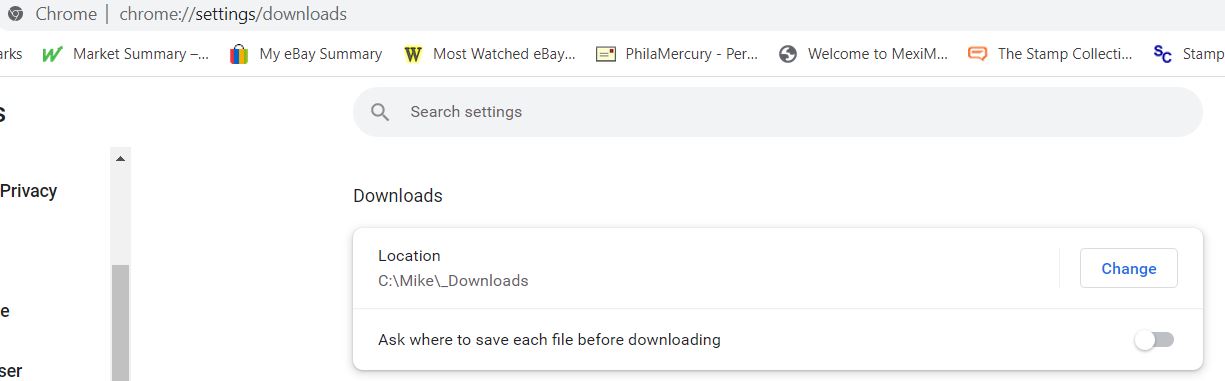
Take a look in your browser settings options, and then look for the area that controls downloads. In both Chrome and Firefox, there is a place that allows you to set a default location for the downloads, or in Chrome at least, a place where you can require the browser to to prompt you EVERYTIME where you want the file to be located on your computer.

This is a screenshot from my Chrome Browser. Rather than download to the default C:\\Users\Mike\downloads folder, I have a personal download folder that is outside the Microsoft User structure [I dislike Microsoft telling me how to organize my data.


I have a similar option for the Firefox browser, and have done the same thing with other browsers in the past.

If I am not understanding what you wish to accomplish, please take some time and provide a more detailed explanation as to what you want to do.

Mike
Send note to Staff  Go to Top of Page
Bedrock Of The Community
Australia
38679 Posts
Posted 03/08/2022   2:34 pm  Show Profile Bookmark this reply Add rod222 to your friends list  Get a Link to this Reply


Quote:
I dislike Microsoft telling me how to organize my data.


Mike

Me too!
I use Chrome browser, and often, I go to a link, say to download a *.pdf and find I am changed over to Microsoft "bring" or Bling" or something. That really irritates me.

Right.
I thought my explanation was clear,
but obviously it is one of those times, when communication has failed.
Sorry about that.

SCF "Postmaster GS" turned me on to using Windows "Notepad"
after initial scepticism, I am now a HUGE fan, I used to rely on
MSWorks for note taking.

Notepad can do the same thing with one click, and I can take notes
whilst researching stamps.

The other day, I lost a file, and realised it had automatically saved to Microsoft users / documents.
I like all my work, going to one folder.

I searched and tried DON's suggestion last evening that did not work,
it was not offering a new destination option.
Hence my query

I have Notepad in my quick launch bar

If you open Win10 notepad
and see "save as" it now gives an option as to where to save
I just do not know if that remains as an automatic destination
or resets to documents
We shall see

Hope that explains.


Send note to Staff  Go to Top of Page
Bedrock Of The Community
Australia
38679 Posts
Posted 03/08/2022   2:42 pm  Show Profile Bookmark this reply Add rod222 to your friends list  Get a Link to this Reply
With Don's solution
all I get is a drive option, nothing else
No option to select a drive and folder.
Send note to Staff  Go to Top of Page
Moderator
Learn More...
United States
12330 Posts
Posted 03/08/2022   2:45 pm  Show Profile Bookmark this reply Add 51studebaker to your friends list  Get a Link to this Reply
The solution I posted does not work in notepad because Notepad is coded for 'Save As' to be persistent to whatever folder the last 'Save As' was used. This is probably why 'it suddenly starting working'.

Every application can be written with specific 'Save As' behaviors, so setting the default in the operating system will not work across the board.
Don

Edit: Notepad is a decent application. For anyone who wants a more full featured text editor (as opposed to a word processor) might want to try NotePad++. This is an open source app much like Notepad but with a LOT more features (i.e. line numbers, ability to select columns and not just rows, etc.).
It is 'free' but if you find it great it is worth donating and throwing a few bucks into the hat.
https://notepad-plus-plus.org/
Send note to Staff  Go to Top of Page
Bedrock Of The Community
Australia
38679 Posts
Posted 03/08/2022   2:49 pm  Show Profile Bookmark this reply Add rod222 to your friends list  Get a Link to this Reply
Mike,
checked my browser, all as expected, downloads to my preference.

Notepad is not linked to the browser
so that it has no effect there
It is an internal windows thing
Send note to Staff  Go to Top of Page
Moderator
Learn More...
United States
12330 Posts
Posted 03/08/2022   2:49 pm  Show Profile Bookmark this reply Add 51studebaker to your friends list  Get a Link to this Reply
Rod, see my post above for explanation.
Don
Send note to Staff  Go to Top of Page
Bedrock Of The Community
Australia
38679 Posts
Posted 03/08/2022   2:50 pm  Show Profile Bookmark this reply Add rod222 to your friends list  Get a Link to this Reply
Thanks Don

Tried Notepad++
Could not get any font other than default. Not good.
Tried
Settings
Style configurator
changed font etc. Nothing happened

I like Arial Narrow Bold Italic (16) as my preference

Has other options that look promising to the newbie.
Send note to Staff  Go to Top of Page
Edited by rod222 - 03/08/2022 3:20 pm
Moderator
Learn More...
United States
12330 Posts
Posted 03/08/2022   3:39 pm  Show Profile Bookmark this reply Add 51studebaker to your friends list  Get a Link to this Reply
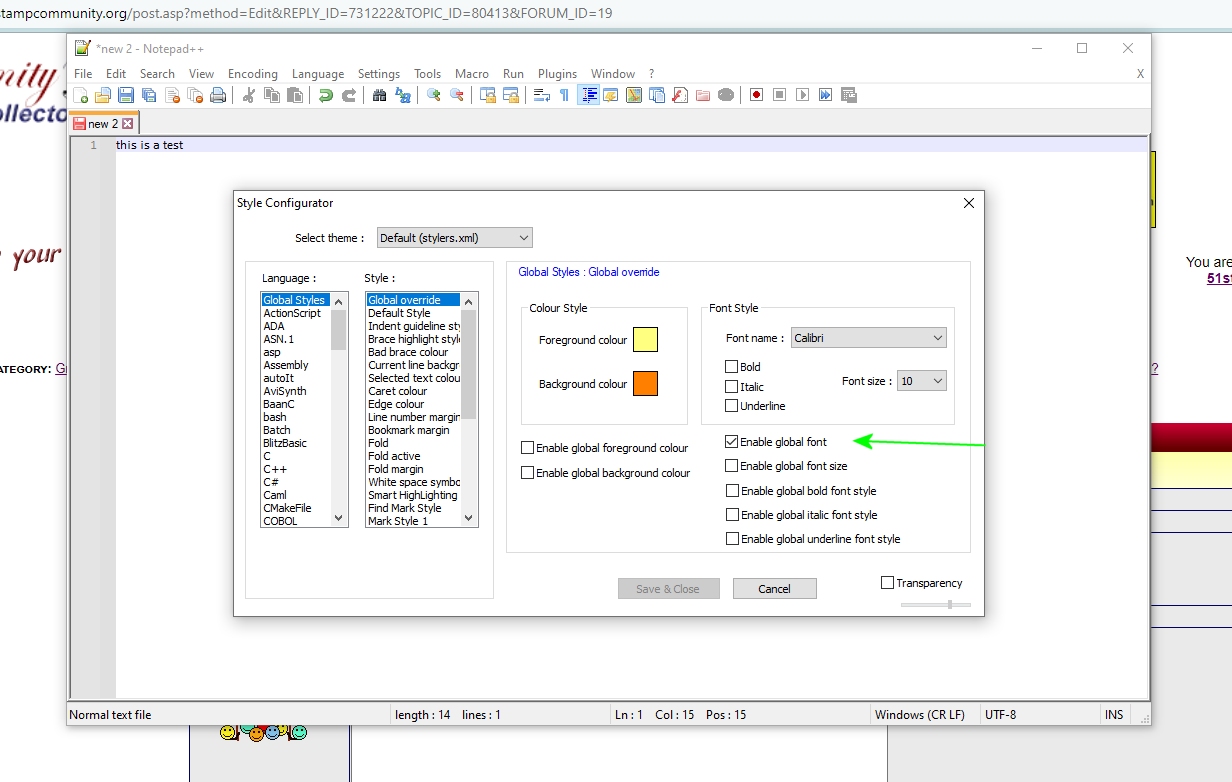
Settings then Style Configurator... fonts on right side
Don

Edit: Make sure you also check 'Enable Global Font' checkbox
Send note to Staff  Go to Top of Page
Valued Member
United States
43 Posts
Posted 03/10/2022   09:52 am  Show Profile Bookmark this reply Add timbre-poste to your friends list  Get a Link to this Reply
I'm also a huge fan of Notepad ++.

Been using it for a number of years. I keep as many as 20 tabs open at a time. I love that they are always there everytime I relaunch Notepad++.
Send note to Staff  Go to Top of Page
  Previous TopicReplies: 12 / Views: 743Next Topic  
 
To participate in the forum you must log in or register.

Go to Top of Page

Disclaimer: While a tremendous amount of effort goes into ensuring the accuracy of the information contained in this site, Stamp Community assumes no liability for errors. Copyright 2005 - 2026 Stamp Community Family - All rights reserved worldwide. Use of any images or content on this website without prior written permission of Stamp Community or the original lender is strictly prohibited.
Privacy Policy / Terms of Use    Advertise Here
Stamp Community Forum © 2007 - 2026 Stamp Community Forums
It took 0.19 seconds to lick this stamp. Powered By: Snitz Forums 2000 Version 3.4.05