Stamp Community Family of Web Sites
Thousands of stamps, consistently graded, competitively priced and hundreds of in-depth blog posts to read


Stamp Community Forum
 
Username:
Password:
Save Password
Forgot your Password?

This page may contain links that result in small commissions to keep this free site up and running.

Welcome Guest! Registering and/or logging in will remove the anchor (bottom) ads. It's Free!

Stupid Steiner Pages Printing Question

Next Page    
 
To participate in the forum you must log in or register.
Author Previous TopicReplies: 16 / Views: 2,283Next Topic
Page: of 2
Valued Member

8 Posts
Posted 05/11/2024   1:07 pm  Show Profile Bookmark this topic Add nexus8793 to your friends list Get a Link to this Message
I love the Steiner pages and historically I have printed them one-sided on thick cardstock. As my collection has grown exponentially, this has gotten way too expensive (and physically large).

I've started printing on thinner paper and I'd like to start printing double sided. However, I cannot figure out how to get the pages to print the way I want them to...so the larger margin matches and both sides are right side up. Can someone please walk me through this like I'm 8 years old?? TIA!
Send note to Staff

Pillar Of The Community
United States
1434 Posts
Posted 05/11/2024   1:51 pm  Show Profile Bookmark this reply Add classic_paper to your friends list  Get a Link to this Reply
How are you editing the pages? You'll have to make the left margins on the odd pages to be the right margin on the even pages, and vice versa.
Send note to Staff  Go to Top of Page
Edited by classic_paper - 05/11/2024 8:07 pm
Pillar Of The Community
United States
2941 Posts
Posted 05/11/2024   3:50 pm  Show Profile Bookmark this reply Add PostmasterGS to your friends list  Get a Link to this Reply
What program are you using to read/print the files? Depending on the program, I might be able to whip up a quick script to shift the margins on the even-numbered pages.
Send note to Staff  Go to Top of Page
Presenting the GermanStamps.net Collection - Germany, Colonies, & Occupied Territories, 1872-1945
Pillar Of The Community
United States
8399 Posts
Posted 05/11/2024   7:34 pm  Show Profile Bookmark this reply Add floortrader to your friends list  Get a Link to this Reply
My advice is do not do it that way . Print on only one side . What you save in the cost of paper is not that much .

For example the binders your using have metal rings that are not as thick as the holes you get punched from a hole puncher. [SEE WHAT USELESS INFORMATION I POST HERE } . This 1/8 0f a inch or maybe just 1/16 of a inch sliding around on each page will cause perforations to lock together .Your going to need glassine inter-leaves .


Your asking for problems .
Send note to Staff  Go to Top of Page
Pillar Of The Community
Learn More...
United States
4415 Posts
Posted 05/12/2024   06:51 am  Show Profile Bookmark this reply Add angore to your friends list  Get a Link to this Reply
While I would not print both sides because of the need for intersleeves, if you open the PDF in LibreOffice Draw you can select the page to be shifted, then select the entire page contents (drag a rectangle) and then using left arrow shift the page contents over to the new position.
Send note to Staff  Go to Top of Page
Al
Pillar Of The Community
United Kingdom
8578 Posts
Posted 05/12/2024   07:08 am  Show Profile Check GeoffHa's eBay Listings Bookmark this reply Add GeoffHa to your friends list  Get a Link to this Reply
As Floor said, maybe think again. With two-sided, you're stuck with thicker, more expensive paper and mounts or unsightly page protectors or glassines. Even if you work out how to load the paper!
Send note to Staff  Go to Top of Page
Pillar Of The Community
United States
8399 Posts
Posted 05/12/2024   07:14 am  Show Profile Bookmark this reply Add floortrader to your friends list  Get a Link to this Reply
Reasoning tells me the common and cheap 20lb paper can be used for stamps on a page . Now if you use stamp mounts and have large souvenir sheets plus a cover to mount then your stressing the holes punched into the page ,weight becomes a factor.Then you need heavy paper ,now you want to add the opposite side with stamps that just doubles your problem .

Send note to Staff  Go to Top of Page
Pillar Of The Community
United States
2830 Posts
Posted 05/12/2024   10:46 am  Show Profile Bookmark this reply Add shermae to your friends list  Get a Link to this Reply
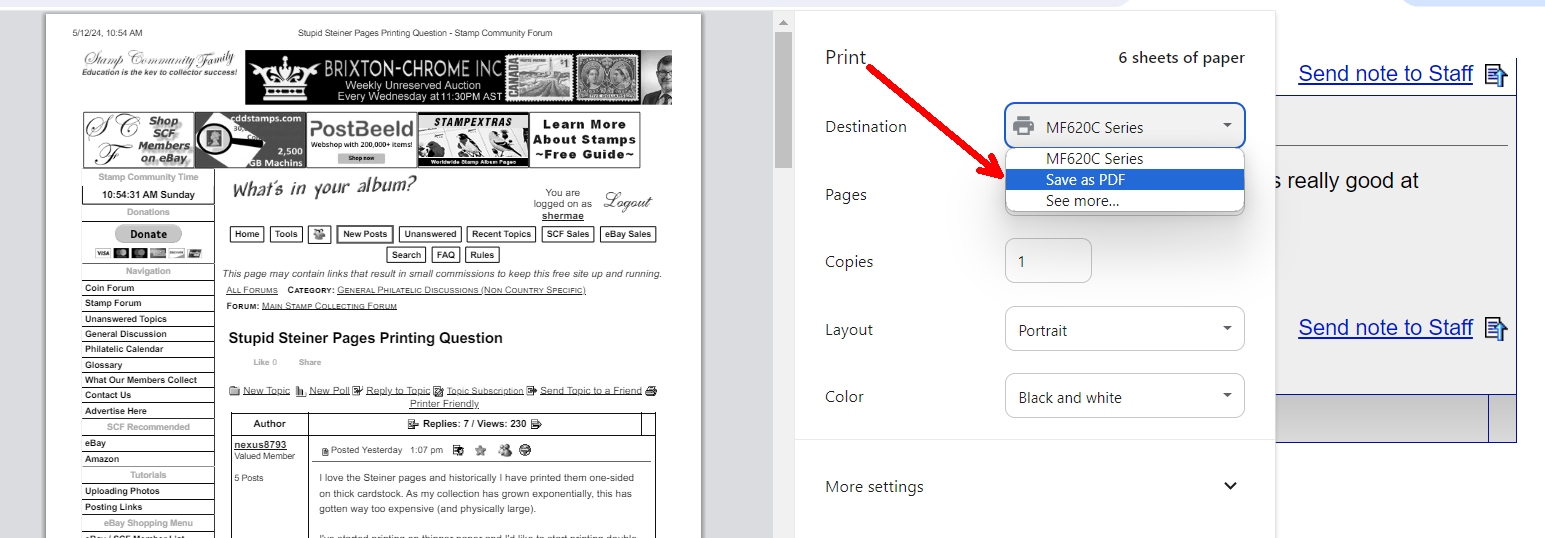
There is a free extension that allows you to print to pdf vs. directly to your printer. I use it all the time as Adobe is really good at handling page formatting when printing.

The file is saved to your drive and then you load it and print. Worth a try?


Send note to Staff  Go to Top of Page
Edited by shermae - 05/12/2024 10:59 am
Valued Member
United States
14 Posts
Posted 05/27/2024   7:28 pm  Show Profile Bookmark this reply Add lightly_unhinged to your friends list  Get a Link to this Reply
nexus8793, I went through that same thought process; how does one do it??
I did see that there are page editors that could effect odd/even sides but I didn't want to get involved in that much fiddly stuff.

I decided to just go with one-sided.

I have several big fat albums with printing on both sides and have bought and inserted thousands of glassine interleaves. It just gave me 'the creeps' thinking of all those stamps sliding past each other as the binders flex, even a little. So, I have a strict glassine policy. (Not required between the Steiner pages.)

Glassines are translucent but not transparent. They seem to always get in the way of pleasant viewing of my collection. Going one-sided was comparatively relaxing. No more turning my head from side to side like being in a theater sitting too close to the screen.

I'm in a years-long process of moving the first hundred years from commercial album pages to Steiner pages. I don't want to have to fiddle with re-editing every other page. I just look over the pre-1940 Steiner pages, decide to go with all those pages, hit Print and relax!
Send note to Staff  Go to Top of Page
Valued Member
8 Posts
Posted 06/16/2024   2:40 pm  Show Profile Bookmark this reply Add nexus8793 to your friends list  Get a Link to this Reply
Thanks to everyone for all the input...I ended up coming to the same conclusion as lightly_unhinged and others did and stuck with the one-sided printing.
Send note to Staff  Go to Top of Page
Valued Member
United States
54 Posts
Posted 06/20/2024   06:56 am  Show Profile Bookmark this reply Add Mastodon to your friends list  Get a Link to this Reply
Hey:

I also LOVE Mr. Steiner's album pages! I have lots of them printed out, and I'm adding more pages and albums regularly. I've noticed the offset as well when printing front-n-back as well, but I don't know how to fix it.

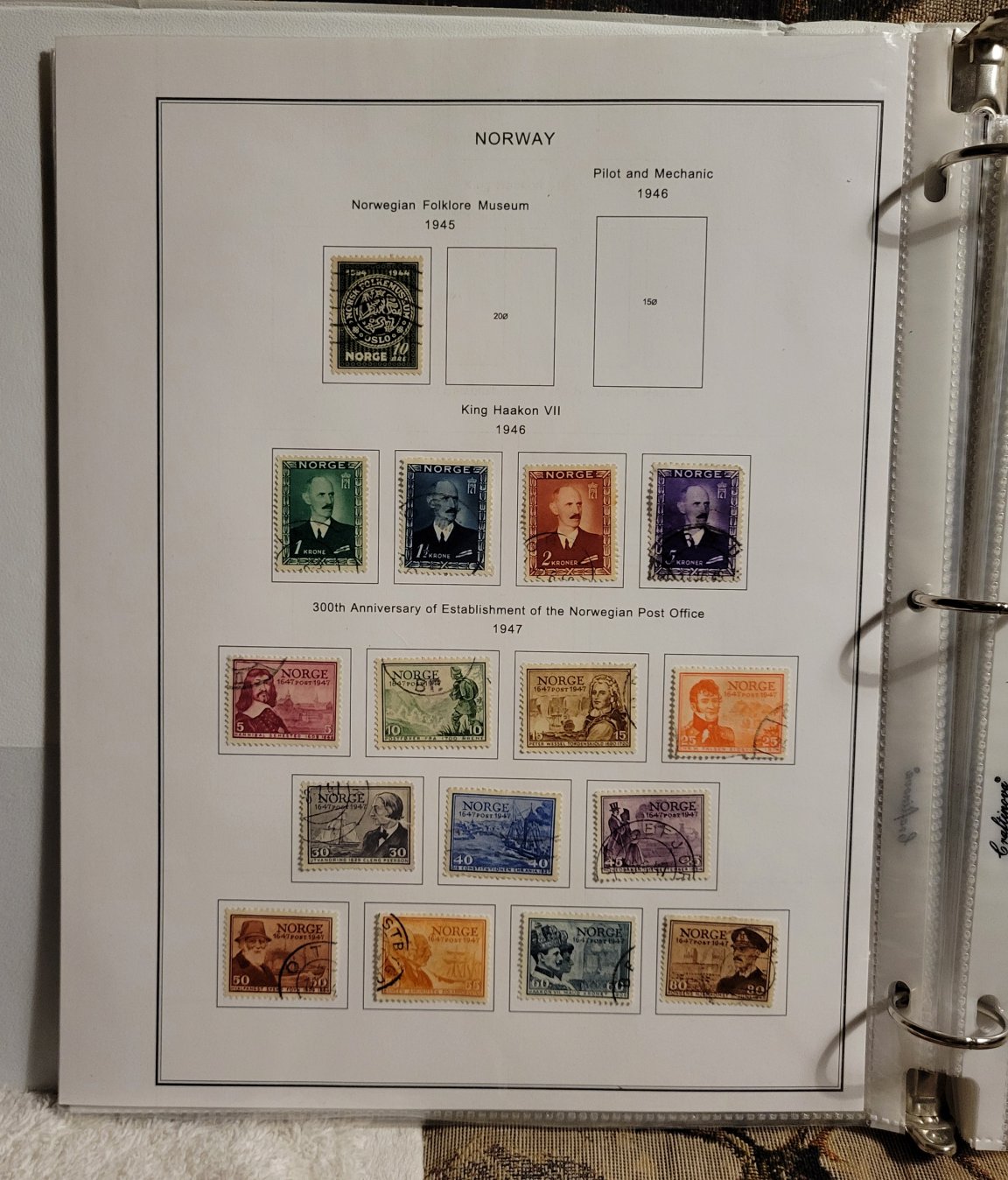
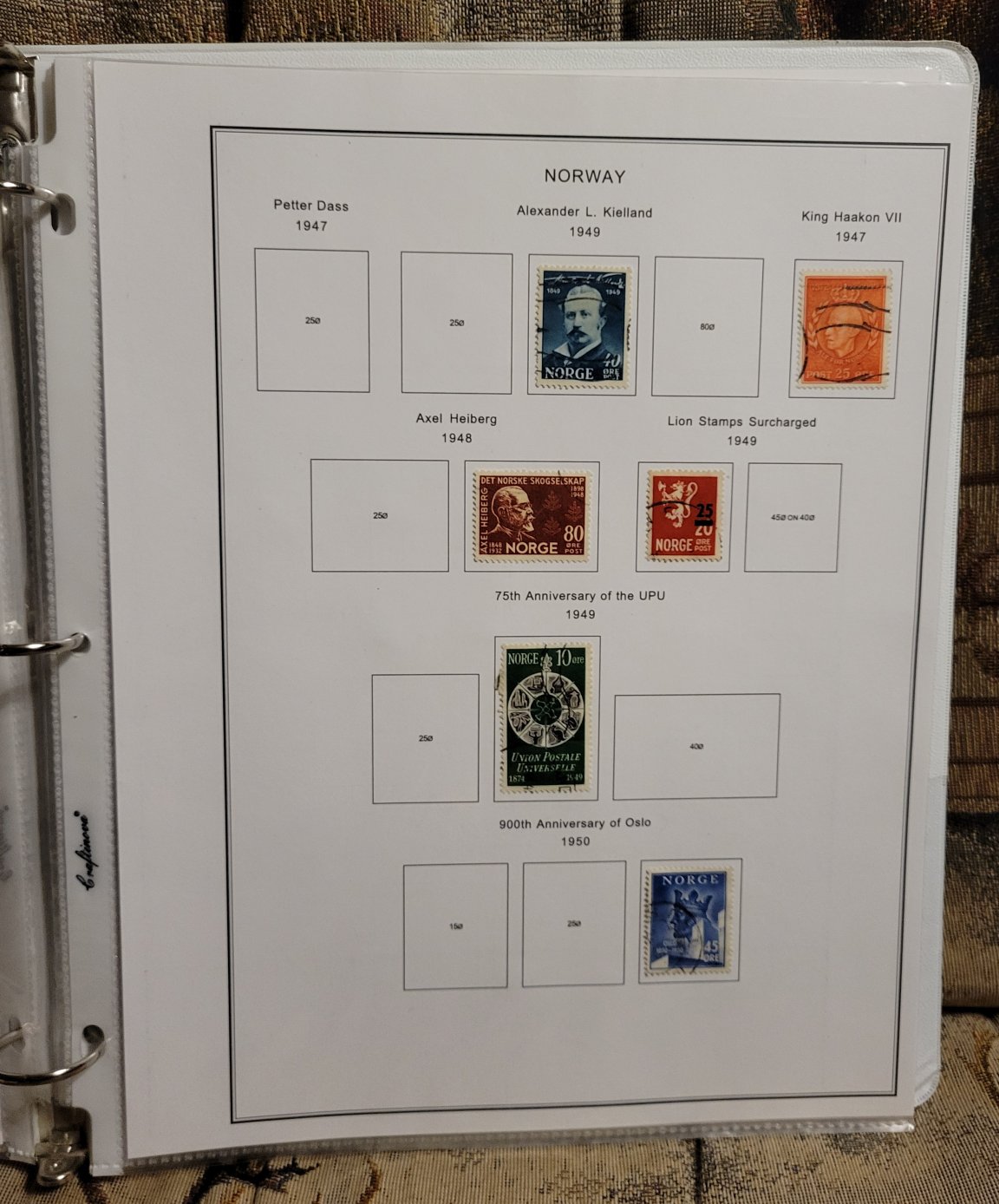
I print my pages front-n-back, but instead of stacking them "bare" in my binders, I slip each page into a plastic "page protector" sheet. This enables the stamps to stay put, stay safe, and if I allow "mixed company" (i.e., non-collectors) to view my albums, there's a prophylactic layer between the rando person and my stamps!

To reinsert sheets into the protectors, like when I add a new stamp, I use a "backing sheet" on the back side of the page to protect hinged stamps on that side so I can slip the page back in without the stamps snagging on the top of the protector opening.

I use really thin page protector sheets. They're like $25 on Amazon for 500 sheets, and I can fit about 75-90 leaves into a 1" binder (my preferred size; large albums span several 1" binder "volumes"). I use regular cardstock to print pages, so 250 sheets for about $12-15. I tend to get used but good condition binders at my job (I work at a high school, so there are always "free" binders floating around).

Printing front and back really helps with containing the physical space my albums occupy. Even with the page protectors, they're manageable. I like having several shelves (and counting!!) of albums, but I don't want them to push me out of my house, either!!

The end result by doing these things is a very attractive collection, and I don't have to feel so "protective" when a friend looks at an album. They can even "touch" the stamps--thru the plastic protector, of course--without messing things up. Greasy finger smears just wipe off :-}

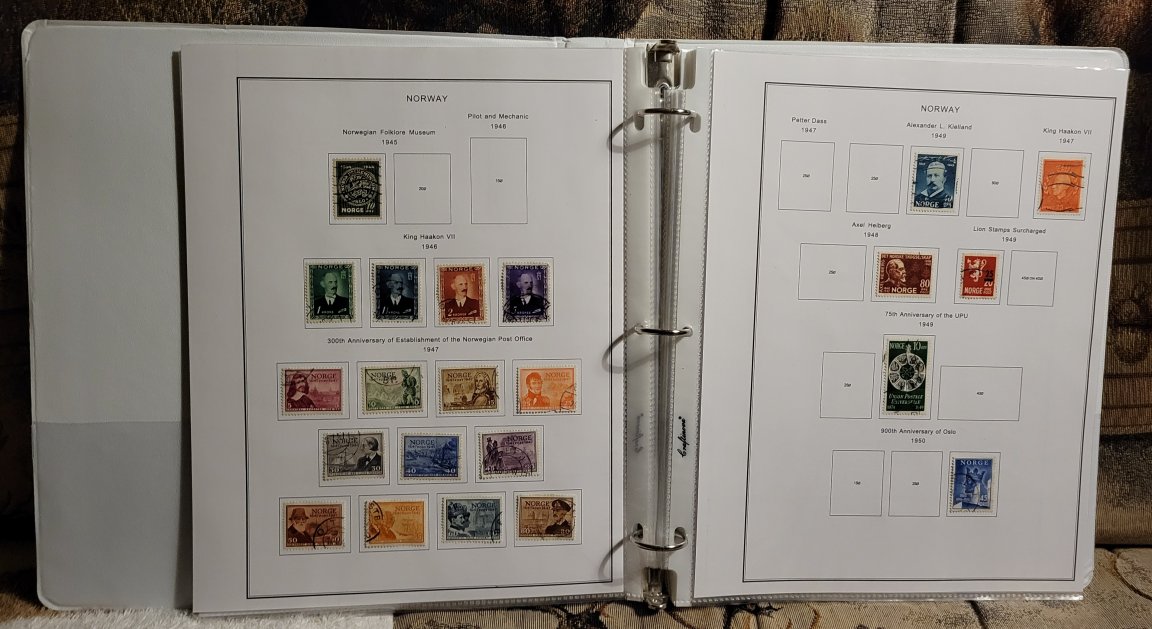
I still have the "wiggle-waggle" as I turn the pages because the back side is formatted as though it's a front-facing page.

A couple sample pages are attached.

Josh


Send note to Staff  Go to Top of Page
Pillar Of The Community
United States
8399 Posts
Posted 06/20/2024   07:08 am  Show Profile Bookmark this reply Add floortrader to your friends list  Get a Link to this Reply
Nice pages and neat way to keep your collection , welcome to the chatboard too.
Send note to Staff  Go to Top of Page
Pillar Of The Community
United States
1434 Posts
Posted 06/20/2024   09:31 am  Show Profile Bookmark this reply Add classic_paper to your friends list  Get a Link to this Reply

Quote:
I've noticed the offset as well when printing front-n-back as well, but I don't know how to fix it.

Good for you, to be able to ignore it. A misaligned offset like that would drive me crazy. The solution depends upon both the file's print defaults and your own print settings. I don't use Steiner pages, so I can't readily say whether Steiner pages are hard-coded to always be right-hand facing (defaulting to single-sided printing), or if it's dynamic and your settings are overriding that. Others here likely know the answer.
Send note to Staff  Go to Top of Page
Valued Member
256 Posts
Posted 06/20/2024   7:36 pm  Show Profile Bookmark this reply Add tsmatx to your friends list  Get a Link to this Reply
Mastodon - those are some great looking pages! Looks like you have a nice system figured out. It's impressive 100 pages fit into the 1" binders (even with the sleeves). And wonderful to have protection system so guests can flip through your collection.
Send note to Staff  Go to Top of Page
Valued Member
United States
54 Posts
Posted 06/20/2024   8:27 pm  Show Profile Bookmark this reply Add Mastodon to your friends list  Get a Link to this Reply
TSMATX: Thanks for your kind words about my albums!

Yeah, about 75 to 90 leaves fit in the thin sleeves. Looks like the binders, all 1" or so, hold more or less depending on--I guess the relative thickness of the binder?

With 75 leaves, it's 150 pages--front and back--for stamp album. Not too bad--but they do kinda stack up as they are printed and set up :-}

But--I like having them this way--very convenient, neat, and trouble-free showing off my collection to those who aren't collectors :-}

Josh
Send note to Staff  Go to Top of Page
Valued Member
36 Posts
Posted 07/17/2024   9:26 pm  Show Profile Bookmark this reply Add sotwuser to your friends list  Get a Link to this Reply

Quote:
I slip each page into a plastic "page protector" sheet.


Hope you are using an inkjet printer as laser toner and sheet protectors are NOT a good mix.
Send note to Staff  Go to Top of Page
Page: of 2 Previous TopicReplies: 16 / Views: 2,283Next Topic  
Next Page
 
To participate in the forum you must log in or register.

Go to Top of Page

Disclaimer: While a tremendous amount of effort goes into ensuring the accuracy of the information contained in this site, Stamp Community assumes no liability for errors. Copyright 2005 - 2026 Stamp Community Family - All rights reserved worldwide. Use of any images or content on this website without prior written permission of Stamp Community or the original lender is strictly prohibited.
Privacy Policy / Terms of Use    Advertise Here
Stamp Community Forum © 2007 - 2026 Stamp Community Forums
It took 0.23 seconds to lick this stamp. Powered By: Snitz Forums 2000 Version 3.4.05