| Author |
 Replies: 277 / Views: 69,557 Replies: 277 / Views: 69,557 |
|
|
|
Bedrock Of The Community
Australia
38679 Posts |
|
|
Pats on the back are not that easy to aquire  Accept it baby! Yes, I thought it was font (the fraction had me curious) So yes, well done BeeSee  |
Send note to Staff 
|
|
|
Rest in Peace
Canada
5701 Posts |
|
|
Rest in Peace
Canada
5701 Posts |
|
|
Valued Member
United States
116 Posts |
|
|
I am using AlbumEasy now. Once you have the various commands mastered it is pretty easy to make a page. Before I was using a grid excel file to make all my boxes. I am glad I did not get to far into that. |
|
Send note to Staff
|
|
|
Pillar Of The Community
United States
2480 Posts |
|
|
Eopie,
I'd appreciate it if you would post a sample of the AlbumEasy output.
Also, which version are you using and about how long did it take you to get comfortable with the commands?
Thanks,
Steve |
|
Send note to Staff
|
|
|
Rest in Peace
Canada
5701 Posts |
|
|
Valued Member
New Zealand
68 Posts |
|
|
Making your own album pages is the way to go! I love being able to include covers with my stamps and to scan receiving postmarks and re-entries magnify them and print the image with the page -see examples below. I use 300 gm card rather than 80 gm paper. 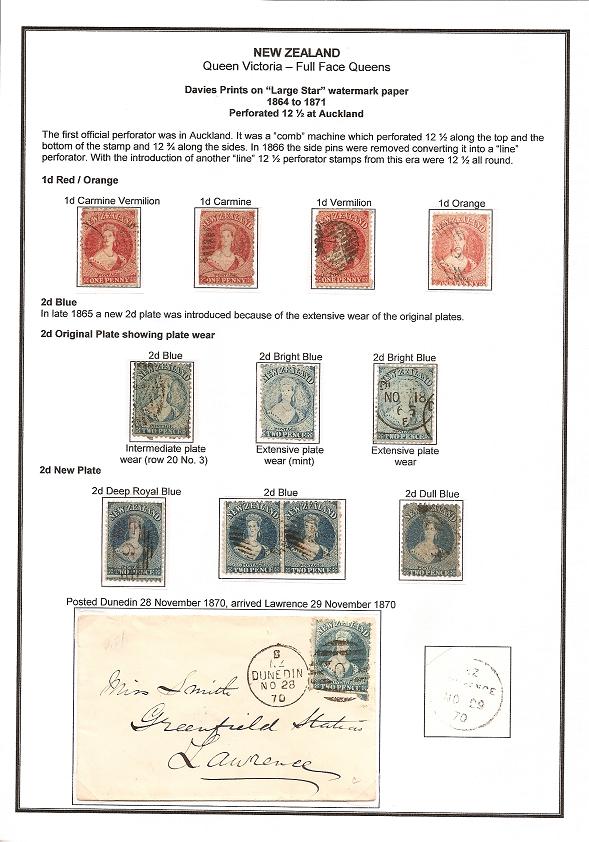 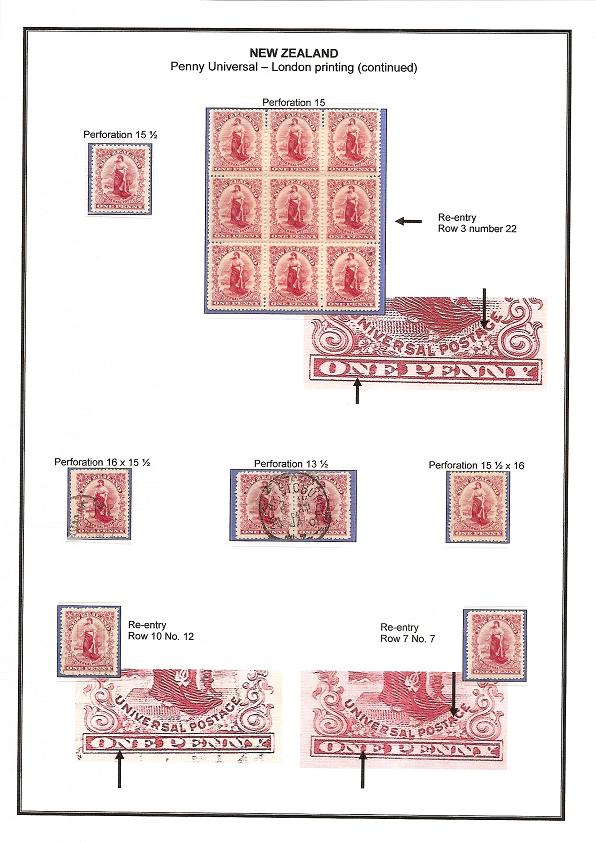 |
|
Send note to Staff
|
|
|
Valued Member
United States
116 Posts |
|
|
I hope this works. I had to keep scanning and changing resolution to keep it under the limit. This is a page that I made for my Wine Stamps. 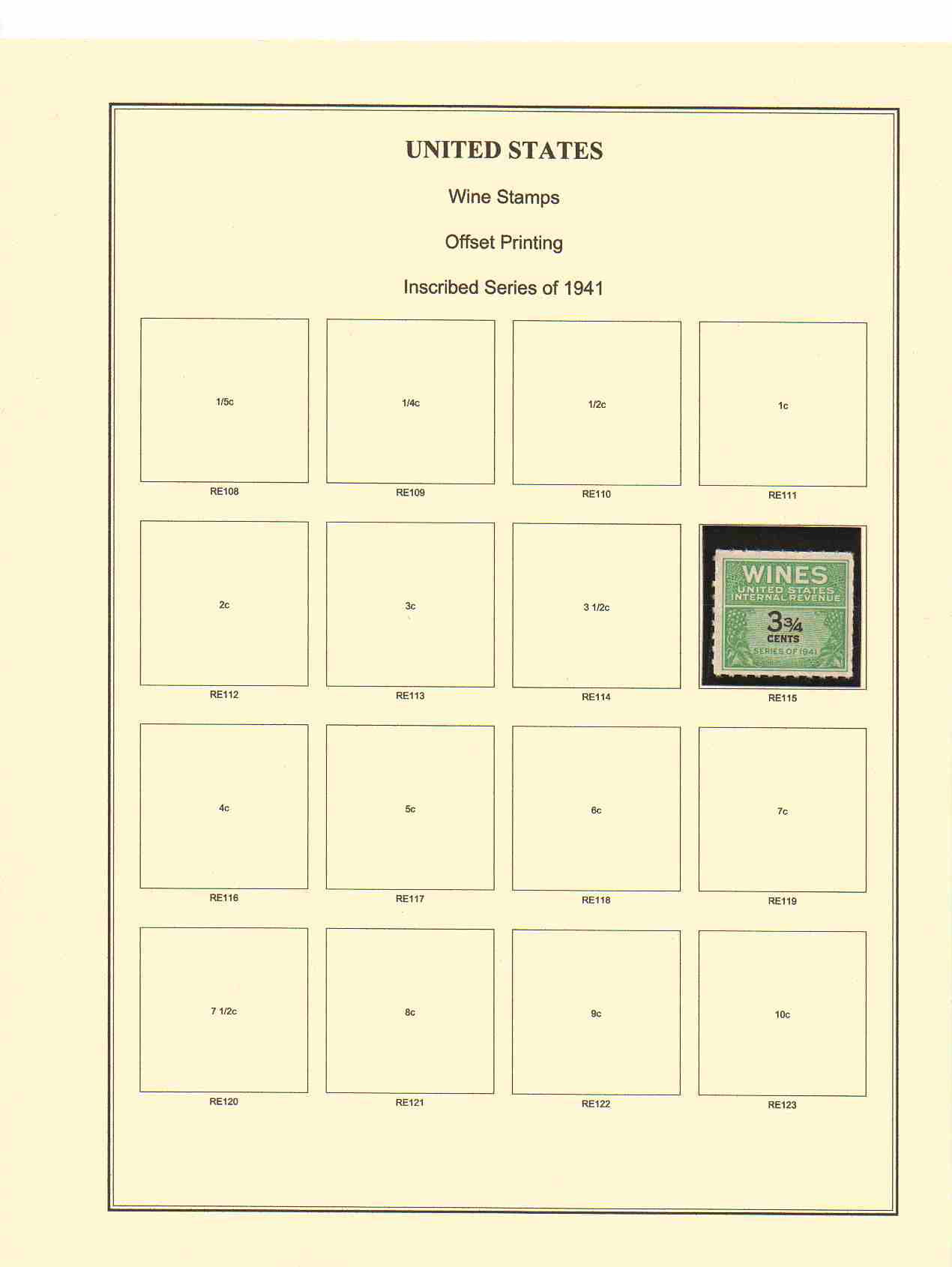 |
|
Send note to Staff
|
|
|
Valued Member
United States
116 Posts |
|
|
I am using the Windows GUI Version of the program. The program can do alot more then what I put on my pages. I am still a newbie at this so keep it pretty simple. It does what I need it to do. I played with the commands for a couple of hours to see what all it could do. This is the text I used to make my simple page.
ALBUM_PAGES_SIZE (215.9 279.4) #Set the page to US Letter (8.5 x 11)
#ALBUM_PAGES_SIZE (210.0 297.0) #Use this for A4
#left, right, top and bottom page margins
ALBUM_PAGES_MARGINS (25.0 12.0 15.0 15.0)
ALBUM_PAGES_BORDER (0.5 0.1 1.0)
ALBUM_PAGES_TITLE (TB 16 "UNITED STATES")
ALBUM_PAGES_SPACING (6.0 6.0)
# ------------------------------------------------------------------------------
# Define the first page of this album
# ------------------------------------------------------------------------------
PAGE_START
PAGE_TEXT_CENTRE (HN 12 "Wine Stamps")
PAGE_TEXT_CENTRE (HN 12 "Offset Printing")
PAGE_TEXT_CENTRE (HN 12 "Inscribed Series of 1941")
ROW_START_ES (HN 6 0.1 6.0)
STAMP_ADD (38.0 37.0 "" "1/5c" "" "" "RE108" "")
STAMP_ADD (38.0 37.0 "" "1/4c" "" "" "RE109" "")
STAMP_ADD (38.0 37.0 "" "1/2c" "" "" "RE110" "")
STAMP_ADD (38.0 37.0 "" "1c" "" "" "RE111" "")
ROW_START_ES (HN 6 0.1 6.0)
STAMP_ADD (38.0 37.0 "" "2c" "" "" "RE112" "")
STAMP_ADD (38.0 37.0 "" "3c" "" "" "RE113" "")
STAMP_ADD (38.0 37.0 "" "3 1/2c" "" "" "RE114" "")
STAMP_ADD (38.0 37.0 "" "3 3/4c" "" "" "RE115" "")
ROW_START_ES (HN 6 0.1 6.0)
STAMP_ADD (38.0 37.0 "" "4c" "" "" "RE116" "")
STAMP_ADD (38.0 37.0 "" "5c" "" "" "RE117" "")
STAMP_ADD (38.0 37.0 "" "6c" "" "" "RE118" "")
STAMP_ADD (38.0 37.0 "" "7c" "" "" "RE119" "")
ROW_START_ES (HN 6 0.1 6.0)
STAMP_ADD (38.0 37.0 "" "7 1/2c" "" "" "RE120" "")
STAMP_ADD (38.0 37.0 "" "8c" "" "" "RE121" "")
STAMP_ADD (38.0 37.0 "" "9c" "" "" "RE122" "")
STAMP_ADD (38.0 37.0 "" "10c" "" "" "RE123" "")
I like the program. If you use alot of the same size you can make a template of that stamp. I have a file saved with a few common stamp sizes and I just copy the line and change the value and Scott number. |
|
Send note to Staff
|
|
|
Pillar Of The Community
United States
2480 Posts |
|
|
Thanks, Eopie. I think I'll have to give AlbumEasy a try.
Bruce, what program are you using?
Steve |
|
Send note to Staff
|
|
|
Pillar Of The Community
750 Posts |
|
|
Getting jealous of all these home made albums, they look great!
I wouldn't know what to put in and what to leave out. |
|
Send note to Staff
|
|
|
Pillar Of The Community
United States
2480 Posts |
|
|
Edwin, I guess that is the beauty of being able to design your own pages -- you can put it all in.  Once I figured out that nothing happens in the AlbumEasy program window except conversion to a .pdf (all of the formatting work occurs in the .txt file) it really was easy. I did find it useful to print out a copy of the commands for easy reference. Here is my first "test" page.  Thanks to you, Eopie, for getting me started with this!  Steve p.s. You can download the program from www.thestampweb.com |
|
Send note to Staff
|
|
|
Valued Member
United States
116 Posts |
|
|
I really like the program. I am working up my Disney topical using it. I am putting more work into it since my kids are the ones that want to look at those stamps.
Once you have the commands down and know your sizes its pretty easy to use it. |
|
Send note to Staff
|
|
|
Pillar Of The Community
Canada
2574 Posts |
|
|
I use Albumeasy for 5 years now for my topical collections and I made hundreds of pages. Many thanks to Clive Levinson from Bundu Thechnology who create it and made available as a freeware. The only problem is that it is not accurate for making a large box for souvenir sheet. I use the box as a frame larger than stamps. For ss I have to guess a large dimension to try to get an appropriate frame. Anyway I have no intention of participating to a philatelic contest so as long as it look clean to me... Daniel |
|
Send note to Staff
|
|
|
Valued Member
New Zealand
68 Posts |
|
|
I will look into this freeware software as the program I use is plain old "Word" and it's drawing tool to draw boxes. Sometimes the boxes are not quite the right size though.
Does AlbumEasy allow for A4 pages? |
|
Send note to Staff
|
|
|
Replies: 277 / Views: 69,557 |
|




 Posted 07/24/2010 9:00 pm