Stamp Community Family of Web Sites
Thousands of stamps, consistently graded, competitively priced and hundreds of in-depth blog posts to read


Stamp Community Forum
 
Username:
Password:
Save Password
Forgot your Password?

This page may contain links that result in small commissions to keep this free site up and running.

Welcome Guest! Registering and/or logging in will remove the anchor (bottom) ads. It's Free!

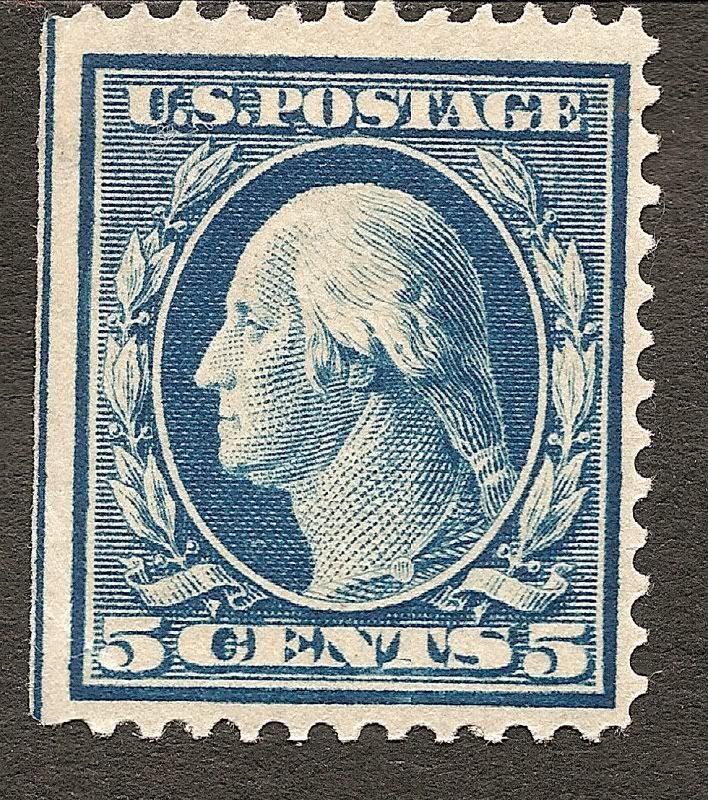
Question On Straight Edge Of Stamp

 
To participate in the forum you must log in or register.
Author Previous TopicReplies: 13 / Views: 2,104Next Topic  
Pillar Of The Community
United States
6661 Posts
Posted 03/01/2011   05:02 am  Show Profile Bookmark this topic Add stallzer to your friends list Get a Link to this Message
Is the line on the left hand side a guide line ?

Send note to Staff

Pillar Of The Community
Learn More...
Canada
3963 Posts
Posted 03/01/2011   06:37 am  Show Profile Bookmark this reply Add Dianne Earl to your friends list  Get a Link to this Reply
I've never seen one like that. I'm sure someone will come along that will know. I'll look through my catalogue and see if I can find anything.

Dianne
Send note to Staff  Go to Top of Page
Don't grumble that the roses have thorns, be thankful that the thorns have roses
Bedrock Of The Community
Australia
38679 Posts
Posted 03/01/2011   06:41 am  Show Profile Bookmark this reply Add rod222 to your friends list  Get a Link to this Reply
Another great scan Stallzer (albeit a bit wonky)
What scanner are you using please?
Send note to Staff  Go to Top of Page
Pillar Of The Community
United States
6661 Posts
Posted 03/01/2011   06:51 am  Show Profile Bookmark this reply Add stallzer to your friends list  Get a Link to this Reply
It is an HP C5180, with Stamp scanned at 1200 dpi. If you mean wonky due to being tilted, that's just my laziness :)
Send note to Staff  Go to Top of Page
Pillar Of The Community
United States
5894 Posts
Posted 03/01/2011   07:08 am  Show Profile Bookmark this reply Add smauggie to your friends list  Get a Link to this Reply
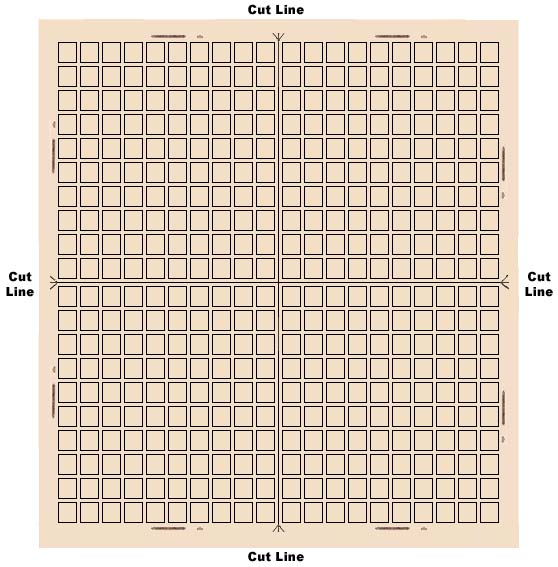
Yes, it is a guide line used to cut apart the pane into sheets. There is still the impression among many that these are of less value, but the argument has also been made that these are rarer than stamps with perfs on all sides.
Send note to Staff  Go to Top of Page
Pillar Of The Community
United States
6661 Posts
Posted 03/01/2011   07:37 am  Show Profile Bookmark this reply Add stallzer to your friends list  Get a Link to this Reply
Unfortunately, pricing reflects the lesser :(
Send note to Staff  Go to Top of Page
Pillar Of The Community
Canada
531 Posts
Posted 03/01/2011   10:15 am  Show Profile Bookmark this reply Add Moonbird to your friends list  Get a Link to this Reply

>>>>>>>>>>>>Yes, it is a guide line used to cut apart the pane into sheets.

Actually one cuts a sheet into panes.
Send note to Staff  Go to Top of Page
Bedrock Of The Community
Australia
38679 Posts
Posted 03/01/2011   4:43 pm  Show Profile Bookmark this reply Add rod222 to your friends list  Get a Link to this Reply

Quote:
It is an HP C5180, with Stamp scanned at 1200 dpi.


Thanks.
HP comes with dubious appreciation in Oz,
but I like the effect you are getting.
1200 dpi is too large for me, I max out at 600dpi
for all my stamps scans, and drop to 200 for souvenir sheets.

With Epson Perfection I do not see any improvement
at 1200 dpi, in fact a degradation overall.

Yours has a great result for an all in one
for the same price as my dedicated epson (circa $300 2007)

What are you using to get the black background?
I am thinking perhaps my kraft paper attached to
the lid of my scanner is causing a slight glare distortion.

Send note to Staff  Go to Top of Page
Edited by rod222 - 03/01/2011 4:45 pm
Pillar Of The Community
Canada
921 Posts
Posted 03/01/2011   7:05 pm  Show Profile Bookmark this reply Add backroads to your friends list  Get a Link to this Reply
Rod - if you are having trouble with results from 1200 DPI on whatever scanner,try looking at the program that opens them on the computer. Sometimes it's there that you get the degradation of your image. I am playing with that problem myself at the moment and am finding that if I open the higher DPI image with an actual, honest to gosh photo program (on someone elses computer) rather than one of the "comes with the package" types (my computer) it works like a hot damn.
Send note to Staff  Go to Top of Page
Pillar Of The Community
United States
2547 Posts
Posted 03/02/2011   01:54 am  Show Profile Bookmark this reply Add Russ to your friends list  Get a Link to this Reply
The plate layout for the 1908-1922 flat plate is shown below

Send note to Staff  Go to Top of Page
Bedrock Of The Community
Australia
38679 Posts
Posted 03/02/2011   03:17 am  Show Profile Bookmark this reply Add rod222 to your friends list  Get a Link to this Reply
Thanks backroads,
now there's a thought,
I'll give it a burst.
Send note to Staff  Go to Top of Page
Pillar Of The Community
United States
6661 Posts
Posted 03/02/2011   07:38 am  Show Profile Bookmark this reply Add stallzer to your friends list  Get a Link to this Reply
Actually I just use the HP Solutioon center software that came with it. It is very simple to use with minimal effort and setup, and scans up to 19200 dpi. For the back ground, I just lay a black stockcard kind of thing over it and close the lid :) The only reason I scan single stamps @ 1200 dpi is when I sell them on ebay, this way the buyer can see every detail of the piece as it bugs me to no end how some people give you the tiny thumbnail only for anything worth over $5.
Send note to Staff  Go to Top of Page
Pillar Of The Community
Canada
737 Posts
Posted 03/02/2011   2:10 pm  Show Profile Bookmark this reply Add Ryan to your friends list  Get a Link to this Reply
I've found with my own newer HP scanner that I didn't get an image as nice as I did with the old one. But oversampling helps there - if I scan at 600 dpi, I'm not that impressed. I see a definite improvement when I scan at 1200 dpi and then resize that scan down by 50%. The oversampled 1200 dpi image turns out much nicer after it has been resized. Don't know why there's such a difference, I have all the sharpening / dust removal / etc options turned off, trying to just get an honest scan.

Ryan
Send note to Staff  Go to Top of Page
Pillar Of The Community
United States
4106 Posts
Posted 03/03/2011   11:46 am  Show Profile Bookmark this reply Add stampvirgin to your friends list  Get a Link to this Reply

Quote:
Thanks.
HP comes with dubious appreciation in Oz,
but I like the effect you are getting.
1200 dpi is too large for me, I max out at 600dpi
for all my stamps scans, and drop to 200 for souvenir sheets.

With Epson Perfection I do not see any improvement
at 1200 dpi, in fact a degradation overall.

Yours has a great result for an all in one
for the same price as my dedicated epson (circa $300 2007)

What are you using to get the black background?
I am thinking perhaps my kraft paper attached to
the lid of my scanner is causing a slight glare distortion.


Rod is your scanning software using interpolation to get higher resolution?
Send note to Staff  Go to Top of Page
  Previous TopicReplies: 13 / Views: 2,104Next Topic  
 
To participate in the forum you must log in or register.

Go to Top of Page

Disclaimer: While a tremendous amount of effort goes into ensuring the accuracy of the information contained in this site, Stamp Community assumes no liability for errors. Copyright 2005 - 2026 Stamp Community Family - All rights reserved worldwide. Use of any images or content on this website without prior written permission of Stamp Community or the original lender is strictly prohibited.
Privacy Policy / Terms of Use    Advertise Here
Stamp Community Forum © 2007 - 2026 Stamp Community Forums
It took 0.36 seconds to lick this stamp. Powered By: Snitz Forums 2000 Version 3.4.05