| Author |
 Replies: 20 / Views: 2,834 Replies: 20 / Views: 2,834 |
|
Pillar Of The Community
Canada
528 Posts |
|
|
|
Does anyone have any suggestions on how I can join/combine two or more scans into a single scan?
I want to have a single *.jpg scan that shows both the front and back of a stamp. I can scan both sides, but the result is two different *.jpg files. I have tried using Paint, and other picture management software packages, but cannot see where I can load both scans into a single file.
Any suggestions?
Thanks,
Stamporator
|
|
Send note to Staff
|
|
|
|
|
Valued Member
United States
427 Posts |
|
|
Likely depends on what software you are using. I use Gimp (It is free). It allows joining, for example in producing panorama photos by melding the different photos together. The key word, I think, is meld or melding in the help files, though I haven't bothered to use it.
edit: Oops, I think merge is the word and setting the images up as transparent layers.
Thank you all for the suggestions -- Photoscape, photobucket, irfan all sound good -- probably easier than gimp. |
Send note to Staff 
|
| Edited by butterfly - 07/23/2011 11:09 am |
|
|
Pillar Of The Community
Canada
528 Posts |
|
|
Thanks Butterfly. I have not heard of 'gimp', but a quick google search provided me with a site to download the sofwtare. I will give it a try this weekend. |
|
Send note to Staff
|
|
|
Pillar Of The Community
Canada
617 Posts |
|
|
Hi STamporator,
If Gimp is anything like Photoshop, the first time you open it, you go.... 'HUH??? now where do I go?"
Google Gimp Tutorials, there is bound to be one out there that can help you.
|
|
Send note to Staff
|
|
|
Pillar Of The Community
Australia
898 Posts |
|
|
stamporator, if you don't have any luck with the above suggestions, download 'Photobucket', then I can assist and you will have two images in 4 clicks of the mouse. They have made it so easy for us older users. |
|
Send note to Staff
|
|
|
Pillar Of The Community
Australia
1251 Posts |
|
|
Hi Finches
I would love to know also.
I went to tools, I tried to create a collage, but it crops the image.
Any ideas
Horamakhet |
|
Send note to Staff
|
|
|
Pillar Of The Community
Australia
898 Posts |
|
|
In Photobucket, click the TINY small square box (IMG) directly under the images you want together. ( A blue line boxes the images clicked )
Then at page bottom (under all stored images on that page) click on 'Choose Action'.
Then choose 4th one down saying 'Generate link codes for selection'.
Then a screen comes up where you will see a heading lower down saying 'Full size'-- Click onto it and the word "Copied" comes up on a yellow background.
Now just paste the link codes into the forum.
P.S. If you get stuck on any instruction just ask and I'll direct you thru. |
|
Send note to Staff
|
| Edited by finches - 07/22/2011 11:54 pm |
|
|
Pillar Of The Community
Australia
1251 Posts |
|
|
  Hi finches is this how it is supposed to look, you directions are very easy to follow, Regards, Horamakhet |
|
Send note to Staff
|
|
|
Pillar Of The Community
Australia
898 Posts |
|
|
Horamkhet, I can see your water mark but if you want to enhance a stamps w/m in Photobucket just click 'edit' under the stored image.
Next screens sub-heading says 'Basic' adjust the 'Hue, Saturation, Lightness' slide settings, a little at a time.
You'll find the right combination that brings out watermark. |
|
Send note to Staff
|
|
|
Pillar Of The Community
Australia
4034 Posts |
|
|
Pillar Of The Community
United Kingdom
1361 Posts |
|
|
What I do in Paint Shop pro is use the add border function to add some blank space the size of the image I want to 'paste' in.
I would imagine most image editing software has this function albeit with maybe a different name. |
|
Send note to Staff
|
|
|
Pillar Of The Community
United States
1128 Posts |
|
|
Since I am into photography I use Photoscape, a freebie every bit as good as Photoshop. After starting Photoscape, just click on the "combine" icon at top left. Then just drag and drop the photos you want. |
|
Send note to Staff
|
|
|
Pillar Of The Community
Australia
1251 Posts |
|
|
Pillar Of The Community
United States
3568 Posts |
|
|
Thanks for the thread. I learned something! :)
|
|
Send note to Staff
|
| Edited by jhlovell - 07/23/2011 09:50 am |
|
|
Pillar Of The Community
Canada
1401 Posts |
|
|
Just out of curiosity, I tried Paint and it does work, but probably not as simply as the other suggested programs that I haven't got or tried. 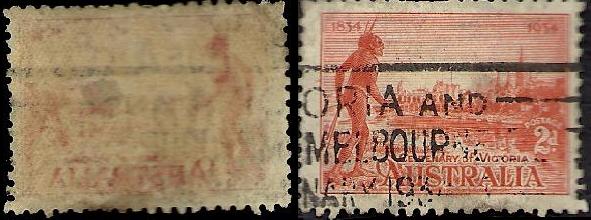 |
|
Send note to Staff
|
| Edited by BlackJag - 07/23/2011 10:50 am |
|
|
Pillar Of The Community
United Kingdom
1361 Posts |
|
|
I got to ask. Is that stamp curled as there are some serious issues with focus at the edges?
|
|
Send note to Staff
|
|
|
Replies: 20 / Views: 2,834 |
|



 Posted 07/22/2011 8:12 pm


