Stamp Community Family of Web Sites
Thousands of stamps, consistently graded, competitively priced and hundreds of in-depth blog posts to read


Stamp Community Forum
 
Username:
Password:
Save Password
Forgot your Password?

This page may contain links that result in small commissions to keep this free site up and running.

Welcome Guest! Registering and/or logging in will remove the anchor (bottom) ads. It's Free!

Cannot Accurately Read My Ruler!

Previous Page
 
To participate in the forum you must log in or register.
Author Previous TopicReplies: 28 / Views: 3,744Next Topic
Page: of 2
Rest in Peace
7742 Posts
Posted 02/03/2015   6:24 pm  Show Profile Bookmark this reply Add wert to your friends list  Get a Link to this Reply
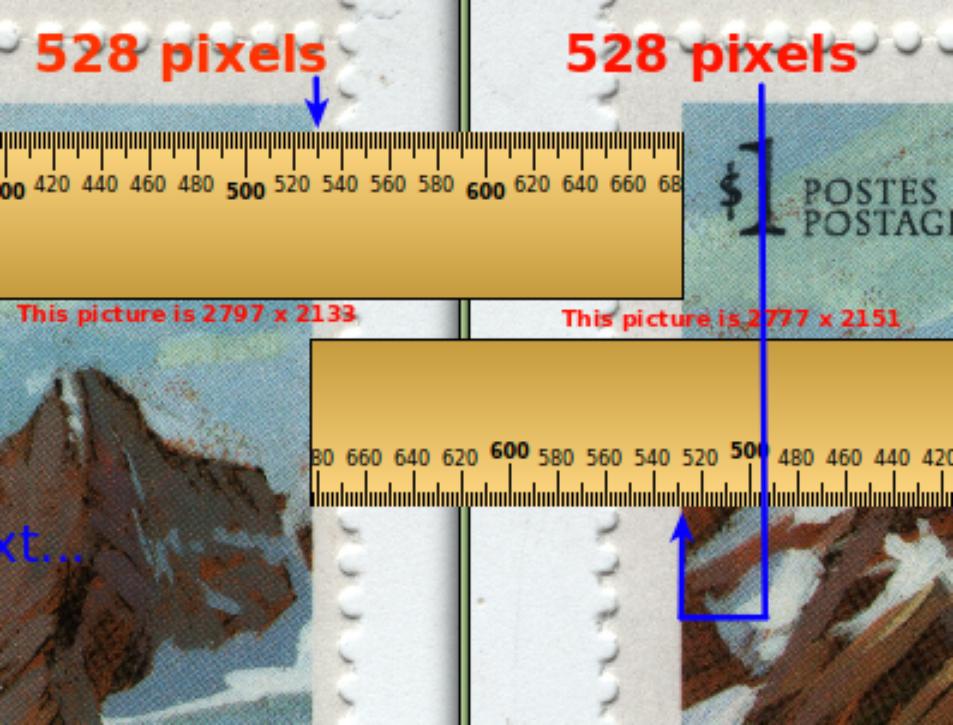
ikeyPikey...There are some fundamental draw backs to JUST reading the pixel content of and image...Look at the stamp I have scanned below..A normal stamp.


Now what I have done is misaligned the pixel rate of this for stamp ...Originally it was 2797 x 2166...I have changed it to 2777 x 2151 for argument sake as shown below side by side..Human eyes CANNOT tell the difference.


Now I have used KRULER to measure the width of the actual printed design on the stamp..Look at the pixel measurement..Both exactly the same..Two different pixel measurements from pictures with exactly the same pixel measurement...Now what does that tell us about relying on the pixel details of any certain picture..??
See below.

Send note to Staff  Go to Top of Page
Edited by wert - 02/03/2015 6:27 pm
Rest in Peace
7742 Posts
Posted 02/03/2015   6:25 pm  Show Profile Bookmark this reply Add wert to your friends list  Get a Link to this Reply
BTW..Greetings ikeyPikey..How ignorant of me..
Send note to Staff  Go to Top of Page
Rest in Peace
United States
4052 Posts
Posted 02/04/2015   01:17 am  Show Profile Bookmark this reply Add ikeyPikey to your friends list  Get a Link to this Reply
wert, Greetings:

I am not able to follow your experiment.

Q/ Did you re-size the image?

Q/ Or, did you only edit the file header?

In any case, this thread began with the need to know the spatial resolution (pixels/inch, for example) so that an object in the image could be measured in pixels and converted to, say, inches.

I tried to explain - in what some found to be a confounding way - that the software could do this if the image included a known reference object - for example, a small coin.

This is standard practice in science & engineering imagery.

The software would measure the diameter of the reference object in pixels, divide that by the known diameter of that reference object in inches, yielding the dpi (dots/inch) (pixels/inch) (spatial resolution) of the image.

This then could be applied willy-nilly by the software to detectable features in the image, the overall horizontal and vertical dimensions being among the simplest.

None of this would require the operator to go running to a catalog to find the size of the image, and enter that value into the software, like some Medieval monk in a monastery, copying the classics, again & again.

Apologia: I was raised by IBM (1130, 2k core, Fortran II), and was taught: "Machines Should Work, People Should Think".

While grinding thru all of that, I remembered that JPG headers (the most relevant for most of us) actually include the [Horizontal Resolution] and [Vertical Resolution] expressed in dpi, obviating the use of the coin (reference object).

When that value is correct.

My as-scanned JPG files have the correct Hdpi and Vdpi as written by the scanner into the header of the image file but, as in an earlier post, you may not want to trust that value when it is '96 dpi'.

No one has suggested that a mere pixel count is sufficient.

No one has suggested that you can get from pixels to inches without going thru the intermediary pixels/inch.

Cheers,

/s/ ikeyPikey
Send note to Staff  Go to Top of Page
Rest in Peace
7742 Posts
Posted 02/04/2015   08:29 am  Show Profile Bookmark this reply Add wert to your friends list  Get a Link to this Reply
Hi ikeypikey

Machines Should Work, People Should Think....haha
I was trained to think out of the box..I believe "machines should think, people should work"

Yes, I did change the pixel rate slightly to show that even with the change, it is apparently possible to measure what it is you are trying to achieve.

As far as placing a known item beside the stamp, now for everyone to achieve 100% accuracy, they would have to use the EXACT same item...BUT..If you tried to scan the two items and I tried to scan the two items, there is a fundamental problem.

You scan at say 600 DPI and I scan the same, remember a $69.00 scanner is only a $69.00 scanner,,,Your scanner may really be scanning at say 597 DPI and maybe my really scans at say 605 DPI..Now throw inaccurate monitors into the mix and we have a problem.
Send note to Staff  Go to Top of Page
Rest in Peace
United States
4052 Posts
Posted 02/04/2015   11:39 am  Show Profile Bookmark this reply Add ikeyPikey to your friends list  Get a Link to this Reply

Quote:
... they would have to use the EXACT same item ...


If you read the original posts, above, I suggested:


Quote:
... such as the smallest coin in general circulation of each country in which they would like to show respect to their customers ...


The 5c Euro is a reference object readily available to 350 million people, for example.

My suggestion is that the software include a library of 'universal' reference objects of known dimensions; a library of one dozen coins would cover the vast majority of the wired world that might use online calipers to measure things; the ROTW folk could, well, key-in a reference value from a catalog.


Quote:
... You scan at say 600 DPI and I scan the same, remember a $69.00 scanner is only a $69.00 scanner,,,Your scanner may really be scanning at say 597 DPI and maybe my really scans at say 605 DPI ...


You are suggesting variations of 0.5% and almost 1%.

Let me lean forward, so you can read the thoughts off of the top of my head:

1) That 0.5% sounds unlikely, but maybe it is not. Depending on the design of the scanner, the source may be traveling, the mirror(s) may be traveling, the sensor may be traveling. While I know a bit about built-in continuous white balance circuits - which are still subject to aging - I admit to knowing nothing about built-in on-going focus, focal distance, etc, monitoring & adjusting. So a 0.5% difference from scanner to scanner - or from scan to scan - might be possible, and might even be expected.

2) For a stamp with a linear dimension of 20 mm, that +/- 0.5% error works-out to 19.9 mm to 20.1 mm.

Q/ Does that +/- 1-10mm distinction make a difference?

My Scott US Specialized (1956) describes ('see note above 448') flat press versus rotary press dimensions with values like "18-1/2 to 19mm" versus "19-1/2 to 20mm" and "22-1/2 to 23mm".

The difference you are describing (+/- 0.1mm) is much smaller than the distinction (20 - 19 = 1mm, worst case 19-1/2 - 19 = 0.5mm) we are trying to make ... in the case of flat press versus rotary press.

For OverPrints, PreCancels, SurCharges, PerfIns - and other stamps best described with InLineCaps - the difference between genuine & forgery might sometimes be closer to the scale of error you are concerned about.

It has always been my understanding that the circumstances under which OverPrints, SurCharges, etc, are applied (during war, after war, etc) makes for fertile ground for arguing that one man's "FORGERY!" is another man's never-been-seen-before-variety.

My bottom lines?

A reference object in the scan is going to be subject to the same error as the rest of the scan, making the error irrelevant.

Mechanical variations between scanners will impact Hres/Hdpi and Vres/Vdpi values written into the file headers. The resulting errors will be irrelevant in some applications (eg distinguishing flat plate versus rotary printing) but might be material in others (eg distinguishing genuine versus forged OverPrints et al).

Collector optimism introduces more errors than the mechanical variations between scanners & scans.

Cheers,

/s/ ikeyPikey
Send note to Staff  Go to Top of Page
Edited by ikeyPikey - 02/04/2015 11:47 am
Pillar Of The Community
United States
2952 Posts
Posted 02/04/2015   12:16 pm  Show Profile Check Rileysan's eBay Listings Bookmark this reply Add Rileysan to your friends list  Get a Link to this Reply
Perhaps I missed it in while browsing through all the posts, but I'll ask anyway. Why wouldn't you just keep a simple ruler handy to scan along-side your stamp in order to calibrate the digital calipers? One would never have to remove it from the scanner bed. No need to over-complicate things by worrying about known sizes of coins, et al!

Brian
Send note to Staff  Go to Top of Page
Brian Riley
APS 223349
Rest in Peace
7742 Posts
Posted 02/04/2015   1:26 pm  Show Profile Bookmark this reply Add wert to your friends list  Get a Link to this Reply
Rileysan...You make a good point..The old fashion ruler like the old fashion magnifying glass will never loose its place in this hobby..
Send note to Staff  Go to Top of Page
Rest in Peace
Canada
5701 Posts
Posted 02/04/2015   10:46 pm  Show Profile Bookmark this reply Add BeeSee to your friends list  Get a Link to this Reply

Quote:
Why wouldn't you just keep a simple ruler handy to scan along-side your stamp in order to calibrate the digital calipers?


Didn't I say that ? I guess it got lost in all this.

Brian (too)
Send note to Staff  Go to Top of Page
BeeSee in BC
"The Postmark is Mightier than the Stamp"
http://brcstamps.com ---- BNAPS, RPSC, APS
Rest in Peace
7742 Posts
Posted 02/04/2015   11:21 pm  Show Profile Bookmark this reply Add wert to your friends list  Get a Link to this Reply

Quote:
Didn't I say that ? I guess it got lost in all this
well, at least I re mentioned it for you BeeSee

Send note to Staff  Go to Top of Page
Edited by wert - 02/04/2015 11:22 pm
Rest in Peace
United States
4052 Posts
Posted 02/04/2015   11:50 pm  Show Profile Bookmark this reply Add ikeyPikey to your friends list  Get a Link to this Reply

Quote:
... Perhaps I missed it ...


Yeah, you did ;)

The original poster - and quite a few others - are applying the digital on-screen calipers to scans posted on auction sites, trying to detect forged & misidentified stamps.

The reference object technique is only available at time of capture. (I've co-scanned a transparent plastic ruler from ACMoore, or my business cards, which featured inch & millimeter scales on the bottom edges of the English & Other Language sides, respectively, of my business cards.)

The header-reading technique is available to software that has access to the original/uploaded image; what you get when you look at the header of the image as it appears on ebay et al is anybody's guess.

Cheers,

/s/ ikeyPikey
Send note to Staff  Go to Top of Page
Edited by ikeyPikey - 02/04/2015 11:51 pm
Valued Member
139 Posts
Posted 02/07/2015   11:05 am  Show Profile Bookmark this reply Add nl1947 to your friends list  Get a Link to this Reply
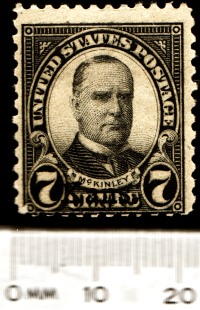
Both these images are the same PPI 320 X 380- (DPIs are for printing)
320 X 380


It is preposterous to think that by knowing the "header" dimensions that you can now measure the details. Pixels do not equal millimeters.

The reference scale needs to be with the picture like so, then dimensions do not matter.

Send note to Staff  Go to Top of Page
Rest in Peace
United States
4052 Posts
Posted 02/07/2015   11:54 am  Show Profile Bookmark this reply Add ikeyPikey to your friends list  Get a Link to this Reply

Quote:
... It is preposterous to think that by knowing the "header" dimensions that you can now measure the details ...


nl1947: It is preposterous that you are not reading what I wrote and, therefor, not following the math. Lemme try again.


Quote:
01/27/2015 ... Iconico could build an even better mousetrap by analyzing scanner images for major features, and overlaying dimensional information on the image, before they even show it on the screen.


Quote:
02/04/2015 ... yielding the dpi (dots/inch) (pixels/inch) (spatial resolution) of the image. This then could be applied willy-nilly by the software to detectable features in the image, the overall horizontal and vertical dimensions being among the simplest ...


We live in an age when a software developer can pay a royalty and buy an API for feature (even facial) recognition.

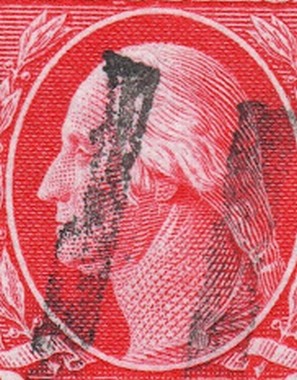
Edge detection is elementary, especially for a rectangular red design on a white background.

Edge detection remains elementary for a red/white design inside a white oval.

Finding the edges and, therefor, the widest point of that oval is relatively trivial.

Counting the number of pixels from one side of that oval to the other is relatively trivial.

Multiplying that number of pixels by the spatial resolution (pixels/inch) of the scan is positively trivial, and yields the horizontal dimension (width) of the oval in inches.

Here's the kicker: whether you have more pixels at a higher resolution, or fewer pixels at a lower resolution, the width of the oval is gonna be the same.

Cheers,

/s/ ikeyPikey (who did not attend one of those Self Esteem Comes First high schools.)
Send note to Staff  Go to Top of Page
Pillar Of The Community
3859 Posts
Posted 02/07/2015   12:07 pm  Show Profile Bookmark this reply Add jogil to your friends list  Get a Link to this Reply
I don't really trust any of those perforation measuring computer programs that rely on any scanner scans.
Send note to Staff  Go to Top of Page
Page: of 2 Previous TopicReplies: 28 / Views: 3,744Next Topic  
Previous Page
 
To participate in the forum you must log in or register.

Go to Top of Page

Disclaimer: While a tremendous amount of effort goes into ensuring the accuracy of the information contained in this site, Stamp Community assumes no liability for errors. Copyright 2005 - 2026 Stamp Community Family - All rights reserved worldwide. Use of any images or content on this website without prior written permission of Stamp Community or the original lender is strictly prohibited.
Privacy Policy / Terms of Use    Advertise Here
Stamp Community Forum © 2007 - 2026 Stamp Community Forums
It took 0.27 seconds to lick this stamp. Powered By: Snitz Forums 2000 Version 3.4.05