| Author |
 Replies: 20 / Views: 2,515 Replies: 20 / Views: 2,515 |
|
Pillar Of The Community
1151 Posts |
|
|
R5c with a double transfer and a scratch. Arrows point to the Pick Up Point (PUP). The PUP at top is just for a scratch, the main part of this posting for the stamp in question is possible double transfer, see arrows pointing to the PUP. Stampmaster    |
|
Send note to Staff
|
|
|
|
|
Pillar Of The Community
1151 Posts |
|
|
Pillar Of The Community
United States
6469 Posts |
|
|
Yes to the plate scratch at top. Unsure as to what is going on at bottom as the image is too low resolution and blurry to tell. |
Send note to Staff 
|
|
|
|
Pillar Of The Community
1151 Posts |
|
|
Hi revenuecollector, maybe your computer is different than mine, on my computer I can "Shift the +" symbol and the image is enlarged!
Stampmaster |
|
Send note to Staff
|
|
|
Pillar Of The Community
1151 Posts |
|
|
Hi revenuecollector, sorry, its the Control key, not the shift key.
Stampmaster |
|
Send note to Staff
|
|
|
Pillar Of The Community
United States
6469 Posts |
|
|
Stampmaster, I know how to change the zoom level in a browser. That doesn't solve anything. Unfortunately, in the case of your images, all that does is make it worse. The image resolution is too low. The stamp needs to be scanned at a higher optical resolution. See below for a resoution appropriate for flyspecking. Then, depending on the size of your browser window, you may be able to click on the image to open the image even larger. For varieties and flyspecking, 1200dpi is the minimum resolution to scan at. I will use 1600 or even 3200dpi depending on the need. Of course this only works if your scanner has a native (optical) resolution that high. If it is using digital interpolation to get to that resolution, it defeats the purpose. Below the image is a link to the original super-high-resolution image, and then below it cutouts from that image. 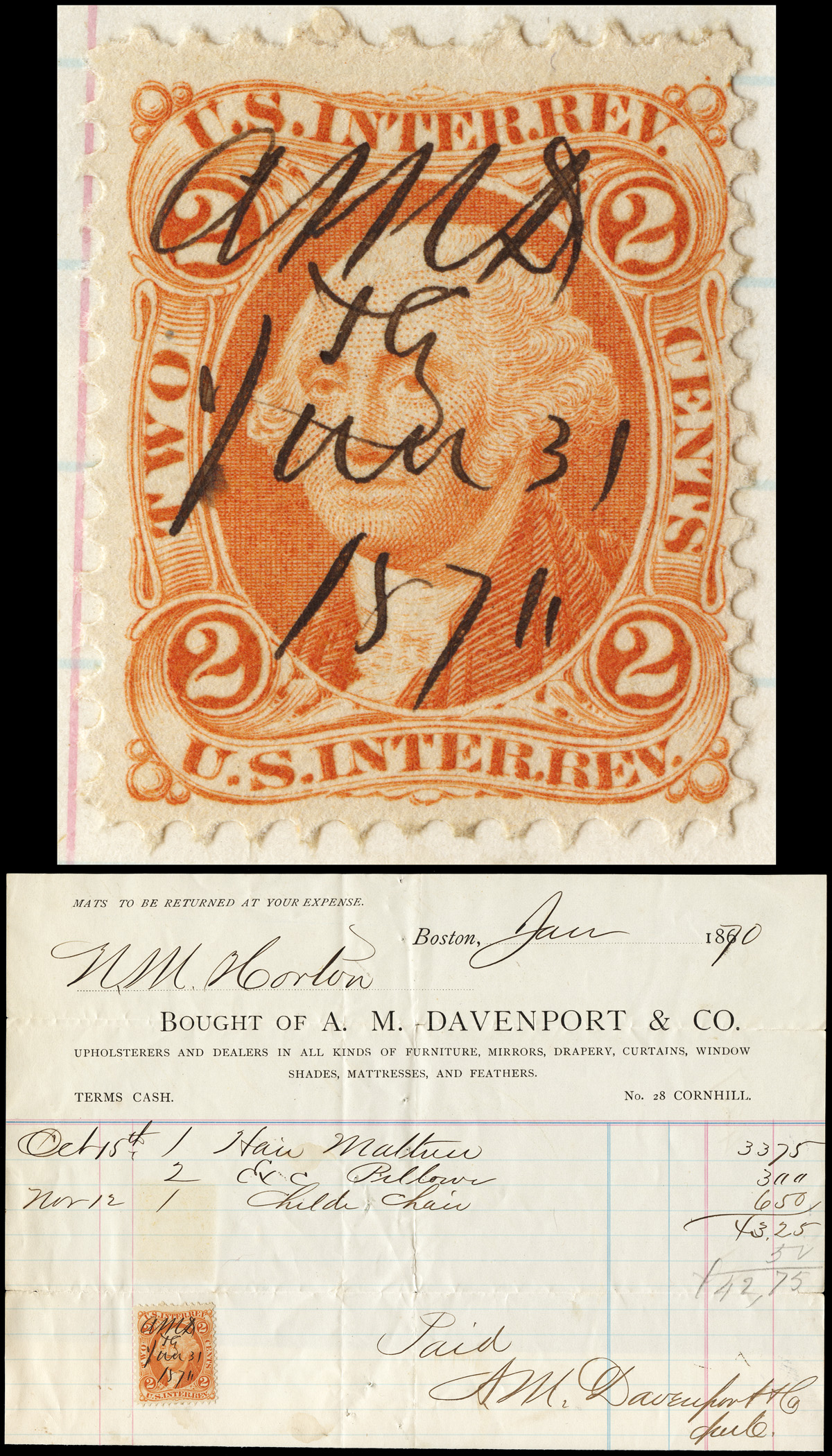 https://revenue-collector.com/zoomify/4396.jpg https://revenue-collector.com/zoomify/4396.jpg  |
|
Send note to Staff
|
|
| Edited by revenuecollector - 09/30/2017 8:02 pm |
|
|
Rest in Peace
United States
1738 Posts |
|
|
Dan, Not all of us host our images on our own server, ya' know.  The highest resolution for a small stamp-sized image that will be accepted by the 300 Kb limit here is 600 dpi, in my experience. Documents and certificates I scan at 200 dpi, and I have to trim them a lot. Jim |
|
Send note to Staff
|
|
|
Pillar Of The Community
United States
6469 Posts |
|
|
Jim,
Fair point. I hadn't thought about that. If the Stampmaster is relying on the image uploading here then all bets are off.
Photobucket is now toast, but Imgur is an option for remote image hosting in order to be able to post high resolution images. |
|
Send note to Staff
|
|
|
|
Pillar Of The Community
1151 Posts |
|
|
Hi revenuecollector, I was talking about the keys on my computer keyboard, but you know I'm not sure, if I'm typing the keys on the keyboard is that the same thing as you call it the browser? I don't think what I do is zooming on the browser.
Hey, no everybody knows everything about computers, so try what I said, that is if you have the "Control" and "+" keys on the computer you use.
But I take what you said, and do plan on updating my scanner to one of those Epson 37's, but have to wait until next trip to Las Vegas (150 miles), the computer store here in town does not carry Epson.
Stampmaster |
|
Send note to Staff
|
|
|
Rest in Peace
United States
1738 Posts |
|
|
Stampmaster, I believe that I mentioned this before, but I would recommend 600 dpi for a small stamp-sized image, and then, a 1200 dpi close up of a very small area that shows the -whatever- you are discussing. And 200 dpi for larger pieces, that you need to show in their entirety. This will allow you to get past the 300 Kb image restriction that is in place here. That's what I've been doing all this time, and I don't think anyone has complained about the quality of my images (other than oranges being off a bit, I guess). Jim p. s. Amazon carries Epson scanners... |
|
Send note to Staff
|
| Edited by James Drummond - 09/30/2017 8:19 pm |
|
|
Pillar Of The Community
United States
6469 Posts |
|
|
Quote:
I don't think anyone has complained about the quality of my images (other than oranges being off a bit, I guess). Actually, I believe the usual complaint is that the poster is off a bit.   |
|
Send note to Staff
|
|
|
|
Rest in Peace
United States
1738 Posts |
|
|
Valued Member
United States
271 Posts |
|
|
My scanner allows for preview scan of image. Then I can drag and draw a rectagonal window over the specific area I want high resolution over. Then proceed to scan small area. Once that image is saved, then upload using SCF tool. Not the greatest, but it does get the image better for detail area. |
|
Send note to Staff
|
|
|
Bedrock Of The Community
12747 Posts |
|
|
Rest in Peace
United States
1738 Posts |
|
|
Rogdcam, Stampmaster is referring to a specific area of his scan that he is discussing, not this:  The term was defined by him, above. Jim |
|
Send note to Staff
|
|
|
Pillar Of The Community

United States
856 Posts |
|
|
Replies: 20 / Views: 2,515 |
|



 Posted 09/14/2017 02:06 am





