| Author |
 Replies: 101 / Views: 41,905 Replies: 101 / Views: 41,905 |
|
|
|
Pillar Of The Community
Canada
1449 Posts |
|
|
Quote:
I am curious - why do you have two boxes for #11 ? Good question Jon.....a space for a better quality # 11 maybe - do not remember what I had in mind. Most of the empty spaces will be filled.....am searching for a # 8i presently and having a hard time (unless I pay 60% of cat value.....too much ! In my pages I only put empty spaces for future acquisitions and I may at times modify the page since they are all titled and saved in my program. Thanks for the input......it is not my greatest page but the last one I did  |
Send note to Staff 
|
|
|
Pillar Of The Community
Norway
1661 Posts |
|
|
Quote:
do not remember what I had in mind ha ha, I recognize that feeling  |
|
Send note to Staff
|
|
|
Pillar Of The Community
United States
772 Posts |
|
|
Here's a new page I just made...thinking about starting a new worldwide semi-postal collection? 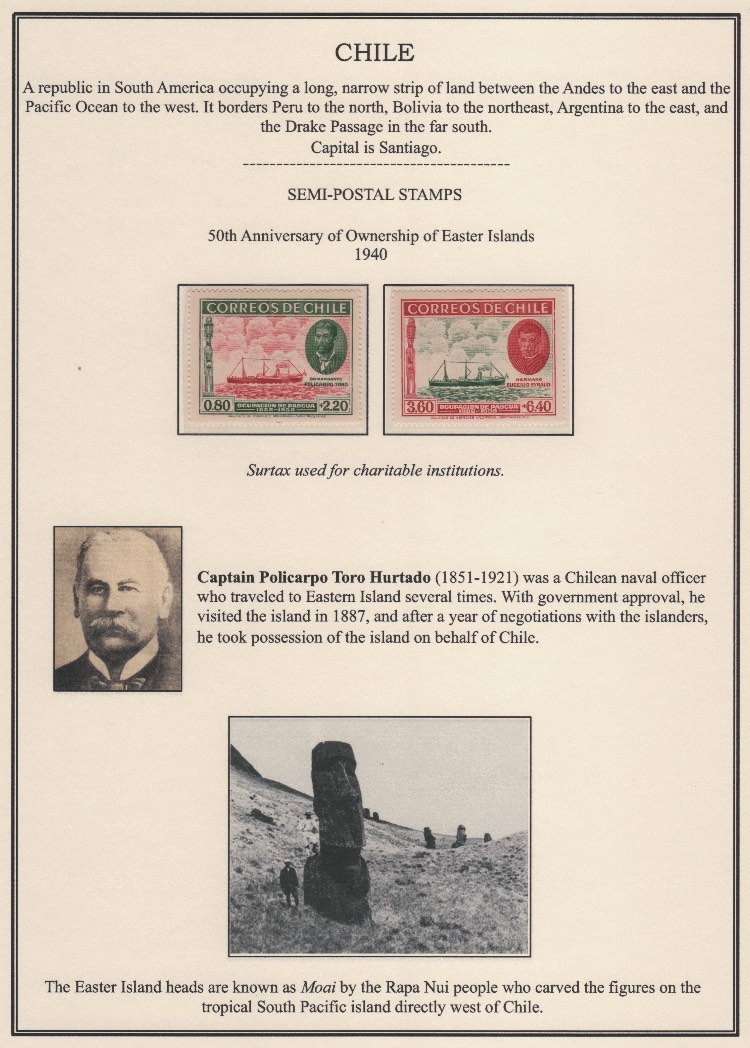 |
|
Send note to Staff
|
|
|
Pillar Of The Community
Canada
1449 Posts |
|
|
Pillar Of The Community
Norway
1661 Posts |
|
|
Pillar Of The Community
United States
507 Posts |
|
|
Nice page.
I think you might have an error. Shouldn't it be "Easter Island" and not "Eastern Island" in the paragraph on Captain Hurtado? |
|
Send note to Staff
|
|
|
Pillar Of The Community
United States
772 Posts |
|
|
Pillar Of The Community
1370 Posts |
|
|
"Unlike most of you I do not actually print my pages at all. I am storing my entire collection on Vario sheets in Lighthouse Classic binders, due to flexibility, no need for hinges and ease of use. I only create the pages in a digital format for getting an 'alternative' presentation, and then populate these virtual pages with images of my own stamps. The stamps themselves remains safely stored on the vario sheets..."
Those are really beautiful album pages even if they're not on paper. But how would someone go about doing this and then printing them?
I assume that we could print out these kinds of pages? With the purchase of a large-format printer, you could easily make your own albums and they would look very professional this way. And they would be on larger format paper, too, which would make them look impressive.
How do you make such pages in PowerPoint? What are your sources for your backgrounds, the stamp boxes, those beautiful borders, and so forth? As a long-time PowerPoint user (history teacher), I'm familiar with the program, but not clear on how you would make album pages using it. And, once you have a group of PowerPoint album pages created, do you just print them directly from PowerPoint? I'm not quite clear on how this all works. If it's not too much trouble, would you be willing to share a step-by-step explanation, even a brief one, for those not familiar with computer programming in how to create an album page in PowerPoint and how to print them? I've been wanting to try this for a long time. |
|
Send note to Staff
|
|
|
Pillar Of The Community
Norway
1661 Posts |
|
|
Drew - thank you for the kudos Quote:
But how would someone go about doing this and then printing them? One can easily print the pages as well, and I have actually done it for pure trial purposes. I've then printed on A4 format, as I do not have access to a larger format printer. I have actually considered printing for taking the pages in use also in 'real life'. However, if so I think I would like to get a printer with possibility for printing on the 'normal size' album page (not A4) and proper quality paper - or alternatively get them printed in a professional studio. Simply because I think the pages look a bit small and provisional in A4 format - in my mind printed pages look better on the 'traditional' format, with broader borders and more 'air'. Quote:
How do you make such pages in PowerPoint? What are your sources for your backgrounds, the stamp boxes, those beautiful borders, and so forth? ...would you be willing to share a step-by-step explanation Sure I am willing to help However - maybe you should check out this thread first? https://goscf.com/t/42545Even tough that thread is about digital (virtual) pages, the process of making them is the same whether printed in real life or not. DC Stamps has shared a great tutorial in 'another forum' about creating custom digital stamp albums using powerpoint, maybe that can help as a start? @DrewM - check you email Drew |
|
Send note to Staff
|
|
|
Pillar Of The Community
1370 Posts |
|
|
Blaamand, thanks for any help you can provide. Or:Takk for at du hjalp meg. :) |
|
Send note to Staff
|
| Edited by DrewM - 11/03/2017 11:55 pm |
|
|
Pillar Of The Community
Norway
1661 Posts |
|
|
You're welcome DrewM - did you get my mail (via SCF) ?
Please let me know if you found the tutorial or if I can help in any other way. Ready to share my album-page template (Powerpoint) with you if you want it as a starting point. |
|
Send note to Staff
|
|
|
Pillar Of The Community
1370 Posts |
|
|
Blaamand, sorry, but I did not see an email. I'm a little clueless, though. Do you mean an email sent to my regular email address or one that I would see on this website? Yes, I would like to know more about your album page making methods. Let me know where to find that email. Maybe I deleted it by accident? Hopefully not. |
|
Send note to Staff
|
|
|
Pillar Of The Community
Norway
1661 Posts |
|
|
Drew - No worries, I'll send again. (ps - yes, a mail sent via this site might easily be mistaken for notifications about new posts for threads your following. I've almost deleted several myself that I am aware of - and probably actually deleted a few I never even noticed) edit: Quote:
Do you mean an email sent to my regular email address or one that I would see on this website? Forgot to answer that....You will receive a mail in your own inbox (for your email-address linked to this site) |
|
Send note to Staff
|
| Edited by Blaamand - 11/07/2017 04:33 am |
|
|
Pillar Of The Community
Norway
1661 Posts |
|
|
Pillar Of The Community
United States
1179 Posts |
|
|
Replies: 101 / Views: 41,905 |
|




 Posted 10/27/2017 1:13 pm


