Stamp Community Family of Web Sites
Thousands of stamps, consistently graded, competitively priced and hundreds of in-depth blog posts to read


Stamp Community Forum
 
Username:
Password:
Save Password
Forgot your Password?

This page may contain links that result in small commissions to keep this free site up and running.

Welcome Guest! Registering and/or logging in will remove the anchor (bottom) ads. It's Free!

Scanned Stamps For Plating Blurry Despite Dpi...help!

Next Page    
 
To participate in the forum you must log in or register.
Author Previous TopicReplies: 17 / Views: 3,047Next Topic
Page: of 2
Valued Member
324 Posts
Posted 09/09/2018   11:00 pm  Show Profile Bookmark this topic Add lukusw to your friends list Get a Link to this Message
So, as I've mentioned on here before, I'm trying to complete Plate 2 of the 10c 1850s stamp (scott#35). I've obtained many positions (>50) in the past year and half and I decided to start documenting them in a way that would serve as a reference. However, I'm running into a problem when scanning in the stamps.

Regardless of resolution (DPI) on the scanner, I'm getting blurry edges. Without any zoom, the stamps look ok. Try to magnify an area, and any edge, border, or inked line is blurred. Kind of like a "kiss print". After much playing around with it, I think it is due to vibrations in the scanner. It seems that the final scanned image is creating slight double and triple images, which creates a blurred overall product. Admittedly, I have a cheap scanner--Epson XP-440. Settings have been tried up to 6400 DPI. I've tried placing scanner on hard and soft surfaces, but it doesn't seem to have noticeable effect.

Is this just an outcome of a crappy scanner? Or do all scanners have an issue for vibrations ruining high detail? Or am I completely missing what's really going on here? Thanks.

This is Position 97L2. Scanned at 2400 DPI to TIF format. (it is converted and compressed to JPG for uploading on here)

Send note to Staff

Bedrock Of The Community
Australia
38679 Posts
Posted 09/10/2018   12:40 am  Show Profile Bookmark this reply Add rod222 to your friends list  Get a Link to this Reply
Opinion:
Over scanning, then reducing.
600dpi should be high enough for great results, you shall be able to see the hairs on the teeth.

Your choice of course, but I would stay with *.jpg images rather than TIF.

Some collectors here do scan highly however.

Send note to Staff  Go to Top of Page
Pillar Of The Community
United States
1317 Posts
Posted 09/10/2018   03:33 am  Show Profile Bookmark this reply Add jaxom100 to your friends list  Get a Link to this Reply
I scan my Franklins at 2400 dpi straight to jpeg format. Your problem may be in the conversion from tiff to jpeg. Try scanning right to jpeg. Jpeg images are so much larger in size (physical) that the images have to be stretched from tiff. This may be causing that blurring. Here is a corner of a Franklin that I scanned at 2400 dpi using an Epson NX510 scanner.

Send note to Staff  Go to Top of Page
Pillar Of The Community
669 Posts
Posted 09/10/2018   07:38 am  Show Profile Bookmark this reply Add graphis to your friends list  Get a Link to this Reply
The sad reality is that some stamps do not look great once scanned and magnified...i have scanned a number of early US stamp issues that look goof from far...but once scanned...far from good.
Send note to Staff  Go to Top of Page
Valued Member
213 Posts
Posted 09/10/2018   07:54 am  Show Profile Bookmark this reply Add AJ Valente to your friends list  Get a Link to this Reply
My scanner has a dust reduction setting that will blur the image at higher resolutions. If scanning doesn't work, try a digital camera. They are getting crazy high resolutions of 36-50 megapixels. Plus, the stamps are not exposed to repeated bright light, that can over time cause UV damage.
Send note to Staff  Go to Top of Page
Pillar Of The Community
Finland
753 Posts
Posted 09/10/2018   12:56 pm  Show Profile Bookmark this reply Add scb to your friends list  Get a Link to this Reply
I've got one of those cheap Epson All-in-one devices as well. I never use it as scanner as it simply cannot go past 1200dpi (any larger dpi-setting creates interpolated picture, which is simply not usable).

Here's a closeup of sample (Spanish) stamp I scanned at 1200dpi. Bit unsharp, but still ok considering the cost of device.


As for your image... The fault an be pretty much anywhere. It can be how you scan (do you have plastic between the stamp and scanner, do you close the lid or not etc), it can be some setting (there's plenty of those), it can be technical fault (either at scanner or cabling). You simply have to systematically check every step along the way.

-k-
Send note to Staff  Go to Top of Page
Collecting the world 1840 to date one stamp at a time.
Author & owner of Stamp Collecting Blog
Edited by scb - 09/10/2018 12:58 pm
Pillar Of The Community
United States
1414 Posts
Posted 09/10/2018   3:04 pm  Show Profile Bookmark this reply Add cfrphoto to your friends list  Get a Link to this Reply
Try toggling the Unsharp Mask setting. I have also encountered problems with VueScan on the flatbed CanoScan 9900 Mark II scanner ant all DPI settings using WIA. The 32-bit Twain ScanGear software into Adobe Photoshop 7 works well.

A word of warning: Scanning to jpg format produces an image that cannot be edited without loss of resolution after each edit. Also, colors are limited. I use photoshop psd format for stamp without seeing any of the problems described above. Images for the web are converted to an optimized jpg format, usually a setting of 60 or high for ebay. When expertizing, I stick with psd format. I use tiff format for scanned slides, but each 3600 DPI image file occupies 90 MB of disk space. HD format jpg files (about 1200 DPI) extracted from the archival tiff files are used to create slide shows.

The minimum resolution for expertizing where measurements to the nearest 0.001" (0.025mm) is 1200 DPI. I believe that 1200 or higher resolution would be a better choice for plating, also.
Send note to Staff  Go to Top of Page
Edited by cfrphoto - 09/10/2018 4:53 pm
Forum Dad
Learn More...
USA
2057 Posts
Posted 09/10/2018   4:30 pm  Show Profile Bookmark this reply Add bobby131313 to your friends list  Get a Link to this Reply

Quote:
Also, colors are limited


Jpg utilizes 24 bits per pixel and can reproduce over 16 million colors.
Send note to Staff  Go to Top of Page
Pillar Of The Community
United States
1414 Posts
Posted 09/10/2018   4:53 pm  Show Profile Bookmark this reply Add cfrphoto to your friends list  Get a Link to this Reply
Send note to Staff  Go to Top of Page
Edited by cfrphoto - 09/10/2018 6:29 pm
Pillar Of The Community
United States
6445 Posts
Posted 09/10/2018   5:32 pm  Show Profile Check revenuecollector's eBay Listings Bookmark this reply Add revenuecollector to your friends list  Get a Link to this Reply
To the OP:

1. That scanner is an all-in-one printer/scanner/copier. Scan quality on those types of units is never going to be as good as a dedicated flatbed scanner.

2. The optical resolution of that unit is 1200dpi, meaning that 1200dpi is the maximum resolution you can scan at without introducing digital artifacts. Anything above 1200dpi is going to look like garbage.

Send note to Staff  Go to Top of Page
Forum Dad
Learn More...
USA
2057 Posts
Posted 09/10/2018   6:04 pm  Show Profile Bookmark this reply Add bobby131313 to your friends list  Get a Link to this Reply


Not sure what you want me to read. You said jpg limits colors, it can display 16 million just like tiff.
Send note to Staff  Go to Top of Page
Moderator
Learn More...
United States
12330 Posts
Posted 09/10/2018   6:27 pm  Show Profile Bookmark this reply Add 51studebaker to your friends list  Get a Link to this Reply
lukusw,
I would trouble shoot by setting all configurations back to the defaults and then view the saved scanned TIFF image to see if the blurriness still exists. If so, I would assume that I have a hardware (scanner) issue.

How old is the scanner? If it is more than a few years old, if you have scanned a lot of images, or if the scanner was ever suffered an impact in it's lifetime (including before you owner it), then the image quality will suck.

Additionally with scanners you get what you pay for; if you have purchased an inexpensive 'consumer' or 'entry' level scanner at a local office supply store than you are not going to get quality scans. (For some reason stamp collectors always harp on buying the best quality stamps and avoiding the false economy of cheap stamps but when it comes to technology they seem to forget this logic.)

For blurry images like you posted, a likely possibility is an issue with the stepper motor. Typically this motor will begin to wear, may have suffered some previous impact, or just simply be low quality. When manufacturing a low cost scanner, manufacturers turn to cheaper components like stepper motors.

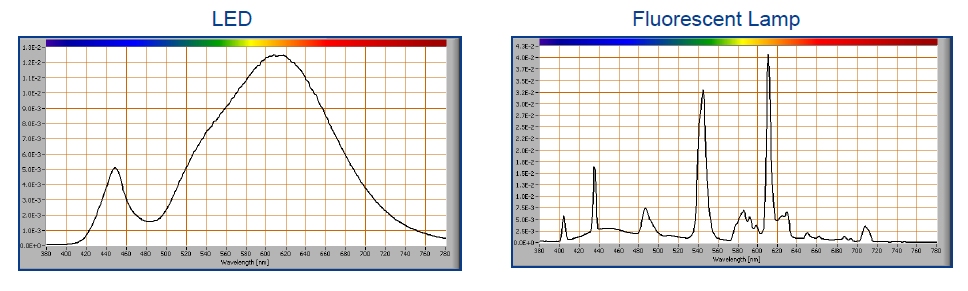
FYI if anyone has an older scanner that uses a fluorescent lamp, and they care at all about capturing correct stamp colors, they should upgrade to a newer scanner. Fluorescent lamps are about the worse possible light source for about 100 reasons. Good scanner now exclusively use white LEDs and these will always render far more accurate color scans. Scanner fluorescent lamps are always optimized for the highest lumen output and not for the response curve of the CCD elements. These tubes are emitting peaks in the green, red and blue area of the spectrum trying to get the most lumens per watt. The spectral response curve of a high quality LED is much more uniform and does not leave out as many colors as the fluorescent lamps do as illustrated below.
Again, you get what you pay for, manufacturers will cut cost corners and cheap out by using lower quality LEDs too. If you are scanning a lot of material, if you care about the quality of your scans, if you care about stamp colors, then invest in a good quality flatbed scanner.
Don

Edit: Even if the optical resolution is high, try lowering the dpi; you might be surprised that you get sharper images. This has to do with the linear design of the CCD and how software might have to be used to deal with merging or stitching the input from multiple rows of sensors. This is a different issue than the more commonly understood 'software emulation' of scanner resolutions.
Send note to Staff  Go to Top of Page
Pillar Of The Community
United States
1414 Posts
Posted 09/10/2018   6:31 pm  Show Profile Bookmark this reply Add cfrphoto to your friends list  Get a Link to this Reply
To clarify: I scan to tif or psd files with 48 bit color. Files saved in jpg format are limited to 24 bit color.
Send note to Staff  Go to Top of Page
Moderator
Learn More...
United States
12330 Posts
Posted 09/10/2018   7:30 pm  Show Profile Bookmark this reply Add 51studebaker to your friends list  Get a Link to this Reply
Of course bits have nothing to do with dpi or resolution. Monitors which can display 48 bit color are not common and quite expensive although they are slowly making an appearance (often in professional environments). 48 bit display monitors also require a compatible computer video setup and is not compatible with the common HDMI 1.4a ports found on many PCs.

But there are a few reasons to consider 48 bit TIFF scans including if the image is going to be used in a printed publication. Most print shops do not care about resolution or care if your scan is 4000 dpi or 300 dpi; they care about the RAW or TIFF image. These incredibly large files contain the most data or digital information for them to work with (and results in the best quality hard copy prints). Saving to a large TIFF file for the future is also a good idea but few people currently have monitors which can display a 48 bit color image.
Don
Send note to Staff  Go to Top of Page
Valued Member
324 Posts
Posted 09/10/2018   7:42 pm  Show Profile Bookmark this reply Add lukusw to your friends list  Get a Link to this Reply
Thanks all. This gives me more things to try
Send note to Staff  Go to Top of Page
Pillar Of The Community
United States
4106 Posts
Posted 09/10/2018   10:04 pm  Show Profile Check eyeonwall's eBay Listings Bookmark this reply Add eyeonwall to your friends list  Get a Link to this Reply
2400 DPI scan with a all-in-one scanner


Send note to Staff  Go to Top of Page
Page: of 2 Previous TopicReplies: 17 / Views: 3,047Next Topic  
Next Page
 
To participate in the forum you must log in or register.

Go to Top of Page

Disclaimer: While a tremendous amount of effort goes into ensuring the accuracy of the information contained in this site, Stamp Community assumes no liability for errors. Copyright 2005 - 2026 Stamp Community Family - All rights reserved worldwide. Use of any images or content on this website without prior written permission of Stamp Community or the original lender is strictly prohibited.
Privacy Policy / Terms of Use    Advertise Here
Stamp Community Forum © 2007 - 2026 Stamp Community Forums
It took 0.27 seconds to lick this stamp. Powered By: Snitz Forums 2000 Version 3.4.05