lukusw,
I would trouble shoot by setting all configurations back to the defaults and then view the saved scanned TIFF image to see if the blurriness still exists. If so, I would assume that I have a hardware (scanner) issue.
How old is the scanner? If it is more than a few years old, if you have scanned a lot of images, or if the scanner was ever suffered an impact in it's lifetime (including before you owner it), then the image quality will suck.
Additionally with scanners you get what you pay for; if you have purchased an inexpensive 'consumer' or 'entry' level scanner at a local office supply store than you are not going to get quality scans. (For some reason stamp collectors always harp on buying the best quality stamps and avoiding the false economy of cheap stamps but when it comes to technology they seem to forget this logic.)
For blurry images like you posted, a likely possibility is an issue with the stepper motor. Typically this motor will begin to wear, may have suffered some previous impact, or just simply be low quality. When manufacturing a low cost scanner, manufacturers turn to cheaper components like stepper motors.
FYI if anyone has an older scanner that uses a fluorescent lamp, and they care at all about capturing correct stamp colors, they should upgrade to a newer scanner. Fluorescent lamps are about the worse possible light source for about 100 reasons. Good scanner now exclusively use white LEDs and these will always render far more accurate color scans. Scanner fluorescent lamps are always optimized for the highest lumen output and not for the response curve of the CCD elements. These tubes are emitting peaks in the green, red and blue area of the spectrum trying to get the most lumens per watt. The spectral response curve of a high quality LED is much more uniform and does not leave out as many colors as the fluorescent lamps do as illustrated below.
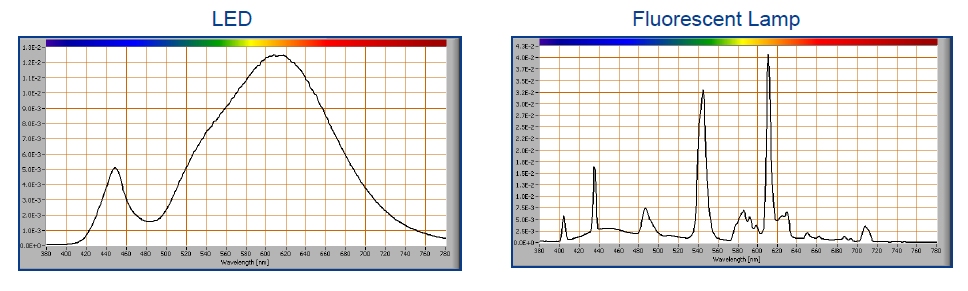
Again, you get what you pay for, manufacturers will cut cost corners and cheap out by using lower quality LEDs too. If you are scanning a lot of material, if you care about the quality of your scans, if you care about stamp colors, then invest in a good quality flatbed scanner.
Don
Edit: Even if the optical resolution is high, try lowering the dpi; you might be surprised that you get sharper images. This has to do with the linear design of the CCD and how software might have to be used to deal with merging or stitching the input from multiple rows of sensors. This is a different issue than the more commonly understood 'software emulation' of scanner resolutions.





 Posted 09/09/2018 11:00 pm