| Author |
 Replies: 17 / Views: 1,807 Replies: 17 / Views: 1,807 |
|
Bedrock Of The Community
Australia
38679 Posts |
|
|
|
Is there an easy way to delete a stubborn file?
I have a file called "Aden" with 0 bytes.
Dashed if I can remove the fellow.
I can delete, then pops back up.
Thanks for any tips.
|
|
Send note to Staff
|
| Edited by rod222 - 04/30/2019 06:15 am |
|
|
|
|
Valued Member
United States
85 Posts |
|
|
Have you tried restarting your computer? Things can get "stuck" and when you restart that sometimes fixes the problem. |
Send note to Staff 
|
| Edited by CL_Arctos - 04/30/2019 07:20 am |
|
|
Valued Member
United States
100 Posts |
|
|
I had to do this once some time ago but darned if I remember how, didn't save the process dangit and I don't remember what it was I did! Have you Googled for how to do this? There are lots of solutions that pop up, one of them has got to work for you. Wish I could have been more helpful... |
|
Send note to Staff
|
|
|
Moderator

United States
12330 Posts |
|
|
Assuming this is Windows; boot into Safe Mode and then delete the file.
If it 'reappears', make sure that you are not using a cloud service as a backup. If so, you will have to also remove the file from the cloud backup so it does not keep 'coming back'.
Don |
|
Send note to Staff
|
|
|
Valued Member
Egypt
372 Posts |
|
|
Bedrock Of The Community
Australia
38679 Posts |
|
|
Thanks to those whom replied.
Safe Mode : No luck
"this is no longer located in ..... verify location and try again.
Still pops up, I do not use cloud
I'll try the google fixes, albeit they look very involved (for me)
|
|
Send note to Staff
|
|
|
Pillar Of The Community
United States
1875 Posts |
|
|
This behavior also can be caused by a virus or other malware. The "Aden" file probably is infected and virus code running in your system is intercepting the file system primitives that normally would delete it. The only solution may be to run a fully updated virus scanner. |
|
Send note to Staff
|
|
|
Bedrock Of The Community
Australia
38679 Posts |
|
|
Cheers CJ Quote:
The only solution may be to run a fully updated virus scanner. I have one, on all the time. |
|
Send note to Staff
|
|
|
Pillar Of The Community

1323 Posts |
|
|
Do you know where the file is? If there is nothing else in that directory, try deleting the whole directory.. windows not Mac , right.? |
|
Send note to Staff
|
|
|
Pillar Of The Community
1323 Posts |
|
|
I take it you know what the file is? It may be an indexing file in system use..... maybe try shift + delete. I think that's permenant delete. I think. Not responsible for bobo's  |
|
Send note to Staff
|
| Edited by Stamps4Life - 04/30/2019 7:09 pm |
|
|
Bedrock Of The Community
Australia
38679 Posts |
|
|
Quote:
Do you know where the file is? No. It resides in windows explorer at a discrete location, when I try and delete, the rejoinder is "this file no longer resides here" blah blah. I think I need an Exorcism. It has 0 bytes, does not reside where indicated, but it is there ....strange days indeed. 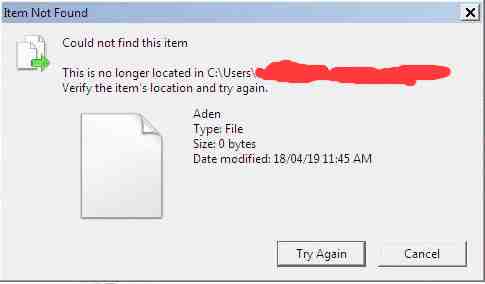 |
|
Send note to Staff
|
| Edited by rod222 - 04/30/2019 7:18 pm |
|
|
Bedrock Of The Community
Australia
38679 Posts |
|
|
Solved: Thanks Jerry.
Opened cmd.exe
browsed to folder with CD command
Typed dir /x
Saw the ADEN file
unable to rename. didn't work
so I typed DEL ADEN~1
It's gone.
Thanks to all that helped
Guess: I think the trouble originated by saving with too large a file name.
|
|
Send note to Staff
|
| Edited by rod222 - 05/01/2019 04:49 am |
|
|
Pillar Of The Community
Canada
1648 Posts |
|
|
Now class, that completes the course of how to delete the adan "stamp" file for today. Rod, sometimes it is the simplist things that create the most work. Now I just have to try and remember that if it happens to me. Yea, sure. Now where did I put that file about delete? |
|
Send note to Staff
|
|
|
Pillar Of The Community
United States
1820 Posts |
|
|
There is also a free downloadable application called "Unlocker" that can be used to solve problems like this. |
|
Send note to Staff
|
|
|
Pillar Of The Community
United States
978 Posts |
|
|
Hi Rodney For how many years have I told you that you are a "closet" techie? I remember when you wouldn't use Command Line. Now you go and do it  Not so hard is it. Next comes Registry Editing Referring to a file name size" Quote:
Individual components of a filename (i.e. each subdirectory along the path, and the final filename) are limited to 255 characters, and the total path length is limited to approximately 32,000 characters. However, on Windows, you can't exceed MAX_PATH value (259 characters for files, 248 for folders). If you have many many many... folders with long names and a file with a long name you just might hit 32,000 characters, but, I doubt it. Remember, with the path, one has to count all "/", "\" and dots. So, Since Windows, as we say in NY: "Fahget aboud it". From what you sent me, it is way under the limits. I guarantee you "fat fingered" something or you changed something accidentally thinking it was something else. In all my years as a consultant, most problems were just that. BTW: I am also guilty of doing things like that.  Glad you got it fixed. Jerry B |
|
Send note to Staff
|
| Edited by jbcev80 - 05/01/2019 11:09 am |
|
|
Bedrock Of The Community
Australia
38679 Posts |
|
|
Quote:
There is also a free downloadable application called "Unlocker" that can be used to solve problems like this. For the record, I did try unlocker, I downloaded the 32bit for my system, but when I installed it popped up with "this is not compatible with your system" (or similar) so I uninstalled. Jerry, Quote:
From what you sent me, it is way under the limits Guess: I think the file name was way too long, windows then appears to give it a short name with a tilda extension as an abbreviation. That's why it is not recognised when attempting to delete. |
|
Send note to Staff
|
| Edited by rod222 - 05/01/2019 12:56 pm |
|
|
Replies: 17 / Views: 1,807 |
|




 Posted 04/30/2019 06:15 am


