Stamp Community Family of Web Sites
Thousands of stamps, consistently graded, competitively priced and hundreds of in-depth blog posts to read


Stamp Community Forum
 
Username:
Password:
Save Password
Forgot your Password?

This page may contain links that result in small commissions to keep this free site up and running.

Welcome Guest! Registering and/or logging in will remove the anchor (bottom) ads. It's Free!

Trick For Viewing Difficult Postmarks

 
To participate in the forum you must log in or register.
Author Previous TopicReplies: 14 / Views: 1,328Next Topic  
Pillar Of The Community
Australia
2156 Posts
Posted 10/02/2020   01:08 am  Show Profile Bookmark this topic Add jimjamtwo to your friends list Get a Link to this Message
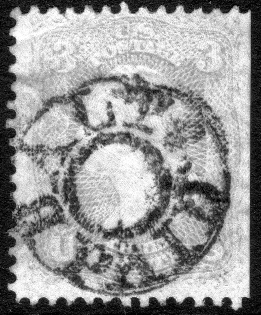
I've noticed that some people are able to process images in a way that allows the postmark to be viewed more clearly.*

Is anyone able to share the secret?

I just use the image processor that comes with my Mac, but I haven't been able to create similar images.

* Example taken from Stampboards:

Send note to Staff
Edited by jimjamtwo - 10/02/2020 01:09 am

Valued Member
Australia
156 Posts
Posted 10/02/2020   01:56 am  Show Profile Bookmark this reply Add langtounlad to your friends list  Get a Link to this Reply
You should have asked the person posting it on Stampboards.

Regards
Frank
Send note to Staff  Go to Top of Page
Pillar Of The Community
Australia
2156 Posts
Posted 10/02/2020   01:58 am  Show Profile Bookmark this reply Add jimjamtwo to your friends list  Get a Link to this Reply
I'm not a member. A lot of people use this technique and I've seen examples on this site too.
Send note to Staff  Go to Top of Page
Pillar Of The Community
United States
1096 Posts
Posted 10/02/2020   02:11 am  Show Profile Check orstampman's eBay Listings Bookmark this reply Add orstampman to your friends list  Get a Link to this Reply
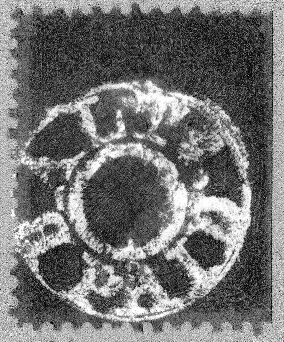
Some folks use the image processing tool on retroreveal.org to get different contrast and other reveal techniques for images.

Some images for an example stamp image:


Send note to Staff  Go to Top of Page
Edited by orstampman - 10/02/2020 02:34 am
Pillar Of The Community
Australia
1209 Posts
Posted 10/02/2020   02:13 am  Show Profile Bookmark this reply Add Aussie Al to your friends list  Get a Link to this Reply
I think its called "RetroReveal"
Send note to Staff  Go to Top of Page
Pillar Of The Community
Australia
2156 Posts
Posted 10/02/2020   02:14 am  Show Profile Bookmark this reply Add jimjamtwo to your friends list  Get a Link to this Reply
Thanks, I tried it once but the results weren't great. That said, the example given here was apparently done at Retroreveal because that's part of the file name. I'll try again tonight.
Send note to Staff  Go to Top of Page
Pillar Of The Community
Australia
2156 Posts
Posted 10/02/2020   02:47 am  Show Profile Bookmark this reply Add jimjamtwo to your friends list  Get a Link to this Reply
Thanks for the help, everyone. I must give it another go!
Send note to Staff  Go to Top of Page
Moderator
Learn More...
United States
12330 Posts
Posted 10/02/2020   03:03 am  Show Profile Bookmark this reply Add 51studebaker to your friends list  Get a Link to this Reply
Send note to Staff  Go to Top of Page
Pillar Of The Community
Australia
2156 Posts
Posted 10/02/2020   03:15 am  Show Profile Bookmark this reply Add jimjamtwo to your friends list  Get a Link to this Reply
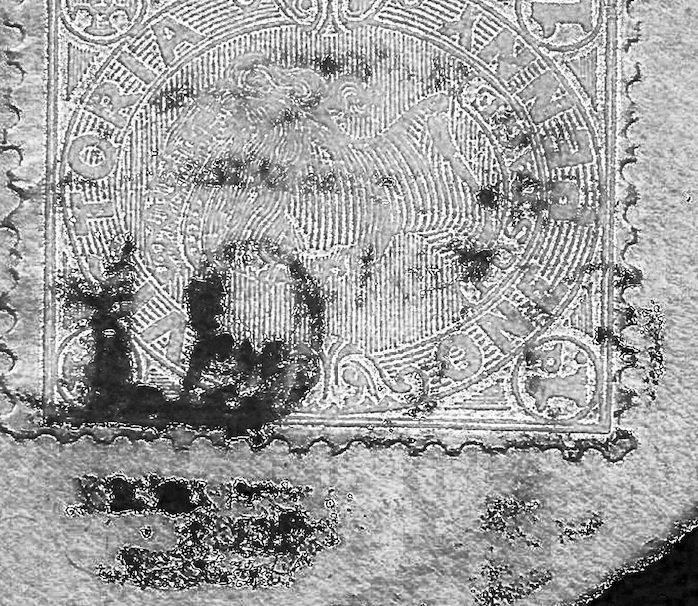
OK, figured it out and got a great result.

The cancel seems more or less legible now, perhaps 1970 (if the last digit is a 0).
Send note to Staff  Go to Top of Page
Edited by jimjamtwo - 10/02/2020 03:51 am
Pillar Of The Community
United Kingdom
568 Posts
Posted 10/02/2020   04:36 am  Show Profile Bookmark this reply Add Anthraquinone to your friends list  Get a Link to this Reply
I am glad it worked. I know nothing about Macs but on windows and photoshop if you convert an image to B&W you can then play with the individual colour channels to, for example, reduce the red part of the image and enhance the blue which would show up a blue / black cancel on a red stamp. It may work with what you have without having to use a web site.

AQ
Send note to Staff  Go to Top of Page
Pillar Of The Community
United States
2941 Posts
Posted 10/02/2020   06:20 am  Show Profile Bookmark this reply Add PostmasterGS to your friends list  Get a Link to this Reply
I wrote a small app called PMGS Reveal that does something similar. You can download it for free here.
Send note to Staff  Go to Top of Page
Presenting the GermanStamps.net Collection - Germany, Colonies, & Occupied Territories, 1872-1945
Valued Member
Learn More...
United States
466 Posts
Posted 10/02/2020   7:12 pm  Show Profile Bookmark this reply Add codehappy to your friends list  Get a Link to this Reply
You can use edge-detecting or color contrast filters in image processing software like GIMP (free) or Photoshop (not free) as well.

Scan the back of the stamp, and you can detect hard-to-see watermarks this way, too.
Send note to Staff  Go to Top of Page
Pillar Of The Community
Australia
975 Posts
Posted 10/19/2020   04:38 am  Show Profile Check 64idgaf's eBay Listings Bookmark this reply Add 64idgaf to your friends list  Get a Link to this Reply
Red cellophane on a red stamp works really well too.
Send note to Staff  Go to Top of Page
Pillar Of The Community
Australia
2156 Posts
Posted 10/19/2020   04:51 am  Show Profile Bookmark this reply Add jimjamtwo to your friends list  Get a Link to this Reply
Thanks for the further responses, everyone!
Send note to Staff  Go to Top of Page
Valued Member
Learn More...
United States
61 Posts
Posted 10/19/2020   06:29 am  Show Profile Bookmark this reply Add AnimatedFDCs to your friends list  Get a Link to this Reply
Thanks for this thread!!! I used retroreveal years ago and I seem to remember that it had stopped working or the site went down. Glad to see from this thread we are able to use it again. I just used it to try and work on a few postmarks that are tough to decipher and it usually gives at least a better idea of what we are looking at.
Send note to Staff  Go to Top of Page
  Previous TopicReplies: 14 / Views: 1,328Next Topic  
 
To participate in the forum you must log in or register.

Go to Top of Page

Disclaimer: While a tremendous amount of effort goes into ensuring the accuracy of the information contained in this site, Stamp Community assumes no liability for errors. Copyright 2005 - 2026 Stamp Community Family - All rights reserved worldwide. Use of any images or content on this website without prior written permission of Stamp Community or the original lender is strictly prohibited.
Privacy Policy / Terms of Use    Advertise Here
Stamp Community Forum © 2007 - 2026 Stamp Community Forums
It took 0.19 seconds to lick this stamp. Powered By: Snitz Forums 2000 Version 3.4.05