| Author |
 Replies: 15 / Views: 1,214 Replies: 15 / Views: 1,214 |
|
|
Moderator

United States
12330 Posts |
|
|
All, I started a new series of SCF instructional videos and the first one has been published here https://goscf.com/t/85340I plan on adding new 'How To' videos on uploading images, navigating the forum, using the forum search, etc. If anyone has other SCF 'How To' suggestions please post them below. Don |
|
Send note to Staff
|
|
|
|
|
Pillar Of The Community
United States
8622 Posts |
|
|
Nice job .....looks very good . Looking forward to other more detail subjects . |
Send note to Staff 
|
|
|
Bedrock Of The Community
12803 Posts |
|
|
Awesome. The editing functions video which is forthcoming should be super helpful. I know when I started here it took me a while on my own to realize the possibilities. Also, detail on efficiently uploading photos. Thanks Don. |
|
Send note to Staff
|
|
|
Pillar Of The Community
Netherlands
6650 Posts |
|
|
Nice job.
I did notice one thing. About 3:20 minutes into the introduction to SCF you say newest posts appear at top. For me, the newer the post the further dowm it is. Only on the 'reply to topic' screen the last post appears at the top.
I was wondering what the member '51StudebakerWife' would bring. |
|
Send note to Staff
|
|
|
Moderator
United States
12330 Posts |
|
|
NSK,
Strange, I cannot explain why your list is not in chronological order.
Yes, I started a new account (after getting permission) so that I could record the videos. If I did not do this, then the screen captures would have contained extra Moderator buttons and links that no one else would have on their screens. I assumed that this would have led to confusion.
Don |
|
Send note to Staff
|
|
|
Pillar Of The Community
Netherlands
6650 Posts |
|
|
They are in chronological order, but with the newest post at the bottom not at top. Only the 'reply to topic' screen shows the newest post first, but not after showing the first post. |
|
Send note to Staff
|
|
|
Pillar Of The Community
1369 Posts |
|
|
Is it possible, NSK, that you accidentally clicked on the "Last" button at the upper right which would reverse the order of posts to make the earliest post first? If so, you will see a button that says "First" in that same location. Click that button and the order is then reversed so that the most recent post, instead of the first post, is now seen at the top.
I make mistakes like this all the time by accidentally hitting a button or a key on my keypad -- and then spend days trying to figure out what I did! I'm not a "digital native" (but I can program a VCR and drive a stick shift!). |
|
Send note to Staff
|
|
|
Pillar Of The Community
Netherlands
6650 Posts |
|
|
I clicked this thread in the "View Last 100 Active Topics" but there is no difference with clicking it in the "Home" page and going to the relevant forum. At the top is the OP, above this post is that by DrewM. I cannot say I have ever seen a 'last' button. |
|
Send note to Staff
|
|
|
Moderator
United States
12330 Posts |
|
|
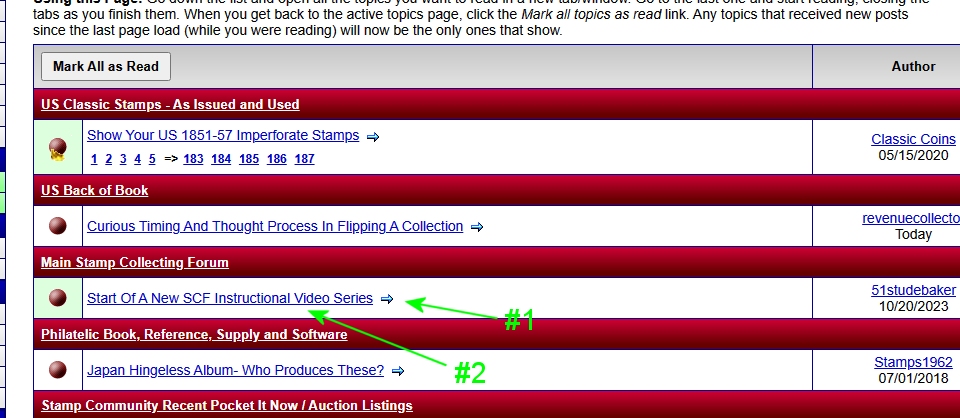 If you click on #1 (little blue arrow), it will take you to the very last post in the thread (even if it is multiple pages) If you click on #2 (the underlined thread title), it will take you to the very first post in a thread (no matter how many pages the thread might be) Don |
|
Send note to Staff
|
|
|
Bedrock Of The Community
12803 Posts |
|
|
Quote:
If you click on #1 (little blue arrow), it will take you to the very last post in the thread (even if it is multiple pages)
If you click on #2 (the underlined thread title), it will take you to the very first in a thread (no matter how many pages the thread might be)
Don I never realized that.  |
|
Send note to Staff
|
|
|
Pillar Of The Community

United States
5472 Posts |
|
|
Pillar Of The Community
United States
8622 Posts |
|
|
On the subject of a instructional video , it is the same weather it is a Jiu jitsu video or a stamp video .
Greet them and thank them for watching ,tell them their going to find it interesting and educational if they watch all X minutes of the video .
Show them a advance collection then a beginner collection ,explain that most advance collectors today came from their youth with stamps that cost pennies and supplies from a 5 and dime store .Explain they can build a collection for just a few dollars and advance over time to a more advance collection at their own pace . It is important to work at your own pace and don't try to figure dollar values as they go down the path . Take time to explore and build a education as they move forward .
The danger and it is a real danger is the ease of buying too much material and it becomes overwhelming but if you take small step and organize it makes it easier to decide which path you follow to build your collection .
Forget about interviews with experts , experts live on a different planet than a beginner . |
|
Send note to Staff
|
|
|
Bedrock Of The Community
12803 Posts |
|
|
Pillar Of The Community
Netherlands
6650 Posts |
|
|
Quote:
If you click on #1 (little blue arrow), it will take you to the very last post in the thread (even if it is multiple pages)
If you click on #2 (the underlined thread title), it will take you to the very first post in a thread (no matter how many pages the thread might be) I had not yet used the arrow. Clicking on the item in the most recent threads at the bottom of the page (most of the time) does the same. Still, it does not change the order. The most recent post remains at the bottom of the last page. Maybe an issue with regional settings? |
|
Send note to Staff
|
| Edited by NSK - 10/23/2023 01:55 am |
|
|
Moderator
United States
12330 Posts |
|
|
Pillar Of The Community
United States
1163 Posts |
|
|
Quote:
If you click on #1 (little blue arrow), it will take you to the very last post in the thread (even if it is multiple pages)
If you click on #2 (the underlined thread title), it will take you to the very first post in a thread (no matter how many pages the thread might be) Feature Request. (Or maybe it is already there and I haven't figured it out yet)... When in a Member Profile, under Recent Topics, how to jump right to that user's most recent post in that thread. Especially if the thread is many pages, it would be nice to be able to quickly jump to that member's last (or even first) post in that thread. |
|
Send note to Staff
|
|
| |
Replies: 15 / Views: 1,214 |
|




 Posted 10/20/2023 4:04 pm


