| Author |
 Replies: 12 / Views: 2,085 Replies: 12 / Views: 2,085 |
|
|
Valued Member
United States
491 Posts |
|
|
|
I have printed some of the PSS TnT pages, by state, but since I would like to collect more than one of each type, I am looking for a neat way to store them.
Are there templates of multi-purpose stamp pages online anywhere?
Ideally, I'd like pages with rows or patterns of definitive-sized boxes on them, if possible, and no text.
Or does anyone have another suggestion, other than just hingeing them onto blank white sheets / album pages.
Thanks.
|
|
Send note to Staff
|
| Edited by JanS - 08/21/2011 12:36 am |
|
|
|
|
Rest in Peace
United States
519 Posts |
|
|
If I understand your question, I have made generic rows of boxes for stamp pages using Microsoft Word. I use the Tables feature and establish the dimensions I want for the boxes using the definition for number of rows or number of tables. Then I expand the vertical dimension of the boxes using the enter key. Sometimes I have used alternating small and large vertical size to create description boxes below the stamp area. And you can use dash or dotted lines, bold, borders and other features. When done they looked like dealer stock pages somewhat but you have all kinds of flexibility. |
Send note to Staff 
|
|
|
Valued Member
United States
360 Posts |
|
|
Valued Member
United States
491 Posts |
|
|
Thanks! I took a quick look at stampweb and I am not sure it's all that "easy"? It sounds like it would be really cool once you got the hang of it. But in addition to the download of the actual program, other (editing) software is advisable, they say. Not sure I can manage all that. Is the editing software really necessary?
In case that defeats me, knowing about using Word sounds intriguing.
Thanks again.
|
|
Send note to Staff
|
|
|
Valued Member
United States
360 Posts |
|
|
Quote:
It sounds like it would be really cool once you got the hang of it. But in addition to the download of the actual program, other (editing) software is advisable, they say. Not sure I can manage all that. Is the editing software really necessary? You can do it in Notepad, but, no, it's not "easy". If you have the specs of the layout of the page, and it's just one generic page you're looking for, I'm happy to do a page for you if you give me the specs. |
|
Send note to Staff
|
|
|
Valued Member
United States
491 Posts |
|
|
That is so kind of you, thank you.
[MAJOR DELETION OF SPECS ETC.]
Guilt is such a great motivator. I will publish my work later, but I just wanted to let you know, mcgeesorg, that I have taught myself to use AlbumEasy and my basic page is in the final stages. |
|
Send note to Staff
|
| Edited by JanS - 08/28/2011 06:02 am |
|
|
Valued Member
United States
360 Posts |
|
|
No problem. Thanks for giving me the box sizes. I'll see what I can put together for you later today. |
|
Send note to Staff
|
|
|
Valued Member
United States
360 Posts |
|
|
Valued Member
United States
360 Posts |
|
|
Valued Member
United States
491 Posts |
|
|
Are you in Hawaii, or are you really up at 3:30 a.m. messing with this stuff, like me? Obsessive, yup, I recognize that one. Here's the first CT page from the PSS website, followed by my blank one. I spent hours trying to get the Connecticut just the right distance from the border -- couldn't get it to move. And then suddenly it turned up in the right spot and I don't know why! Not quite perfect, but I think it will almost do. 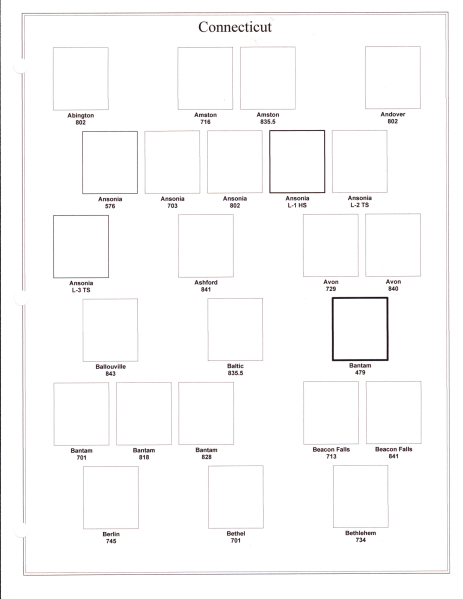 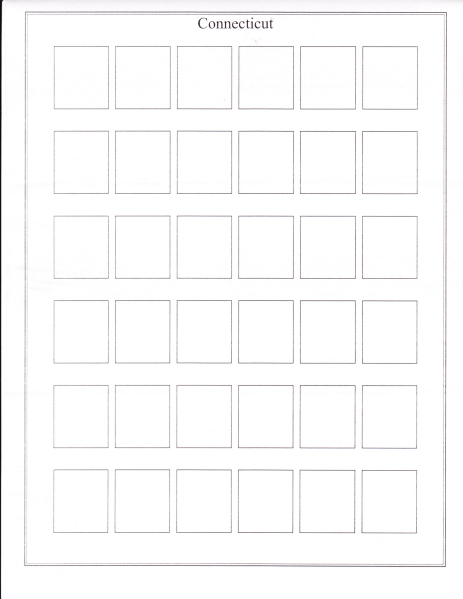 |
|
Send note to Staff
|
| Edited by JanS - 08/28/2011 06:55 am |
|
|
Valued Member
United States
360 Posts |
|
|
Yes, it's really almost 4:00 here.  Glad you made one you like. Great program, huh? I've talked to the author about my most-desired feature being precise control of vertical offset for elements. He's a cool guy. Anyway, happy I could help, if by nothing other than unintentionally guilting you into learning the program. |
|
Send note to Staff
|
| Edited by mcgeesorg - 08/28/2011 06:58 am |
|
|
Valued Member
United States
491 Posts |
|
|
It's very cool and his instructions and the lines of code he pre-enters are so helpful, it's really quite easy.   I almost feel confident that I could adjust this to create lines or pages for commemoratives, mixes, etc., when needed.  If you speak to him again -- apart from the vertical elements, the only other odd thing I noticed is that when you enter 26mm x 29mm, the boxes are not actually that size. I had to enlarge by about 2mm in each direction (that's why your boxes look a little smaller than mine). Odd. Thanks a bunch.  |
|
Send note to Staff
|
|
|
Valued Member
United States
360 Posts |
|
|
Hey @JanS,
I spoke with the author and he said the most-common cause of pages printing with wrong-sized boxes was having Adobe's "Fit to Page" feature turned on, and that disabling this will result in properly-sized pages. That seems reasonable to me. Check that setting on your side, maybe?
HTH. |
|
Send note to Staff
|
| Edited by mcgeesorg - 09/04/2011 2:36 pm |
|
| |
Replies: 12 / Views: 2,085 |
|




 Posted 08/20/2011 11:01 pm


